
Table of Contents
- Why Manual Credential Rotation Tracking Falls Short
- Credential Rotation Management Tools: Beyond Spreadsheets
- Building a Credential Inventory Template for Accountability
- API Key Rotation Best Practices for Automation Planning
- Credential Expiration Tracking and Scheduled Reminders
- Selecting the Right Approach for Your Team
- Implementation and Migration from Manual Processes
- Conclusion
- Frequently Asked Questions
Last Updated: October 19, 2026
Why Manual Credential Rotation Tracking Falls Short
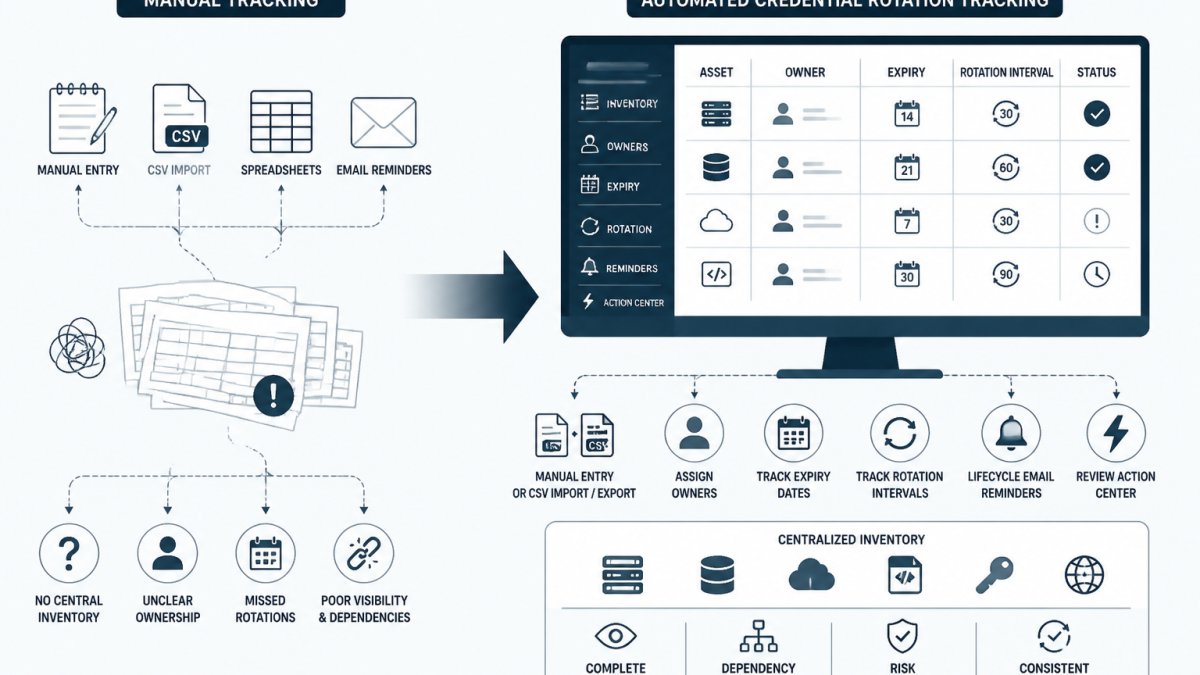
Spreadsheets and ticket systems create the illusion of control over credential rotation tracking, but they leave gaps that grow with team size. A developer rotates an API key and sends a Slack message. The ticket gets marked resolved. Two weeks later, nobody remembers who owns that credential or when it actually expires.
Manual processes rely on memory and discipline. Both fail. Teams forget which credentials need rotation next. Ownership gets lost during staff changes. Expiry dates slip past because the reminder landed in the wrong inbox. The audit trail becomes a series of disconnected notes instead of a verifiable record.
The real cost isn't the time spent updating spreadsheets. It's the credentials that don't get rotated on schedule, the shared passwords that linger because nobody wants to coordinate a change, and the compliance questions that can't be answered with confidence.
Manual credential rotation tracking also obscures accountability. If a credential is compromised, the question "who was responsible for rotating this?" has no clear answer. Spreadsheets don't track who made changes or when. Tickets get reassigned. Ownership becomes ambiguous.
Credential Rotation Management Tools: Beyond Spreadsheets
Moving beyond manual processes means choosing the right type of tool for your team's size and infrastructure. Not all solutions are the same. Some focus on storing secrets. Others focus on tracking metadata. Some automate the rotation itself. Understanding the differences helps avoid buying something that doesn't fit your actual problem.
Lifecycle monitoring platforms
Lifecycle monitoring platforms track credential metadata without storing the secret values themselves. They maintain an inventory of who owns each credential, when it expires, and whether it has been rotated recently. Users add credentials manually or import them via CSV, assign owners, set rotation intervals, and receive reminders when action is due.
The core value is visibility and accountability. When a credential is due for rotation, the platform notifies the owner. The owner rotates the credential in their existing provider (AWS, GitHub, cloud vault, wherever it lives) and then records the action in the platform. The audit trail documents what happened and who did it.
This approach complements existing tools rather than replacing them. It does not store secret values, so it does not compete with vaults. It does not automatically rotate credentials in your providers, so it requires manual action.
KeyGuardRail is a lifecycle monitoring platform designed for small technical teams. It lets teams maintain a credential inventory through manual entry or CSV import, assign owners to each credential, track expiry dates and rotation intervals, receive lifecycle email reminders, and keep an audit history of rotation actions.
Secrets vaults with scheduling features
Dedicated secrets vaults store credential values and often include rotation scheduling. These tools are designed to be the source of truth for secrets. They offer encryption at rest, access controls, audit logging, and sometimes automated rotation workflows.
Vaults solve a different problem than lifecycle monitoring. They secure the secret itself. A vault encrypts your API keys, database passwords, and certificates so they cannot be read by unauthorized users. Some vaults can trigger automated rotation workflows that change the credential in the provider without human intervention.
The trade-off is complexity and scope. Vaults require integration with your applications and infrastructure. They become a critical system that must be highly available and properly backed up. They are powerful for teams with mature infrastructure and security requirements. For smaller teams, the overhead can outweigh the benefit if the main problem is tracking what needs rotation rather than securing the secrets themselves.
Cloud provider native tools
AWS Secrets Manager, Azure Key Vault, and similar cloud-native tools offer secret storage and rotation scheduling built into your cloud platform. They integrate directly with your cloud services and can trigger automated rotations through Lambda functions or other automation.
The advantage is tight integration with your cloud infrastructure. If your entire credential ecosystem lives in one cloud provider, a native tool may be simpler than adding another system. The disadvantage is vendor lock-in and limited visibility across multiple cloud platforms or on-premises systems. If your credentials span AWS, Google Cloud, GitHub, and self-hosted services, a cloud-native tool only covers part of the picture.
Building a Credential Inventory Template for Accountability
A credential inventory is the foundation for any rotation tracking system. It answers basic questions: What credentials do we have? Who owns each one? When does it expire? When was it last rotated?
Start with a simple structure. Include columns for credential name, type (API key, SSH key, password, token), owner, creation date, expiry date, rotation interval, last rotated date, and notes.
Populate the inventory by auditing your actual systems. Check your cloud provider dashboards, GitHub settings, CI/CD pipelines, and development machines. Look for credentials in environment variables, configuration files, and deployment scripts.
Assign a single owner to each credential. That person is responsible for rotating it on schedule and updating the inventory when the rotation is complete. Shared ownership creates ambiguity. When something is everyone's responsibility, it becomes nobody's.
Set a realistic rotation interval for each credential type. API keys used by automated systems might rotate every 90 days. Shared passwords should rotate more frequently. SSH keys used by individuals might rotate annually.
A credential inventory template helps teams move from manual spreadsheets to structured tracking. KeyGuardRail provides a free credential inventory template that teams can use to get started.
API Key Rotation Best Practices for Automation Planning
API keys are among the most common credentials in modern infrastructure. They authenticate applications to cloud services, third-party APIs, and internal systems. Rotating API keys regularly reduces the window of exposure if a key is compromised.
Plan your API key rotation workflow before you automate it. Document which systems use each key, who has permission to rotate it, and what happens when the key changes.
Many teams use a blue-green rotation pattern: generate a new key, configure the system to accept both keys, test the new key, then disable the old key.
For credentials used by automated systems, consider implementing a rotation trigger that updates the key in your configuration management or secrets system automatically. This reduces manual work but requires careful testing to avoid service interruptions.
For credentials used by people, send clear notifications before the rotation date. Provide step-by-step instructions for updating local configuration files or environment variables. Follow up to confirm the rotation is complete.
Document failures. If a rotation fails, record why. Common reasons include misconfigured permissions, stale documentation, or systems that still reference the old key. Fix the root cause so the next rotation succeeds.
Credential Expiration Tracking and Scheduled Reminders
Credentials that expire without being rotated cause outages. A certificate expires and suddenly your application cannot authenticate to a service. An API key expires and your automated job fails. An SSH key expires and your deployment pipeline breaks.
Tracking expiration dates prevents these failures. Every credential should have a clear expiry date in your inventory. Calculate the expiry date based on when the credential was created and its rotation interval.
Set reminders well before expiry. A reminder 30 days in advance gives time to plan and execute the rotation. A reminder 7 days before expiry is a final warning. Some teams add a reminder on the expiry date itself as a backstop.
Email reminders work well for credentials with clear owners. The owner receives a notification, rotates the credential, and updates the inventory. For credentials without a clear owner, reminders go unanswered. This is a signal to assign ownership or consolidate the credential.
Automated reminders reduce the chance that a rotation is forgotten. Manual tracking relies on someone remembering to check the spreadsheet. Automated systems send notifications on schedule and create a paper trail showing the reminder was sent.
Selecting the Right Approach for Your Team
Choosing between manual tracking, lifecycle monitoring, vaults, and cloud-native tools depends on your team size, credential volume, and infrastructure.
Small teams with fewer than 50 credentials and a single cloud provider can start with manual tracking in a spreadsheet or a simple inventory document. The overhead is low and the process is transparent. As the team grows or credentials multiply, the manual process becomes error-prone.
Teams with 50-500 credentials across multiple systems benefit from lifecycle monitoring. A platform like KeyGuardRail provides central visibility, ownership tracking, expiry alerts, and audit history without the complexity of a full vault.
Teams with hundreds or thousands of credentials, or strict compliance requirements, need a secrets vault. A vault stores secrets securely, controls access, and can automate rotation workflows.
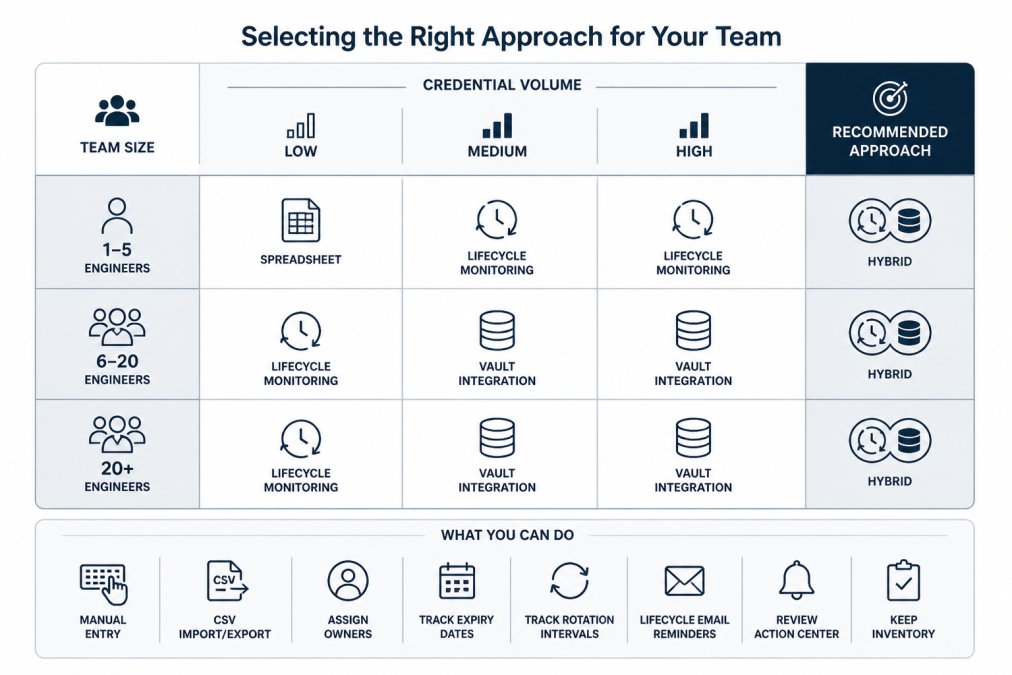
| Team Size | Credential Volume | Recommended Approach | Key Consideration |
|---|---|---|---|
| 1-5 engineers | Under 50 | Spreadsheet or inventory template | Simplicity and low overhead |
| 6-20 engineers | 50-300 | Lifecycle monitoring platform | Central visibility and ownership tracking |
| 20+ engineers | 300-1000+ | Vault with lifecycle monitoring | Automation and compliance requirements |
Implementation and Migration from Manual Processes
Moving from manual tracking to a structured system requires planning. A rushed migration creates confusion and gaps.
Start by auditing your current credentials. List every API key, SSH key, password, and token your team uses. Document where each credential is stored, who has access, and when it was last rotated.
Choose a target system. If you are starting with lifecycle monitoring, set up your inventory with the platform. Import credentials manually or via CSV. Assign owners and set rotation intervals based on your audit.
Run a parallel period where both the old system and new system are active. Continue using spreadsheets while also recording actions in the new platform.
Establish a rotation schedule and stick to it. The first rotations should happen on time to build confidence in the new process. If a rotation fails, document why and fix it before the next one.
Communicate changes to the team. Explain why the change is happening, how the new system works, and what is expected from each person. Assign clear ownership for maintaining the system.
Conclusion
Manual credential rotation tracking fails because it relies on memory, discipline, and perfect communication. As teams grow or credentials multiply, the manual process breaks down. Credentials expire without being rotated. Ownership becomes unclear. Audit trails disappear.
The alternative is structured tracking through lifecycle monitoring, vaults, or cloud-native tools. The right choice depends on your team size, credential volume, and infrastructure. Small teams can start with a simple inventory template. Growing teams benefit from lifecycle monitoring platforms that provide central visibility and accountability. Large teams with strict compliance requirements need vaults that store secrets securely and automate rotation workflows.
Whatever system you choose, the foundation is the same: a clear inventory of credentials, assigned owners, documented rotation intervals, and regular reminders. Without these basics, no tool will solve the problem. With them, credential rotation becomes a predictable, auditable process instead of a source of operational risk.
Frequently Asked Questions
How can teams track credential rotation without spreadsheets?
Dedicated credential lifecycle monitoring platforms replace spreadsheet tracking by centralizing expiry dates, ownership, and rotation history in one auditable location. These tools send reminders before credentials expire, track who rotated what and when, and maintain a clear inventory without storing secret values. Teams can import existing credentials via CSV, assign owners, set rotation intervals, and record completion in their existing providers, then log the work in the tracking system.
What should a credential inventory template include?
A complete credential inventory template captures credential type (API key, SSH key, token, password), service or system it accesses, assigned owner, creation date, expiration or rotation date, rotation interval, last rotated date, and status. Including a notes field for context and a revocation reason helps during offboarding. A well-structured template ensures consistent data entry, makes ownership clear, and supports audit compliance by recording who changed what and when.
Can a credential lifecycle tracker replace a secrets vault?
No. A credential lifecycle tracker complements a vault but does not replace it. The tracker stores metadata about credentials (owner, expiry, rotation schedule, audit history) while the vault stores the actual secret values. This separation keeps sensitive data in a dedicated vault while giving teams visibility into rotation deadlines and accountability across all credentials, including those in multiple vaults or cloud providers.
How do you assign ownership for service account credentials?
Assign each credential to a specific person or team responsible for rotation and troubleshooting. Document the owner in your credential inventory and update it during offboarding handoffs. Lifecycle monitoring tools send reminders to the assigned owner before expiry, making accountability explicit. For service accounts shared across teams, assign a primary owner and list backup contacts to prevent credentials from expiring due to unclear responsibility.