
Last Updated: November 14, 2026
Quick Summary
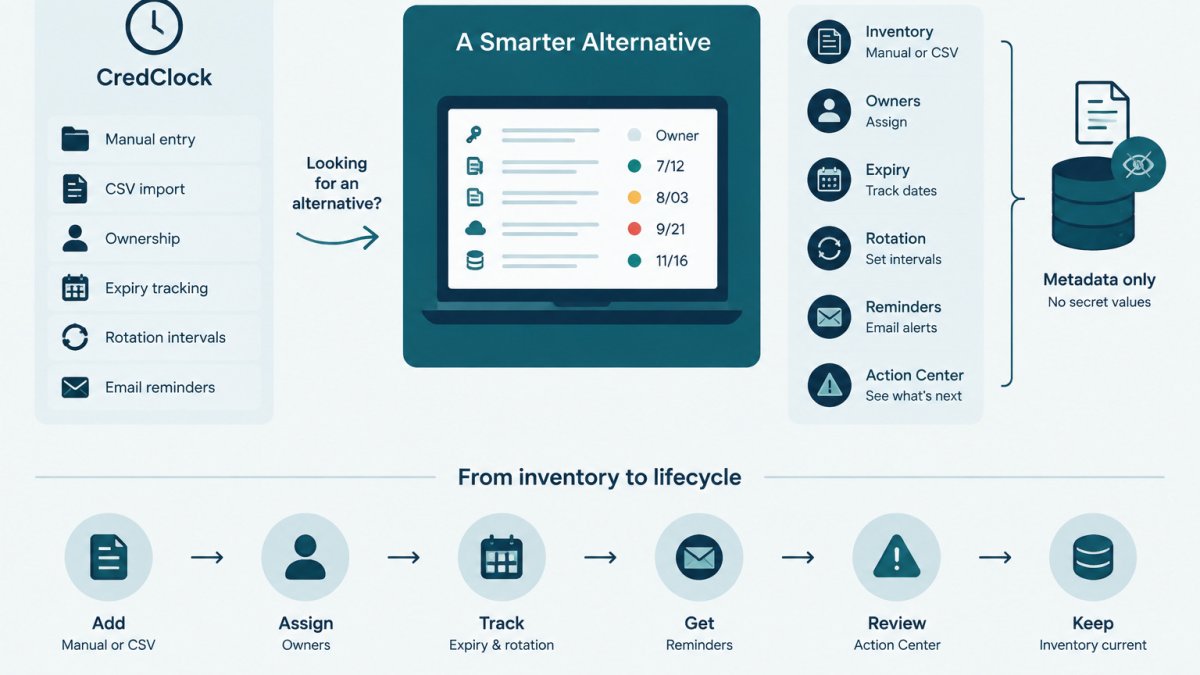
A good credclock alternative is a credential tracker that records owners, expiry dates, rotation intervals and rotation history without holding secret values. Most teams pair it with an existing vault or provider, recording the rotations done there. Compare tools on whether they track owners and separate expiry from rotation interval.
- Track provider, owner, expiry date, rotation interval and rotation history for every credential.
- Record expiry dates and rotation intervals separately, since the provider sets expiry and your policy sets rotation.
- Confirm whether any tool stores secret values before procurement.
- Keep the inventory to metadata and store secret locations by name only.
- Assign a named person to a monthly review of items due in the next 60 days.
Table of Contents
- What CredClock Users Typically Need From a Replacement
- Credential Expiration Tracking: What to Check in Any Tool
- Secrets Management vs Credential Tracking: Where Each Fits
- API Key Rotation Best Practices for Small Teams
- Building a Credential Inventory Template Your Team Will Maintain
- Side-by-Side: Evaluating CredClock, KeyGuardRail and Vault-Based Options
- Choosing a Credential Tracking Tool and Setting Up Your First Inventory
- Frequently Asked Questions
What CredClock Users Typically Need From a Replacement
Teams searching for a CredClock alternative usually want a clear record of which credentials exist, who owns them, and when they expire.
Credential lifecycle metadata is everything about a credential that is not the credential itself: provider, owner, expiry date, rotation interval and past work.
A replacement should cover four needs:
- A single inventory of API keys, service accounts, integration credentials and certificates
- Named owners for every entry, with a handoff process for role changes
- Expiry dates and rotation intervals that produce reminders before deadlines
A tool that only stores secret values misses most of these needs. If you are just getting started, credential lifecycle monitoring is one way to track these fields without moving the secrets themselves.
Credential Expiration Tracking: What to Check in Any Tool
Expiration tracking is the core of any credential inventory. Whatever product you evaluate, check how it handles the details below.
Expiry dates, rotation intervals and reminders
Ask whether the tool records expiry date and rotation interval separately. The provider sets expiry; your policy sets the rotation interval, which is often shorter. Tracking only one leaves gaps.
Check how reminders work. Look for:
- Lead times you can configure, so a reminder arrives before the deadline
- Notification channels that your team actually reads
- A review queue where overdue items are listed in one place
KeyGuardRail sends lifecycle email reminders and shows items in an Action Center. Other products may use different channels, so review each tool's documented options before assuming parity.
Ownership and handoff records
An entry without an owner is a future incident. Confirm the tool requires or strongly encourages an owner per credential and lets ownership be reassigned without losing history. When an engineer leaves, the inventory should show which credentials need a new owner that day.
KeyGuardRail supports accountable ownership on each credential and an audit history of lifecycle events. Confirm the exact handoff workflow in current product documentation before relying on it.
Secrets Management vs Credential Tracking: Where Each Fits
Secrets management and credential tracking solve different problems, and confusing them leads to poor tool choices.
A secrets manager, such as HashiCorp Vault or a cloud provider's secret store, holds secret values, controls read access and issues them to applications.
A practical division looks like this:
| Concern | Secrets manager | Credential tracker |
|---|---|---|
| Stores secret values | Yes | No |
| Controls read access to secrets | Yes | No |
| Records owner and expiry date | Varies by product | Yes |
| Sends expiry reminders | Varies by product | Yes |
| Records completed rotations | Varies by product | Yes |
KeyGuardRail is a credential tracker, not a vault, and complements an existing vault or provider.
Many teams need both: the vault protects values, and the tracker ensures a person is responsible for each one and rotations happen on schedule.
API Key Rotation Best Practices for Small Teams
Rotation is easier with a routine. Small teams often rotate only after an alert, which creates outages; a simple process reduces that risk.
- Inventory first. List every key, its provider, its owner and where it is used. A key that appears in no inventory will not be rotated.
- Set an interval per credential type. Pick a policy for each category, such as production payment keys versus a test sandbox token. Write the interval down.
- Plan the overlap. Where the provider allows, create the new key before revoking the old one. This prevents downtime while the application picks up the change.
- Update consumers. Change the secret in the vault or deployment system, then confirm the application uses the new value.
- Revoke the old key. Remove the previous credential in the provider once consumers are confirmed.
- Record the work. Note the date, the person and the outcome in your tracker.
Common mistakes: rotating without finding every consumer, revoking before the new key is deployed, and forgetting to record the change. The last causes the most audit trouble, because the rotation happened but cannot be shown.
Building a Credential Inventory Template Your Team Will Maintain
An inventory is only useful if people keep it current. Keep the template short enough that updating it takes a few minutes per credential.
A workable set of fields:
- Credential name (for example,
example-payments-prod-key, a fictional placeholder) - Provider and service
- Owner (a named person or role)
Never put secret values in the inventory, in spreadsheets, in tickets or in source control. Store the location, not the content.
The free credential inventory template includes these fields and fictional examples.
Review the inventory on a fixed schedule.
Side-by-Side: Evaluating CredClock, KeyGuardRail and Vault-Based Options
A clearly scoped comparison is more useful than a generic list of tools. The table below compares three approaches on the criteria that decide a credential-lifecycle purchase.
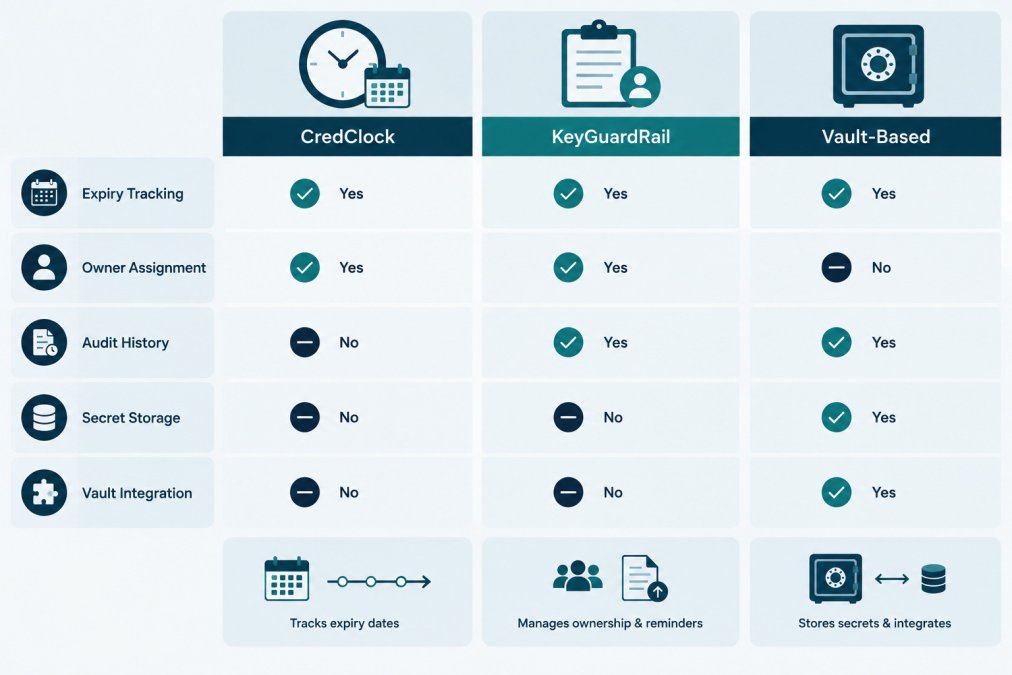
| Criterion | CredClock | KeyGuardRail | Vault-based options (e.g., HashiCorp Vault, cloud secret stores) |
|---|---|---|---|
| Primary purpose | Credential expiration tracking | Credential lifecycle metadata tracking | Storing and controlling access to secret values |
| Stores secret values | Confirm in vendor documentation | No | Yes |
| Named owner per credential | Confirm in vendor documentation | Yes | Varies by product; often via policy metadata |
| Expiry dates and rotation intervals tracked separately | Confirm in vendor documentation | Yes | Varies; expiry is usually provider-set, rotation is policy-driven |
| Lifecycle reminders | Confirm in vendor documentation | Email reminders and Action Center | Varies; often requires custom automation |
| Audit history of lifecycle events | Confirm in vendor documentation | Yes | Varies; audit logs typically cover access, not rotation records |
| Manual metadata entry and CSV import/export | Confirm in vendor documentation | Yes | Usually not a first-class workflow |
| Automatic discovery of credentials | Confirm in vendor documentation | No | Varies; some cloud stores integrate with provider inventories |
| Automatic provider rotation | Confirm in vendor documentation | No | Varies; some vaults support dynamic secrets for specific backends |
| Permission or leaked-secret analysis | Confirm in vendor documentation | No | Varies; some vaults log access but do not scan for leaks |
Three things stand out when you read the table as a buyer:
- A vault and a tracker are not substitutes. A vault protects values and controls read access; a tracker makes a person accountable for each credential and ensures rotations happen on schedule. Many teams run both, with the tracker recording work done in the provider or vault.
- Expiry and rotation interval are different fields. The provider sets expiry; your policy sets the rotation interval, often shorter. Confirm which fields each product records separately.
- Audit history means different things. Vault audit logs usually record who read a secret; tracker audit history records who changed an owner, updated an expiry date or marked a rotation complete. For lifecycle evidence, a tracker fits closer; for access evidence, the vault does.
Pricing depends on team size and needs. KeyGuardRail's current pricing is on its getting started page. To try the workflow yourself, you can create a free workspace and import a small inventory before deciding.
Choosing a Credential Tracking Tool and Setting Up Your First Inventory
Teams searching for a replacement are often not starting from zero. They have a spreadsheet, wiki page or provider console list and want to move it into something with owners and reminders. The guidance below covers selection criteria, migration steps and mistakes that stall a first inventory.
Selection criteria by team shape
The right tool depends on who maintains the inventory. A common pattern is to match the tool to the team, not the other way around.
- Solo IT operator. You need low setup overhead and reminders that reach one person. Favor manual entry, CSV import and email reminders. A vault is probably already in place for storage; the gap is ownership and expiry visibility.
- MSP or shared-services team. You manage credentials across several client or business-unit environments. Favor tools that record an owner per credential and support export. Confirm how the tool separates environments or tenants before committing.
- Larger internal IT or platform team. You have multiple owners and need audit history that survives staff changes. Favor reassignable ownership, a review queue and exportable history, and confirm how the tool handles growth in entries and users.
Across all three, check these criteria:
- Data boundary. Confirm in writing whether the tool stores any secret values; your security team may require this before procurement.
- Import and export. Check whether you can move the inventory in and out as CSV. Lock-in is a real risk for a metadata system that should outlive any one vendor.
- Notification fit. Make sure reminders reach people who will act on them; a reminder in an unread inbox is not a control.
Migrating from a spreadsheet or provider console
Prerequisites: a current list of credentials from at least one provider, a named owner for each entry (or a plan to assign one), and access to the tool you are evaluating.
- Export what you have. Pull the provider's key list and any existing spreadsheet into one file. Do not include secret values; record only the location of each secret by name.
- Normalize the columns. Map existing fields to: credential name, provider, owner, environment, where it is used, expiry date, rotation interval and last rotation date. The free credential inventory template uses these fields and fictional examples.
- Import the CSV or enter the top ten by hand. Start with the highest-risk credentials: production keys, payment integrations and anything with a near-term expiry. Ten well-owned entries beat a hundred with no owners.
- Assign an owner to every entry. Treat entries without owners as incomplete; if no owner exists, that is itself a finding worth recording.
- Set expiry dates and rotation intervals from provider records. Do not guess. Where the provider does not expose an expiry date, record the rotation interval your policy requires and note the source.
- Configure reminders and review the queue. Confirm the lead time is long enough to act; a reminder arriving the day before expiry is too late for a change window.
- Record one completed rotation end to end. Rotate a low-risk key in the provider, update the consumer, revoke the old key, then mark the rotation complete in the tracker. This verifies the audit history works before you rely on it.
Watch out: importing a spreadsheet that still contains secret values in a column is the most common migration mistake. Strip those columns before import, and store only the location of each secret.
Verification and recovery
After the first import, verify three things: every entry has an owner, every entry has an expiry date or rotation interval, and the reminder queue shows the items you expect. If an entry lacks an owner, assign one or mark it unowned and schedule a review. If a reminder does not appear, check the lead time and notification address before assuming the tool is broken. If you import duplicate rows, export, deduplicate in the spreadsheet and re-import rather than editing entries one by one.
Keep the first inventory small and expand once the routine works. A monthly review of items due in the next 60 days catches most problems, and assigning it to a named person keeps it from drifting.
Frequently Asked Questions
What is CredClock used for?
Check the vendor's own website for any tool's current feature set and pricing before comparing options. Evaluate any alternative against the same criteria: whether it tracks expiry dates and rotation intervals, whether every credential has a named owner, whether it keeps an audit history, and whether it stores secret values or only metadata about them. Those four questions usually reveal whether a tool fits your workflow.
Can I track API key expiration dates without storing the keys?
Yes. Lifecycle metadata such as the credential name, provider, owner, expiry date, rotation interval and last rotation date can be recorded without the secret value itself. KeyGuardRail works this way: secret values stay in your existing vault or provider, and the platform holds only the metadata needed for reminders and records. Teams should still confirm that any tool they evaluate meets their own data handling policies, since metadata can reveal which systems a credential protects.
How often should API keys and service credentials be rotated?
The right interval depends on your provider's guidance, your internal policy and the sensitivity of the access the credential grants. Record the interval you have chosen for each credential in your inventory, then set reminders before the deadline. Treat any published provider recommendation as the source of truth and check the provider's current documentation, since guidance can change. A tracking tool can remind you when a rotation is due, but the rotation itself happens in the provider.
