
Last Updated: November 3, 2026
Quick Summary
Small teams need credential management when they cannot quickly say who owns each API key, service account or certificate, or when it expires. Credential management tracks this lifecycle metadata in a shared record, separate from where secret values are stored. A well-kept spreadsheet can be enough for a few stable credentials; a dedicated tool helps as owners, deadlines and handoffs multiply.
- Credential management here means tracking owners, expiry dates and rotation schedules, not storing secret values.
- Signs of outgrowing informal tracking include unclear owners, expired keys that broke integrations, and rotation only after incidents.
- Score the six checklist factors from 0 to 2; totals of 0-3 suggest a spreadsheet, 8 or more suggest a tool.
- Assign each credential to one named person or team, since shared ownership usually means no ownership.
- Before switching to a tool, confirm someone owns the inventory as an ongoing task.
Table of Contents
- What Credential Management Covers, and What It Does Not
- Signs Your Team Has Outgrown Informal Tracking
- A Decision Checklist: Spreadsheet or Dedicated Tool
- Building a Credential Inventory Template for Your Team
- Assigning Owners and Setting Rotation Schedules for API Keys
- Handoffs, Offboarding and Keeping a Password Manager in the Picture
- Choosing Your First Step This Quarter
- Frequently Asked Questions
What Credential Management Covers, and What It Does Not
Credential management is the practice of knowing which credentials your team relies on, who owns each one, when it expires, and how often it should be rotated. For a small engineering team, those credentials often include API keys, service account passwords, integration tokens and certificates spread across several providers.
Be precise about scope: credential management here means lifecycle tracking, not secret custody. Secret values usually live in a password manager, a secrets vault or the provider's console. What teams often lack is a shared, current record of the metadata: owner, provider, expiry date and rotation schedule.
Secret storage versus credential lifecycle tracking
Secret storage answers the question "where is the value kept, and who can read it?" Lifecycle tracking answers a different set of questions: "who is responsible for this key, when does it expire, and when was it last rotated?"
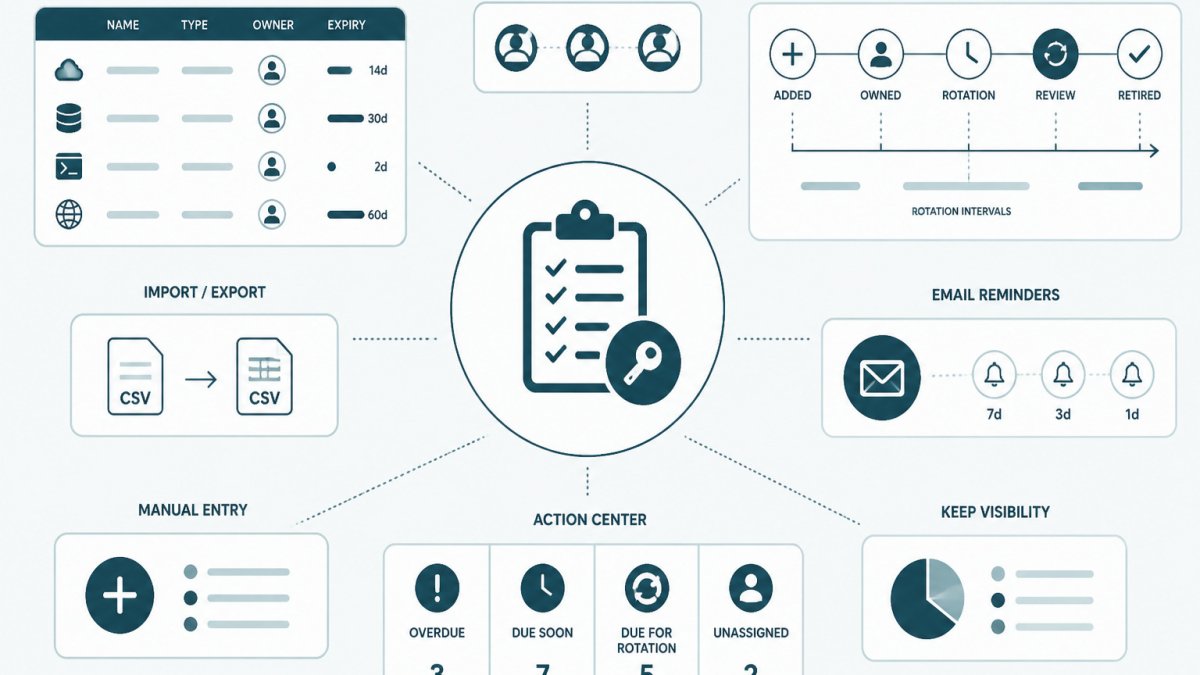
A password manager or vault can do the first job well and still leave the second undone. A team may store every key correctly and still miss an expiry date because nobody was recorded as the owner. KeyGuardRail focuses on the second job: it stores credential metadata, owners, expiry dates and rotation intervals, and does not hold secret values.
Signs Your Team Has Outgrown Informal Tracking
Many small teams start with no formal record. Keys are created as needed, and whoever set up an integration remembers where its credential lives. That works until it doesn't.
Common signs that informal tracking has stopped working include:
- Nobody can say who owns a particular API key without searching chat history.
- A key expired and an integration broke before anyone noticed.
- A departing engineer held credentials that nobody else knew about.
- Rotation happens only after an incident, not on a schedule.
- The same credential is recorded in three places, and the three records disagree.
A useful test: pick five credentials at random and ask a teammate to state the owner, expiry date and last rotation. If the answers take more than a few minutes to find, the team has likely outgrown its current approach.
A Decision Checklist: Spreadsheet or Dedicated Tool
Many small teams can manage credential metadata in a shared spreadsheet. A spreadsheet is free, familiar, works offline and takes minutes to set up.
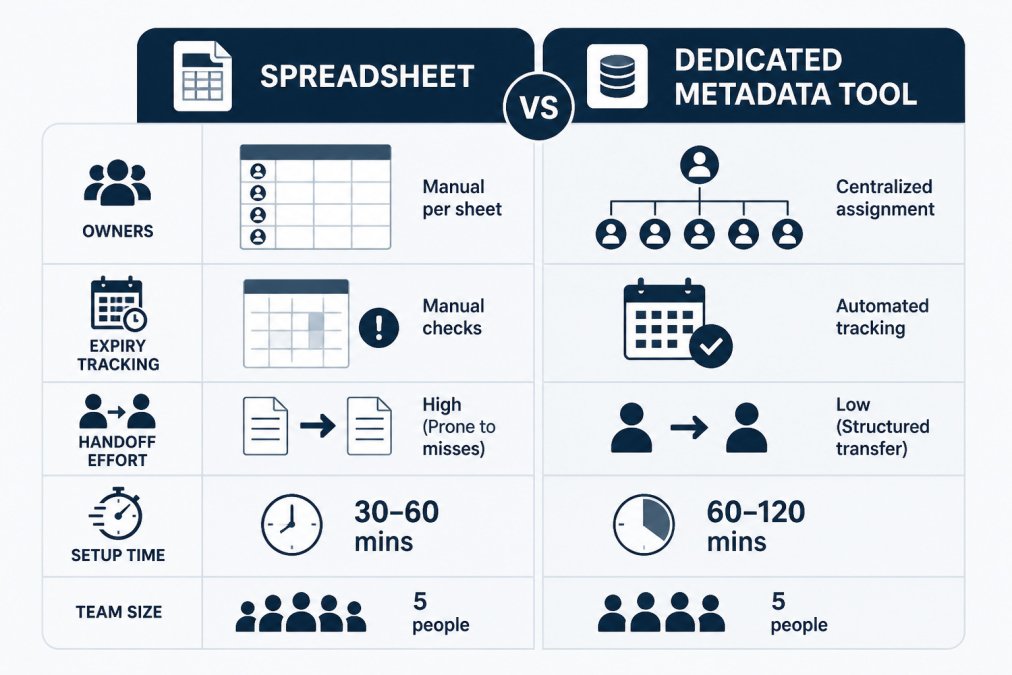
The checklist below is designed to produce a decision rather than a vague feeling.
| Factor | Question to ask | Scoring guide |
|---|---|---|
| Owners | Can every credential be assigned to one named person or team, and is that assignment recorded somewhere shared? | 0 = most credentials have a clear owner in a shared record; 1 = owners exist but are tracked informally; 2 = ownership is unclear or lives in chat history |
| Deadlines | How many expiry dates or rotation due dates fall in the next 90 days? | 0 = a handful you can track by memory; 1 = enough that you have missed one before; 2 = more than you can reliably track without reminders |
| Handoffs | How often do people join, leave, or change roles on the team? | 0 = rarely; 1 = a few times a year; 2 = frequently, or a handoff has already caused a missed rotation |
| Review effort | How long does a monthly review of credential status take? | 0 = under 15 minutes; 1 = 15-60 minutes; 2 = over an hour, or the review is skipped |
| Audit trail | Do you need to show when a rotation happened and who recorded it? | 0 = no external or internal need; 1 = occasionally; 2 = regularly, or a spreadsheet has already lost history |
| Setup effort | How much time would moving current records into a new tool take? | 0 = under an hour; 1 = a few hours; 2 = a day or more, or records are too messy to import cleanly |
Add the scores. A total of 0-3 suggests a well-kept spreadsheet is likely sufficient for now.
These thresholds are a reasoning aid, not a rule.
Watch out: teams often migrate to a tool and then stop updating it, which is worse than a maintained spreadsheet because the record looks authoritative while being stale.
If a spreadsheet is enough for now, keep it in a shared location with edit history enabled, restrict who can change the owner and expiry columns, and review it on a fixed cadence. KeyGuardRail's credential inventory template can be used as a starting point, and the getting-started page describes the manual entry and CSV import paths without requiring any secret values.
Building a Credential Inventory Template for Your Team
Whichever approach you choose, start with an inventory: a list of every credential with the metadata needed to manage it. It should never contain the secret values themselves.
A practical inventory includes these fields:
| Field | Purpose |
|---|---|
| Credential name | A clear, unique label |
| Provider | Where the credential is issued |
| Owner | One named person or team accountable for it |
| Where the secret lives | The vault or console that holds the value |
| Expiry date | When the credential stops working |
| Rotation interval | How often it should be replaced |
| Last rotated | The date of the most recent rotation |
| Notes | Dependencies, such as the integrations that use it |
For example, a fictional row might read: "Billing webhook token, Provider: ExamplePay, Owner: Platform team, Vault: team password manager, Expiry: 2026-12-31, Rotation interval: 90 days." This tells the team what the credential is, who handles it and when action is due, without revealing the token.
KeyGuardRail offers a free credential inventory template in CSV format with these fields. Whether you use it or your own sheet, keep the columns consistent so the inventory stays easy to review.
Assigning Owners and Setting Rotation Schedules for API Keys
Ownership is the most important field in the inventory. A credential without an owner tends to expire quietly, because no single person feels responsible for noticing. Assign each credential to one named person or team and record it in the shared inventory.
Rotation schedules should reflect how sensitive a credential is and how widely it is used. A key used by a single internal script may tolerate a longer interval than one used across several production services. Set intervals your team can realistically meet, and record them so the schedule is visible rather than remembered.
Beyond API keys: the credential types small teams actually hold
Most small teams do not manage only API keys. A realistic inventory usually includes several distinct types, each with different ownership and rotation behavior:
- API keys and integration tokens. Often scoped to a single service. Rotation usually means creating a new key in the provider console, updating the consuming service, then revoking the old key. Record the rotation date and the new key's identifier, never the value.
- Service account passwords. Used by automation rather than people, so they are easy to forget. Assign them to the team that owns the automation, not the engineer who created them.
- Certificates. Have a fixed expiry date set by the issuer. Tracking the expiry is the critical field; renewal happens at the certificate authority or provider, not in the inventory. Set reminders well ahead of it.
- Recovery codes and break-glass credentials. Used rarely, which makes them easy to lose track of. Record where they are stored and who can retrieve them, and review them on a fixed cadence.
- Personal access tokens. Often created by individuals for convenience. These are the most likely to be orphaned when someone leaves, so they deserve explicit ownership and a review at every offboarding.
For each type, the inventory fields are the same, but the rotation mechanism differs. The tracking tool records the plan and the history; the actual rotation happens in the provider, the certificate authority, or the vault. Keeping that distinction clear prevents the common mistake of assuming the inventory rotates anything on its own.
A simple rotation planning routine
A rotation plan does not need to be elaborate. A workable routine looks like this:
- List due items. Each month, pull every credential whose expiry or rotation date falls in the next 30-60 days.
- Confirm the owner is current. If the listed owner has changed teams, reassign before the rotation work starts.
- Rotate in the provider. Create the replacement credential, update the consuming service, verify it works, then revoke the old one.
- Record the work. Update the last-rotated date and the next due date in the inventory. If the tool keeps audit history, note who did the rotation.
- Review misses. If an item was missed, note why, unclear owner, no reminder, or a handoff gap, and fix that cause rather than only the date.
Watch out: rotating a credential without verifying the replacement works before revoking the old one can break an integration with no easy rollback. Rotate in a low-traffic window, confirm the new credential is in use, and keep the old one valid until verification passes.
KeyGuardRail supports this routine by storing ownership, expiry dates and rotation intervals, and by sending lifecycle email reminders and surfacing due items in an Action Center. It does not rotate or revoke credentials itself; the engineer performs those steps in the provider and then records the work.
Handoffs, Offboarding and Keeping a Password Manager in the Picture
Handoffs are where credential ownership most often breaks down. When an engineer changes teams or leaves, every credential they owned needs a new owner before their access ends.
A simple handoff routine helps. Before someone leaves, review their entries in the inventory, reassign each credential, and confirm the new owner knows where the secret lives and how to rotate it. Then check that no credential was held only in the departing person's personal storage.
A team password manager remains useful for storing shared secrets and controlling who can read them. It does not, on its own, answer ownership or expiry questions.
Choosing Your First Step This Quarter
Most teams do not need a large project to start. Pick a small, specific first step:
- List the 10 credentials your team considers most critical.
- Assign an owner, provider, expiry date and rotation interval to each.
- Review the list monthly and record every rotation.
- Decide, after one quarter, whether the spreadsheet is keeping up or whether a dedicated tool would save effort.
Once the inventory exists, the spreadsheet-versus-tool decision becomes much easier, because you can measure the real effort involved. Readers can start with a simple inventory and add their first credentials without sharing any secret values.
Frequently Asked Questions
What should a credential inventory include?
A useful inventory records, for each credential, a name and description, the system or provider it belongs to, the accountable owner, the expiry date, the rotation interval, the date of the last rotation and where the secret value is stored (for example, a named vault entry). It should not contain the secret value itself. Keep it in one place that the whole team can find, and review it on a fixed schedule so entries stay accurate as people and systems change.
When is a spreadsheet enough to track credentials?
A shared spreadsheet is often enough when the team has a small number of credentials, one or two people who handle most rotations, and few handoffs. Check whether anyone other than the owner could find the right credential and know its deadline without asking. If reminders, owner reassignment and a record of completed rotations are being handled by memory or ad hoc messages, the spreadsheet is no longer doing the job.
How should a small team assign owners to API keys and service accounts?
Assign one named person as the accountable owner for each credential, and a backup for when that person is unavailable. Ownership should follow the system the credential serves, not the person who created it. Record the owner next to the expiry date so that a renewal request reaches someone who can act on it. Review ownership whenever a team member changes role or leaves.
