
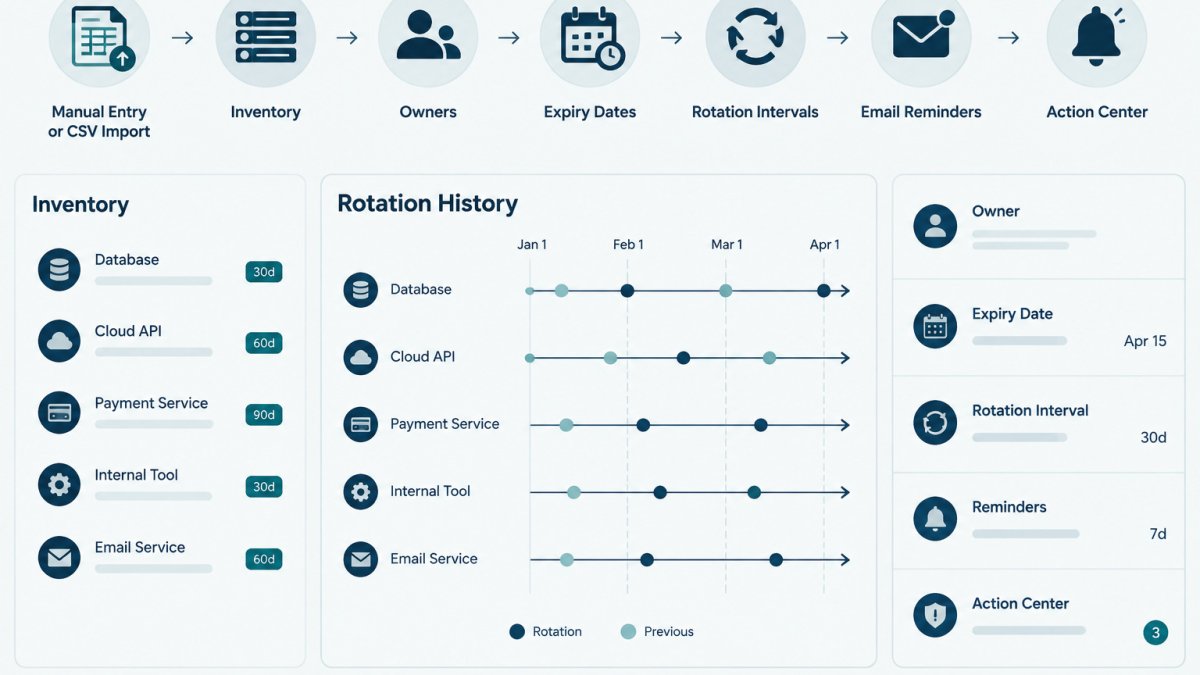
Last Updated: November 5, 2026
Quick Summary
Auditing secret rotation history means reviewing, for each credential, when it was rotated, who was accountable, what changed, and whether the change can be verified. Confirm rotations against provider-side logs and team records. KeyGuardRail's audit trail records actions taken in KeyGuardRail, so it is not independent proof that a provider rotated a key.
- Answer five questions for every credential: when, who, what changed, whether it succeeded, and why any rotation was missed.
- Pull provider create, rotate, and revoke events filtered by resource ID, not free-text search.
- A rotation is complete only when the new credential is in use and the old one is revoked or disabled.
- Record the earliest verifiable date and the provider's log retention limit for each credential.
- Document every missed or late rotation with the reason, approver, and new target date.
Table of Contents
- What a Secret Rotation History Review Should Answer
- Prerequisites: Gathering Provider Evidence and Team Records
- Step-by-Step Audit Workflow for Each Credential
- Credential Rotation Audit Checklist
- Secret Rotation Log Template and Required Fields
- Credential Rotation Evidence Examples and Documented Exceptions
- How Often to Rotate API Keys and Review Rotation Records
- Scheduling Your Next Rotation Review
- Frequently Asked Questions
Auditing secret rotation history means checking, for each credential, when it was rotated, who was responsible, what changed, and whether the change can be verified. KeyGuardRail records this work in its own audit history, but the evidence that a provider actually rotated a key lives with that provider and in your team's records.
NIST Special Publication 800-57 on key management guidance describes why rotation records matter for managing cryptographic keys over their lifetime, and the same logic applies to API keys and service account credentials.
What a Secret Rotation History Review Should Answer
A useful review answers five questions for every credential in scope:
- When was the credential last rotated, and when is the next rotation due?
- Who was accountable for the rotation?
- What changed: the credential itself, its scope, or the system that uses it?
A review that cannot answer these questions for a credential has found a gap, not a clean result. Record the gap rather than filling it with an assumed date.
Prerequisites: Gathering Provider Evidence and Team Records
Before you start, collect the sources you will compare. Most reviews fail because only one source is consulted.
- Provider-side evidence: the credential's creation, rotation, and revocation events in each provider console or audit log export.
- Team records: your credential inventory, change tickets, and handoff notes showing who owned each credential.
- Integration references: a list of which services, pipelines, or environments use each credential.
Check access before you begin. Confirm you can read the provider logs, and do not use shared or personal credentials to pull them.
Step-by-Step Audit Workflow for Each Credential
Work through one credential at a time and keep a single record per credential so results stay comparable. The workflow below is vendor-neutral: it tells you what evidence to look for, then shows where that evidence typically lives. Confirm exact menu and log field names against the provider's current documentation, because consoles change.
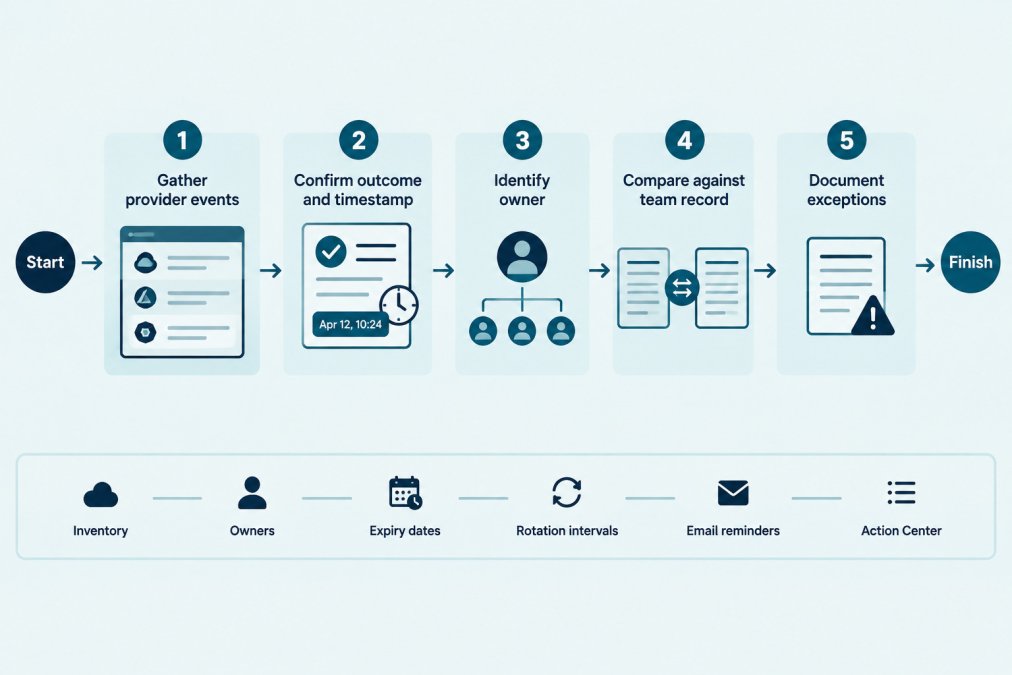
- Identify the credential. Use a stable, non-secret identifier such as the provider name plus a label (
payments-api-prod-01). Never write the secret value, a hash, or a fragment of it into the audit record. - Define the review window. Pick start and end dates in UTC, no earlier than the provider's log retention limit, and note that limit.
- Pull provider events for that credential over the window, filtered by resource ID or name rather than free-text search.
- Classify each event as a rotation, a scope or permission change, a metadata edit, a failed attempt, or a revocation. Only the first and last count toward rotation history.
- Confirm the outcome. A rotation is complete only when the new credential is in use and the old one is revoked or disabled. Record activation and revocation as separate timestamps.
- Match to a person and a change record. Tie the event to a named owner and a change ticket or handoff note. For a shared service account, record the responsible team and mark the individual as unconfirmed.
- Compare against policy. Note whether the last successful rotation falls inside your team's interval and whether the next is scheduled before expiry.
- Document exceptions. For any missed, late, or unverifiable rotation, record the reason, approver, new target date, and whether the risk was accepted.
- Record the evidence source for every field, export filename, log query, or ticket ID, so a later reviewer can re-check it.
Where Rotation Events Live Across Provider Types
The event names differ, but the pattern is consistent: look for a create event, an update or rotate event, and a revoke or delete event, each with a timestamp and an actor.
- Cloud provider key and secret services (cloud KMS keys, IAM access keys, managed secret stores): rotation usually appears as a key version creation plus a version disable or destroy, or as an access-key update event. Policy edits appear as separate event types and should not be counted as rotations.
- Vault-style secret managers: rotation often appears as a lease renewal or a new secret version, with the old version deprecated or revoked. Check whether the tool rotates the credential in the backing system or only re-issues it from the vault; those are different events.
- SaaS and API providers: many expose an audit or activity log in the admin console, sometimes with short retention. Look for token or key creation, regeneration, and revocation entries, and confirm whether the log records the actor or only the action.
A common pattern is that the provider records the action but not the reason, while your change ticket records the reason but not the exact timestamp. The audit record is strongest when both are cited side by side.
Distinguishing a Rotation From Other Secret Updates
Reviewers frequently count the wrong event. Use these rules to separate them:
- Rotation: a new credential value is issued and the old value stops working. Evidence: a create/rotate event plus a revoke/disable event, and confirmation that the consuming service authenticated with the new value.
- Scope or permission change: the value is unchanged but its permissions or attached policy changed. Security-relevant, but not a rotation.
- Metadata edit: a label, description, owner, or expiry field changed. Not a rotation.
Watch out: treating the creation of a new key as a completed rotation is the most common error in this workflow. Until the old credential is revoked and the integration is confirmed working, the rotation is in progress, not done.
Verification and Recovery
After classifying events, verify before closing the record. Confirm the consuming service is using the new credential (a successful authentication after the rotation timestamp is good evidence) and that the old credential is revoked or disabled. If verification fails, do not mark the rotation complete: reopen the change ticket, re-check the provider event for a partial failure, and record the gap.
Credential Rotation Audit Checklist
Use this checklist as a repeatable pass over each credential:
- Credential has a stable, non-secret identifier
- Provider rotation events pulled for the full review window
- Earliest verifiable date recorded, with log retention noted
Secret Rotation Log Template and Required Fields
A rotation log only helps if it captures the same fields for every credential. At minimum, include:
| Field | Example (fictional) | Notes |
|---|---|---|
| Credential identifier | payments-api-prod-01 |
Non-secret label only |
| Provider | Example Payments Co | Name of the system that issued it |
| Owner | Dana Reyes, Platform team | Named person or team |
| Rotation interval | 90 days | Set by your team policy |
| Last rotation (UTC) | 2026-08-14 09:12 | From provider event |
| Rotation outcome | Completed, verified | Completed means old key revoked |
| Evidence source | Provider audit export, row 42 | Where the proof lives |
| Exception | None / reason and approver | Document any delay |
Maintain this in a spreadsheet or your inventory. The free credential inventory template includes owner, expiry, and rotation fields that match this structure.
Credential Rotation Evidence Examples and Documented Exceptions
Good evidence is specific and checkable. Examples include:
- A provider audit export showing a rotation event with timestamp and success status
- A change ticket linking the rotation to a named owner and date
- A screenshot or export showing the old credential was revoked
Weak evidence includes a verbal statement that a rotation "was done," an undated note, or a log line that cannot be tied to a specific credential.
Exceptions are normal: a vendor may be down, a team may be on leave, or a key may be tied to a system scheduled for retirement.
KeyGuardRail records lifecycle actions taken in KeyGuardRail, including the history you enter about rotations and reminders.
How Often to Rotate API Keys and Review Rotation Records
Rotation frequency is a policy decision, not a universal rule. Many teams set intervals based on how sensitive a credential is, how widely it is shared, and whether the provider supports automated rotation. Regulated environments may set their own requirements. The review cadence should be shorter than the rotation interval: a quarterly review catches a missed 90-day rotation within one cycle, while reviewing only after expiry finds the gap after the risk already existed.
Troubleshooting Missing, Delayed, or Failed Rotations
When a credential's history does not show an expected rotation, work through these causes in order before you record a gap. The order matters because the cheapest explanations are the most common.
- Wrong filter or identifier. Confirm you searched by resource ID, not a display name another key shares. Re-run with the exact ID.
- Retention limit. If the rotation predates the earliest retained event, the evidence is gone; record the limit and mark the event unverified.
- Permissions or log scope. Confirm your account can read the audit log and that it covers the resource's region or project; some providers scope logs per project or region.
- Event coverage gap. Some providers log administrative actions but not automated rotation events, or vice versa. Check the audit log documentation for which categories are recorded.
- Partial or failed rotation. Look for a create event with no matching revoke, or a rotation job that errored. That is a failed attempt, not a completed rotation.
- Rotation done outside the provider. A vault or automation tool may have re-issued the credential. Check that tool's own history before concluding the rotation did not happen.
- No rotation at all. If none of the above explains it, the rotation was likely missed. Open an exception with a reason, approver, and new target date.
Watch out: a silent gap in the log is not proof that nothing happened, and a log entry is not proof that the rotation succeeded. Record what you can verify and label the rest as unverified.
Retaining and Exporting Rotation Evidence
A rotation history is only useful if it survives staff changes and log expiry. Export the relevant provider events at each review and store them alongside the audit record, noting the export date and query.
KeyGuardRail records lifecycle actions taken in KeyGuardRail, including the history you enter about rotations and reminders. For a starting structure, the free credential inventory template includes owner, expiry, and rotation fields that match the audit record described above.
Scheduling Your Next Rotation Review
Set the next review date when you finish the current one. Put the date in your team calendar, assign a named reviewer, and list the credentials in scope.
For each review, repeat the workflow, compare results with the previous log, and note any credential whose rotation slipped.
For help setting up the inventory that makes these reviews faster, see From signup to your first inventory.
Frequently Asked Questions
What is the difference between a provider audit log and an internal rotation record?
A provider audit log is generated by the external service where the credential lives and records events it observed, such as a key being created, updated or deleted. An internal rotation record is written by your team and documents the planned change, the accountable person, the reason and the verification performed. The two should be compared, not treated as interchangeable. A provider log shows what the system recorded; an internal record shows what your team intended and checked. Discrepancies between them are the main reason an audit needs a documented exception. Where a provider log is unavailable, the internal record should state that limitation explicitly.
How can you verify that a credential was rotated in its provider?
Start with the provider's own event history for the specific credential, filtered by its identifier and the review period. Confirm that a creation or update event exists, that its timestamp falls within the expected window, and that the outcome is successful. Then check that the old credential no longer appears as active where the provider exposes that status. If the provider offers no event history for the action, record that gap as an exception and retain whatever confirmation the provider does give, such as a console screenshot taken during the change. Verification should use the provider's data, not only your team's memory.
What should a credential rotation record include?
A useful record identifies the credential by a non-secret name or identifier, never by its value. It states the date and time of the rotation, the person accountable for it, the reason, the systems that depend on the credential, and the verification result. It also notes what changed, such as a new key being issued and the old one revoked, and links to the provider evidence. Any deviation from the plan should be written down with a reason. Keep the record short and consistent so that someone reviewing it later can follow the sequence without asking the original owner.
How often should teams review credential rotation records?
The review frequency should follow the rotation interval and the number of credentials you manage. Many teams review records on a fixed schedule, such as monthly, and also review any credential whose rotation is overdue or has an open exception. The right cadence is a team decision, and it should be written in your process so reviewers know what to check and when. KeyGuardRail can record lifecycle history and surface upcoming expiry and rotation dates through reminders and its Action Center, but the review itself is performed by your team.
