
Table of Contents
- Why Tracking API Key Expiry Matters
- Set Up Your API Key Inventory Template
- Distinguish Between Expiry Dates and Rotation Schedules
- Create an API Key Rotation Schedule
- Set Up API Key Expiration Reminders
- API Key Management Best Practices
- Common Mistakes to Avoid
- Frequently Asked Questions
Last Updated: October 19, 2026
Why Tracking API Key Expiry Matters
API keys are the backbone of service-to-service authentication, yet unlike user passwords they often sit in configuration files, environment variables, and CI/CD pipelines for months or years without review. When one expires without warning, every service depending on it stops working.
The problem compounds across teams: a key created by one engineer, documented nowhere, expires six months later after that engineer has moved on, and another team discovers the outage in production. This repeats because most organizations lack a central place to track how to track API key expiry across providers and services.
Expiry tracking forces a deliberate conversation: Who owns this credential? When does it expire? What depends on it? How will we rotate it without breaking the application? These questions sound basic but are rarely answered until something breaks.
Set Up Your API Key Inventory Template
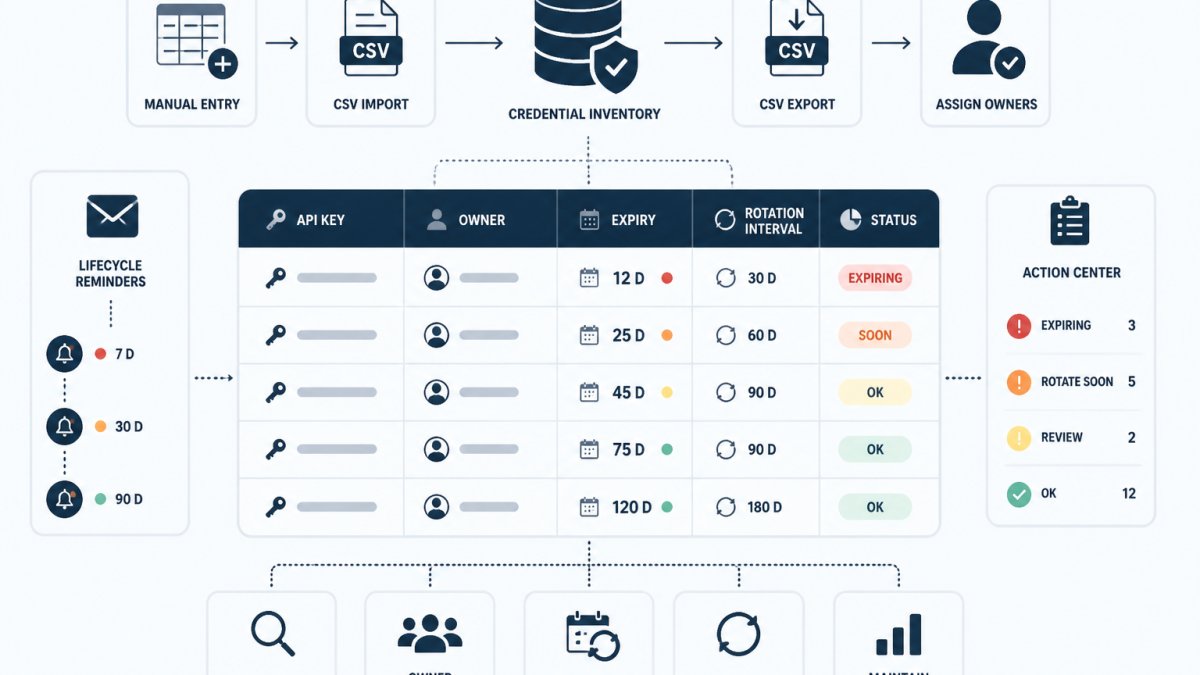
A credential inventory is the foundation of expiry tracking. It's a structured list of every API key, service account, and integration credential your teams use, along with metadata about each one. The inventory itself doesn't store secret values, it stores only the information needed to manage the credential's lifecycle.
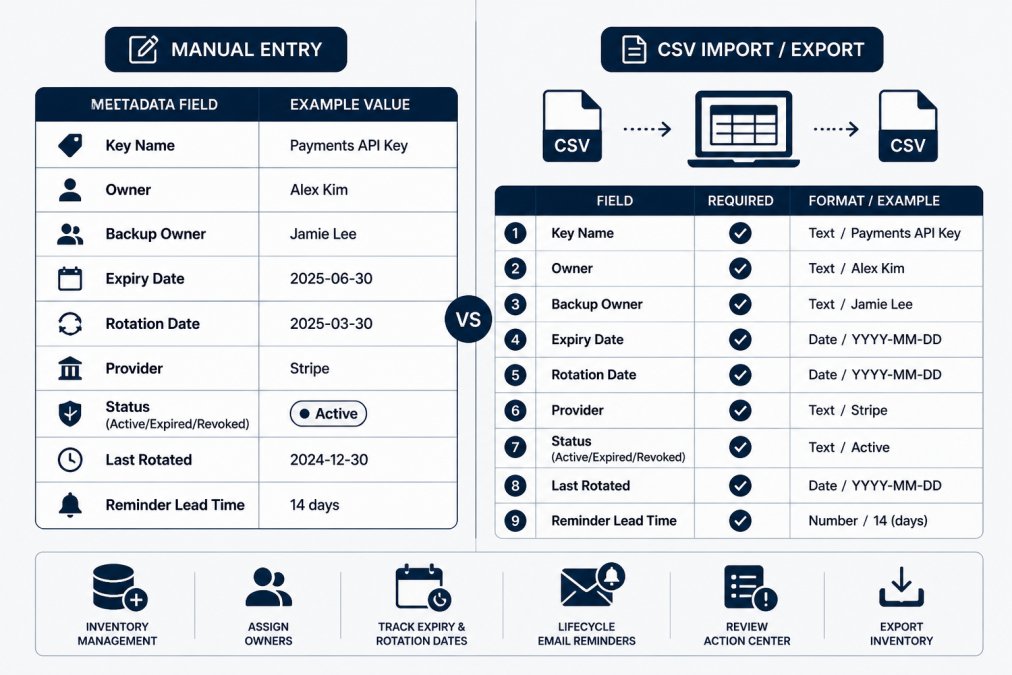
If you're starting from scratch, a free credential inventory template can help you structure the essential fields and get your first entries recorded quickly.
Essential metadata fields for tracking
Start with these core fields in your inventory. Each field serves a specific purpose in the rotation and expiry workflow.
Key Name identifies the credential in human-readable form. Use a convention that includes service, environment, and purpose: stripe-prod-api-key, github-actions-ci-token, datadog-metrics-ingestion.
Owner is the person responsible for rotating the key and responding to expiry alerts. This is not optional: unowned credentials expire silently.
Backup Owner covers vacation, illness, or turnover, so someone can rotate the key and verify success while the primary owner is unreachable.
Expiry Date is the date the key stops working. Record it in ISO 8601 format (YYYY-MM-DD).
Rotation Date tracks when the key was last rotated, so you can verify rotation happened and spot keys untouched for years.
Provider records where the credential lives (AWS, GitHub, Stripe, Datadog).
Status tracks whether the key is active, expired, or revoked.
Reminder Lead Time specifies how many days before expiry you want to be notified.
A minimal inventory template looks like this:
| Key Name | Owner | Backup Owner | Provider | Expiry Date | Rotation Date | Status | Reminder Lead Time |
|---|---|---|---|---|---|---|---|
| stripe-prod-api-key | alice@company.com | bob@company.com | Stripe | 2027-03-15 | 2026-03-15 | Active | 30 |
| github-actions-ci | devops-team-lead@company.com | platform-engineer@company.com | GitHub | 2027-02-28 | 2026-02-28 | Active | 14 |
| datadog-metrics | monitoring@company.com | sre-backup@company.com | Datadog | 2027-01-20 | 2026-01-20 | Active | 21 |
| old-api-key-prod | (none) | (none) | AWS | 2026-05-10 | 2024-05-10 | Revoked | , |
Assigning owners and backup owners
Ownership is the linchpin of expiry tracking. A key with no owner expires unnoticed; a key whose owner leaves becomes someone else's problem at the worst possible time.
Assign owners based on who created the credential or uses it most directly. If the payments team maintains the Stripe integration, the payments team lead owns the Stripe key; the DevOps engineer managing a CI/CD pipeline owns its GitHub token.
Backup owners prevent single points of failure. They should understand the credential's purpose and know how to rotate it. A backup on a different team or time zone is often a good choice for coverage.
Review ownership quarterly. When someone leaves, transfer their credentials before they depart; when teams restructure, update owners. Stale ownership data means alerts go to people who can't act on them.
Distinguish Between Expiry Dates and Rotation Schedules
Many teams conflate expiry and rotation, but they're different concepts.
An expiry date is when the provider stops accepting the credential. After it, the key no longer works: services fail, requests are rejected, and alerts fire.
A rotation schedule is how often you proactively replace a credential before it expires. You might rotate every 90 days even though the provider allows a year. Rotation is a security and operational practice; expiry is a technical limit.
The two interact. If a key expires on 2027-06-30 and you rotate every 90 days, your next rotation should happen around 2027-03-30, giving you a buffer. Miss that window and the key expires and services break.
Some keys have no provider-enforced expiry. AWS access keys, for example, remain valid until you revoke them. For these, set your own expiry date based on your rotation policy.
Record both in your inventory: the expiry date is the hard deadline, the rotation schedule tells you when to act before it.
Create an API Key Rotation Schedule
A rotation schedule is a repeating plan for replacing credentials. It prevents keys from aging indefinitely and reduces the window of exposure if a key is compromised.
Planning rotation windows and dependencies
Start by identifying all services that depend on each key. A Stripe API key might be used by your billing service, webhook handler, and accounting integration; all three need the new key before the old one stops working.
Map these dependencies explicitly: for each key, list the services that use it, then identify the rotation window when you can safely replace it without breaking them.
A rotation window typically spans a few hours to a full business day: generate a new key, update all dependent services, verify they work with the new key, then revoke the old one. Keep it long enough for updates and testing, short enough that you're not running two keys for weeks.
Schedule rotations during business hours when your team can monitor for failures. Rotating a critical key at midnight on Friday invites a weekend outage.
For keys with many dependencies, coordinate across teams: block time, notify stakeholders, and ensure someone is on call to troubleshoot if rotation fails.
Safe rotation with overlap and rollback
The safest rotation uses overlap: both old and new keys stay active during a transition period, giving dependent services time to pick up the new key without an immediate cutover.
The typical overlap procedure works like this:
- Generate a new key in the provider
- Deploy the new key to all dependent services (in configuration, environment variables, or secrets stores)
- Verify that services are working with the new key (check logs, metrics, or test requests)
- Wait 24-48 hours with both keys active
- Revoke the old key
- Monitor for any failures that indicate a service still using the old key
The waiting period is critical: it lets you catch any service still using the old key, so failures surface during the window rather than after revocation.
Rollback is your escape hatch. If a service fails and you can't quickly fix it, revert to the old key, investigate, and schedule another attempt. Document what went wrong so you can address it next time.
For keys with unknown or hard-to-map dependencies, extend the overlap to perhaps a week, reducing the risk of finding a hidden dependency after revocation.
Record the rotation and any issues in your audit trail: old key ID, new key ID, rotation date, and rollback actions. This history helps troubleshoot future rotations and documents your key management practices.
Set Up API Key Expiration Reminders
Reminders are the operational trigger for rotation. Without them, expiry dates are just spreadsheet cells no one checks.
Choosing reminder lead times
A reminder lead time is how many days before expiry you want to be notified. The right value depends on the key's criticality, rotation complexity, and your team's response time.
For non-critical keys (development, staging, low-traffic services), a 14-day reminder is often sufficient; missing it limits impact to a dev or staging environment.
For critical keys (production API keys, database credentials, payment processors), a 30-day reminder is more prudent: production rotations involve multiple services, testing, and coordination, and 30 days lets you plan, schedule, and execute without rushing.
For keys with many dependencies or complex rollback procedures, consider 45 or even 60 days, trading more advance notice for the overhead of longer reminder periods.
Set different lead times by category: production 30 days, staging 14, development 7. This tiering focuses attention on what matters most.
Handling keys with unknown expiry dates
Some keys have no clear expiry date: old credentials created before you tracked expiry, or keys from providers that don't enforce expiration.
For these, make an explicit decision: set a rotation deadline (a manual expiry date) or mark the key for investigation and potential revocation.
A common approach is a 90- or 180-day rotation deadline for undated keys, depending on your security policy. Record it as the expiry date, and the key is treated like any other credential with a known expiry.
If a key has no clear owner, no known dependencies, and no recent usage, consider revoking it rather than tracking it indefinitely. An unused key is a liability, not an asset.
Where expiry is genuinely unknown, set a conservative 21-30 day lead time and schedule a rotation review: contact the owner, verify status, and establish a proper expiry date and rotation schedule going forward.
API Key Management Best Practices
Expiry tracking is part of a broader credential lifecycle practice. These habits make it more effective.
Review cadence and verification
Schedule a monthly or quarterly inventory review and verify that:
- All active keys are still in use
- Ownership assignments are current
- Expiry dates and rotation schedules are accurate
- Revoked keys are removed from active use
A 15-minute quarterly review is far cheaper than troubleshooting an unexpected key expiry in production.
Spot-check a few keys in their source systems: log into Stripe, GitHub, or AWS and confirm the recorded keys exist and match your inventory. This catches keys revoked or replaced without updating your tracking.
Tracking rotation completion and audit history
Record every rotation: the date, the old key ID (or a hash, never the full value), the new key ID, affected services, and any issues.
An audit trail serves two purposes: it shows you're actively managing credentials, and it helps troubleshoot future rotations by showing what worked and what didn't.
Credential lifecycle monitoring tools help teams maintain this audit history alongside their inventory, recording each rotation step, when the new key was deployed, when it was verified, and when the old key was revoked, so you have a complete record of what happened and when.
Common Mistakes to Avoid
Treating expiry dates as optional. Many teams set expiry dates but don't treat them as hard deadlines, rotating "when they get around to it," which often means never.
Assigning keys to teams instead of individuals. "The payments team owns this key" is too vague: when it expires, who gets the alert and who rotates it?
Ignoring keys with unknown dependencies. A key might be used by a service you don't maintain, a third-party integration, a legacy system, or another team's service.
Rotating without overlap. A single-step cutover is risky: if a service doesn't pick up the new key immediately, it fails. Use an overlap period where both keys are active.
Not documenting rotation procedures. Each provider has different mechanics: AWS access keys rotate differently than Stripe API keys. Document the procedure per key type so rotations are consistent and repeatable.
Forgetting to revoke old keys. Revoke the old key promptly once the new one is confirmed working.
Frequently Asked Questions
What is the difference between an API key's expiry date and rotation date?
An expiry date is when the key stops working and must be replaced. A rotation date is when you plan to replace the key before it expires, typically weeks or months earlier. Setting a rotation date ahead of expiry gives your team time to update applications and verify the new key works before the old one stops.
How far in advance should I set an API key expiry reminder?
Set reminders at least 2-4 weeks before expiry to allow time for rotation and application updates. For critical services, send a first reminder 6 weeks out and a second at 2 weeks. For less critical keys, 2 weeks is usually sufficient. Adjust based on your team's deployment frequency and testing cycles.
What should I do if an API key's expiry date is unknown?
Contact the service provider or check their API documentation for the default expiry policy. If no expiry is set, treat the key as indefinite but still include it in your inventory with a note. Plan a manual rotation schedule every 12-24 months as a security best practice, even for non-expiring keys.
How can I verify that an API key was rotated successfully?
After rotation, test authentication with the new key in a non-production environment first. Monitor the old key's usage to confirm applications have switched over. Check your audit trail for the rotation event and timestamp. Once confirmed, revoke the old key and document the completion in your inventory.