
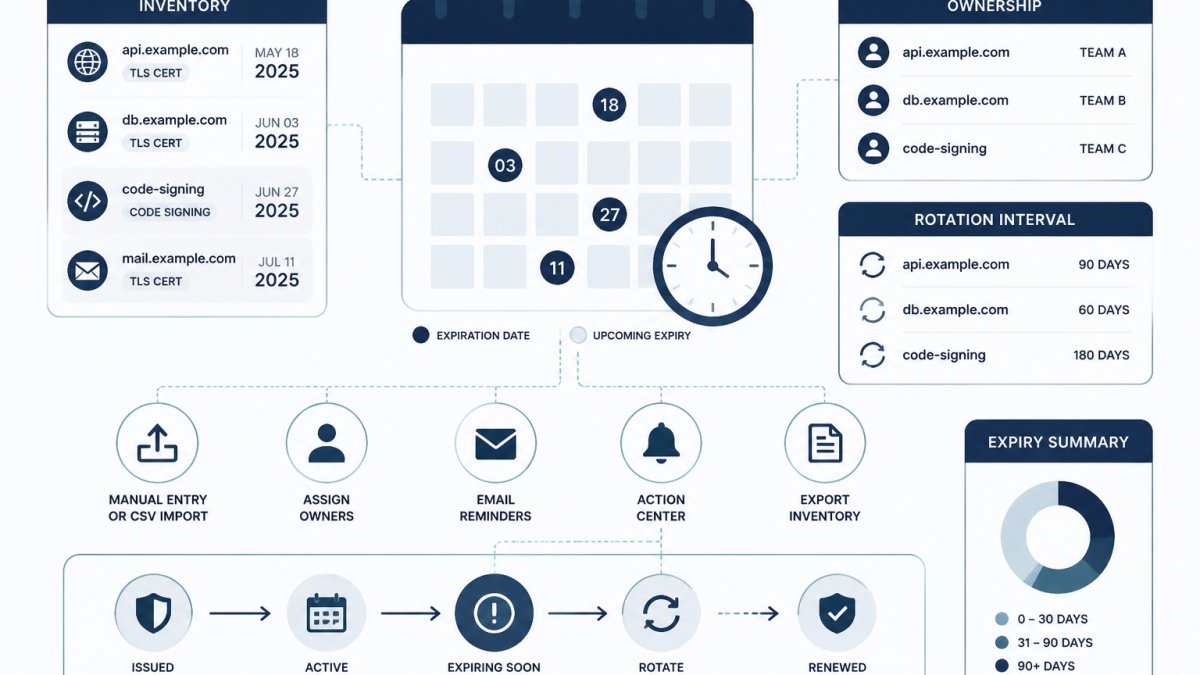
Quick Summary
Track certificate expiration dates by recording each certificate's valid-to date in one shared inventory, with a named owner for each. Read the date from a live host with OpenSSL or a browser, then set warning thresholds such as 60, 30, 14 and 7 days before expiry.
- Read the valid-to date from a live host with OpenSSL's x509 -dates option.
- Record hostname, port, issuer, valid-to date and owner in one inventory.
- Assign one named owner to every certificate so reminders reach a person.
- Set warning stages at 60, 30, 14 and 7 days before expiry.
- After renewal, re-check the live host and update the inventory's last-verified date.
Table of Contents
- What Certificate Expiration Means and Why Dates Get Missed
- How to Check a Certificate's Expiration Date
- Building a Certificate Inventory Template
- Setting Warning Thresholds and Escalation Owners
- How to Automate Certificate Expiration Monitoring
- SSL Certificate Renewal Checklist and Post-Renewal Verification
- Next Step: Start Your Certificate Inventory This Week
- Frequently Asked Questions
How to Track Certificate Expiration Dates: A Practical Guide
Last Updated: October 28, 2026
Tracking certificate expiration dates helps teams keep renewal deadlines visible. A certificate that lapses without warning can break a website, an API integration or an internal service that nobody remembered to check. This guide explains how to find expiration dates, build a simple inventory, set warning thresholds, and verify renewals.
A certificate is a digital file that proves a server's identity and enables encrypted connections. Each certificate has a fixed validity window, defined by a "valid from" and a "valid to" date (draft-ietf-pkix-ipki-part1-11). Once the valid-to date passes, clients stop trusting the certificate.
What Certificate Expiration Means and Why Dates Get Missed
An expired certificate causes browsers and clients to show security errors or refuse the connection entirely (Provisioning and managing certificates in the Web PKI). The certificate itself does not degrade over time. It simply stops being valid on a fixed date.
Dates get missed for predictable reasons:
- No central record. Certificates live on load balancers, web servers, and internal hosts. Nobody has a single list.
- Ownership changes. The engineer who installed a certificate leaves, and the renewal reminder goes with them.
- Long lifetimes hide the deadline. A certificate issued years ago may not have come up in anyone's thinking since.
- Non-public certificates are overlooked. Internal services and private certificate authorities often sit outside the normal renewal process.
Tracking expiration dates puts the information in a shared record.
How to Check a Certificate's Expiration Date
You can read a certificate's expiration date in a browser or from the command line. Both methods show the same underlying data: the subject (what the certificate was issued to, often the common name), the issuer (the certificate authority that signed it), and the validity dates.
Checking a certificate in a web browser
- Open the site in a browser such as Chrome or Firefox.
- Click the padlock icon in the address bar.
- Open the connection or certificate details. The exact menu wording varies by browser.
- Find the "valid from" and "valid to" fields.
- Note the subject, issuer, and hostname shown.
This method works for public sites. It is slow for many hosts, so use it for quick spot checks only.
Checking a hostname and port from the command line with OpenSSL
OpenSSL can query a live server and print its certificate details. Replace the placeholder hostname with your own:
openssl s_client -connect example.internal.test:443 -servername example.internal.test </dev/null 2>/dev/null | openssl x509 -noout -subject -issuer -dates
This prints the subject, issuer, and the notBefore and notAfter dates. The notAfter value is the expiration date. The -servername flag matters when a single IP hosts several sites, because it tells the server which certificate to return.
Watch out: A command that connects to the wrong port or hostname will return a different certificate than the one users see. Confirm the hostname and port match the real service before you record the date.
Most operating systems also include curl, which can show certificate details during a request. Any of these tools works; consistency across your team matters more than the tool you choose.
Building a Certificate Inventory Template
An inventory is a single list of every certificate your team relies on. It should record metadata only, never the private key or the certificate's secret material.
A useful inventory includes these fields:
- Name: a short label, such as "Customer portal, public".
- Hostname and port: where the certificate is served.
- Issuer: the certificate authority.
- Valid-to date: the expiration date.
- Owner: one named person or team accountable for renewal.
- Renewal method: manual, scripted, or handled by a provider.
- Last verified: the date someone last confirmed the details.
Example entry (fictional values):
| Name | Hostname:Port | Issuer | Valid to | Owner | Renewal method |
|---|---|---|---|---|---|
| Portal public | portal.example.test:443 | Example CA | 2027-03-14 | Platform team | Provider renewal |
| Internal API | api.internal.test:8443 | Private CA | 2026-12-01 | Backend team | Manual |
A spreadsheet works well at first. You can start with our free credential inventory template, which tracks metadata only. Keep it simple, and review it on a fixed schedule.
Setting Warning Thresholds and Escalation Owners
A warning threshold is the number of days before expiration when someone must act. Warning too late leaves no time for renewal. Warning too early creates noise that people learn to ignore.
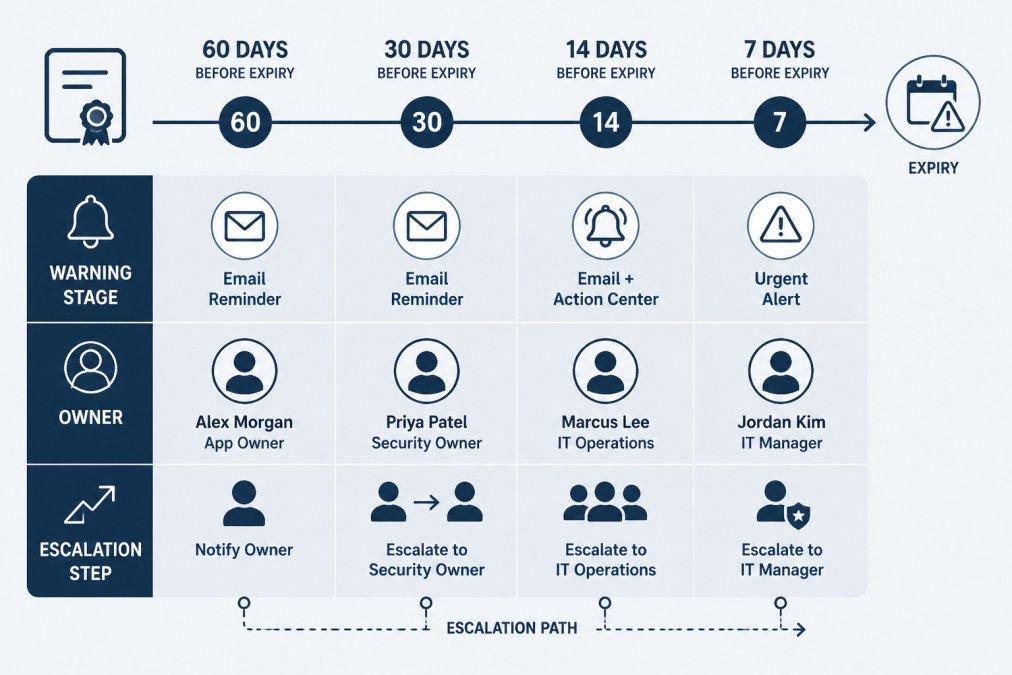
A common pattern uses several stages:
- 60 days before expiry: the owner confirms the renewal plan.
- 30 days before expiry: the renewal is scheduled or in progress.
- 14 days before expiry: escalate to the team lead if the renewal is not started.
- 7 days before expiry: escalate to the on-call or engineering manager.
Each stage should name a specific owner and a specific next step. A reminder with no named person gets ignored.
Adjust these windows to your renewal process. A manual renewal that needs a change window may need a longer lead time than an automated one.
How to Automate Certificate Expiration Monitoring
Manual checks work for a handful of certificates. As the count grows, automation can help teams check more endpoints consistently. Automated monitoring typically does three things: it reads the expiration date from each host on a schedule, compares the date to your thresholds, and sends a notification when a threshold is crossed.
Basic automation steps:
- List every host. Start from your inventory, including internal and non-HTTPS services where certificates apply.
- Schedule checks. Run a check daily or weekly, depending on how often your certificates change.
- Compare to thresholds. Calculate days remaining and flag anything inside your warning window.
- Route alerts to owners. Send each alert to the named owner, not a shared inbox alone.
- Record the result. Log the date checked and the outcome for audit purposes.
Monitoring plugins, scheduled scripts, and commercial tools all follow this pattern. Choose based on your environment and on whether you need central tracking, not on the feature list alone.
KeyGuardRail focuses on credential lifecycle metadata: expiry dates, owners, rotation intervals, lifecycle reminders, the Action Center, and audit history. It does not discover certificates automatically or renew them, so renewal still happens in your certificate provider or internal certificate authority. For certificate-specific scanning, pair your inventory with a tool built for that job. If you want to track expiry dates and owners alongside your other credentials, you can create a free workspace to get started, or review how credential lifecycle monitoring works.
SSL Certificate Renewal Checklist and Post-Renewal Verification
Renewal is not finished when the new certificate is installed. Verify the result, then update your records.
Before renewal
- Confirm the owner and the change window.
- Check the current expiration date in the inventory.
- Confirm the new certificate covers the correct hostnames.
- Note the rollback plan if the new certificate fails.
After renewal
- Re-run the OpenSSL check against the live host and port.
- Confirm the new valid-to date matches what you expect.
- Load the service in a browser and confirm no security warning appears.
- Confirm the issuer and subject are correct.
- Update the inventory with the new date and the "last verified" value.
- Record who performed the renewal and when.
Common mistake: Teams install the new certificate on the load balancer but leave an old certificate on a backend host or a second endpoint. Checking every hostname and port in the inventory catches this.
Next Step: Start Your Certificate Inventory This Week
Pick the ten certificates most important to your business, record their hostnames, ports, owners, and valid-to dates, and set one warning threshold for each. That single list, kept current, makes expiration dates easier to review. Expand from there as your environment grows.
Frequently Asked Questions
How do you track SSL certificate expiration dates?
Record each certificate's expiry date in a central inventory, check the dates with a browser or OpenSSL when you add or renew a certificate, and set automated checks or reminders that alert a named owner before the date arrives. Manual checks work for a small number of hosts, but they depend on someone remembering to run them. A scheduled check or a reminder tied to each inventory entry can help teams review dates as the number of certificates grows. Review the inventory on a regular schedule so that entries for retired hosts are removed and new ones are added.
How can I check when a certificate expires?
For a public website, open the site in a browser, inspect the certificate, and read the valid-to field. From the command line, you can connect to a hostname and port with OpenSSL and read the notAfter value from the returned certificate. Both methods show the date the certificate stops being valid. Run the check against the exact hostname and port that your clients use, because a certificate served on one port can differ from another. Record the date and the owner in your inventory afterward.
What information should a certificate inventory include?
At minimum, record the hostname or service name, the port, the certificate authority, the common name or subject, the issue and expiry dates, the named owner, the renewal method, and where the private key is stored. Add a note on whether the certificate is public or internal, and which systems depend on it. These fields let you find a certificate quickly, know who acts on it, and understand the impact of letting it lapse. Keep private key material out of the inventory itself; record only where it is held.
Can certificate expiration monitoring be automated?
Yes. Scheduled scripts or monitoring tools can connect to each endpoint on a regular interval, read the expiry date, and send alerts when the number of days remaining falls below a threshold you set. Automated checks cover the endpoints you configure them to check. KeyGuardRail tracks expiry dates and sends lifecycle email reminders from metadata you enter or import; it does not renew certificates or discover endpoints automatically, so renewal and verification still happen in your certificate provider or infrastructure.
