
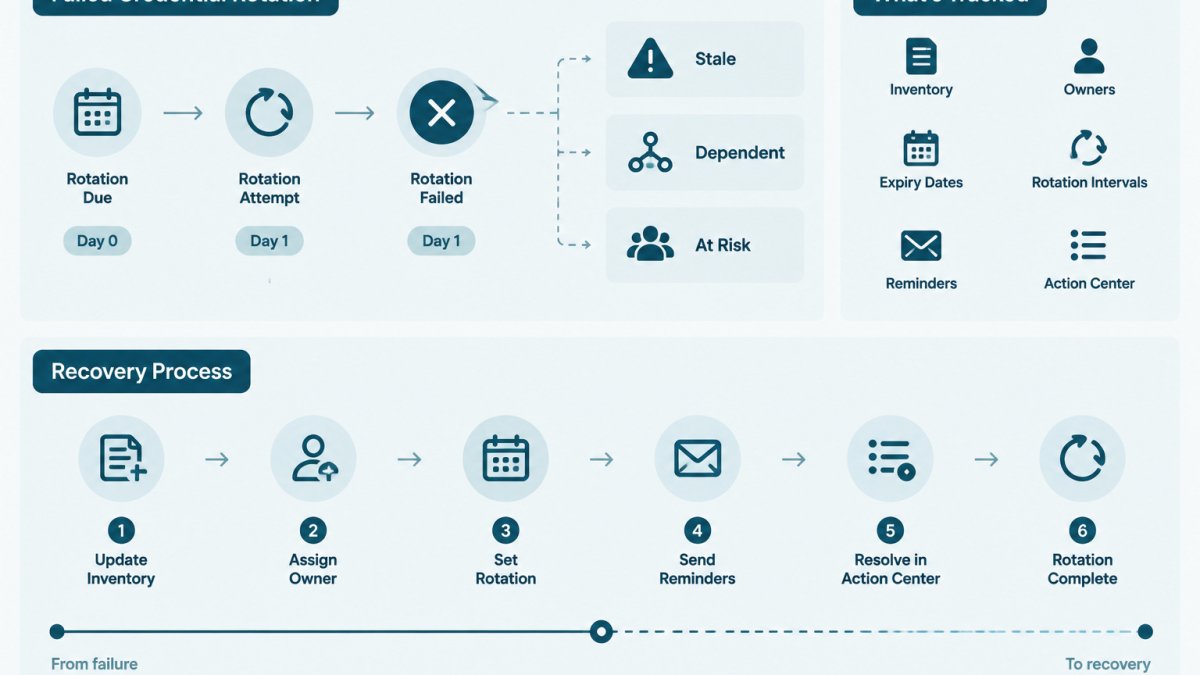
Last Updated: November 4, 2026
Quick Summary
Recover from a failed credential rotation by first finding out which credential each consumer is actually using, then either rolling back to the old credential or retrying the update for any system that missed the new value. Only disable the old credential once every consumer is confirmed to authenticate with the new one.
- Record the credential identifier, not the secret value, for each consumer in a simple table.
- Roll back when the new credential fails in several consumers or the cause is unclear.
- Retry when only one consumer missed the new value and the new credential works elsewhere.
- Keep the old credential enabled until the provider audit log shows no calls using it.
- Record the identifier, last successful call and audit results for each consumer afterward.
Table of Contents
- What Happens When a Credential Rotation Fails
- Identify Which Credential Is Currently Active
- Credential Rotation Rollback Procedure: Roll Back or Retry
- AWS Secrets Manager Rotation Failure Recovery Steps
- How to Verify Credentials After Rotation
- Build a Credential Rotation Runbook Template
- Record the Recovery and Prevent the Next Handoff Failure
- Frequently Asked Questions
What Happens When a Credential Rotation Fails
A credential rotation replaces an old secret, an API key, password or certificate, with a new one.
Failures usually show up as authentication errors. A service returns "invalid key" or "access denied" even though nothing in its own code changed.
KeyGuardRail records rotation work and lifecycle dates. It does not perform the rotation itself, so the recovery steps below happen in your existing provider and in the systems that consume the credential.
Partial Rotations and Split-Brain States
A partial rotation happens when some systems receive the new credential and others still hold the old one. Teams call this a split-brain state, because different parts of the environment disagree about which credential is valid.
This is most common when:
- A rotation script updates one environment but not another.
- A cached copy of the old value persists in a service after the source changed.
- The old credential was revoked before every consumer was updated.
Split-brain states are harder to diagnose than full failures. Some requests succeed and others fail, which can look like an intermittent network problem.
Identify Which Credential Is Currently Active
Before you change anything, confirm which credential each consumer is using. Recovery starts from that fact.
Prerequisites:
- A list of every system that uses the credential. If you keep a credential inventory, start there.
- Access to the provider console or API where the credential is issued.
- Read access to the logs or configuration of each consumer.
Steps:
- Note the credential identifier, not the secret value. Use the key ID or name shown in the provider.
- Check the provider to see whether the new credential is active and whether the old one is still enabled.
- For each consumer, check which identifier it is configured to use. Compare the timestamp of its last successful call.
- Record the result in a simple table, one row per consumer.
| Consumer | Expected credential | Actual credential | Last success | Status |
|---|---|---|---|---|
| Billing job (example) | New key ID | Old key ID | 09:14 | Stale |
| Web API (example) | New key ID | New key ID | 09:20 | OK |
Never paste secret values into tickets, chat or logs while you do this. Work with identifiers.
Watch out: Some consumers cache a credential for minutes or hours. A consumer can look healthy simply because it has not yet retried.
Credential Rotation Rollback Procedure: Roll Back or Retry
Once you know the state, choose between rolling back and retrying, depending on whether the new credential is working and whether the old one is still available.
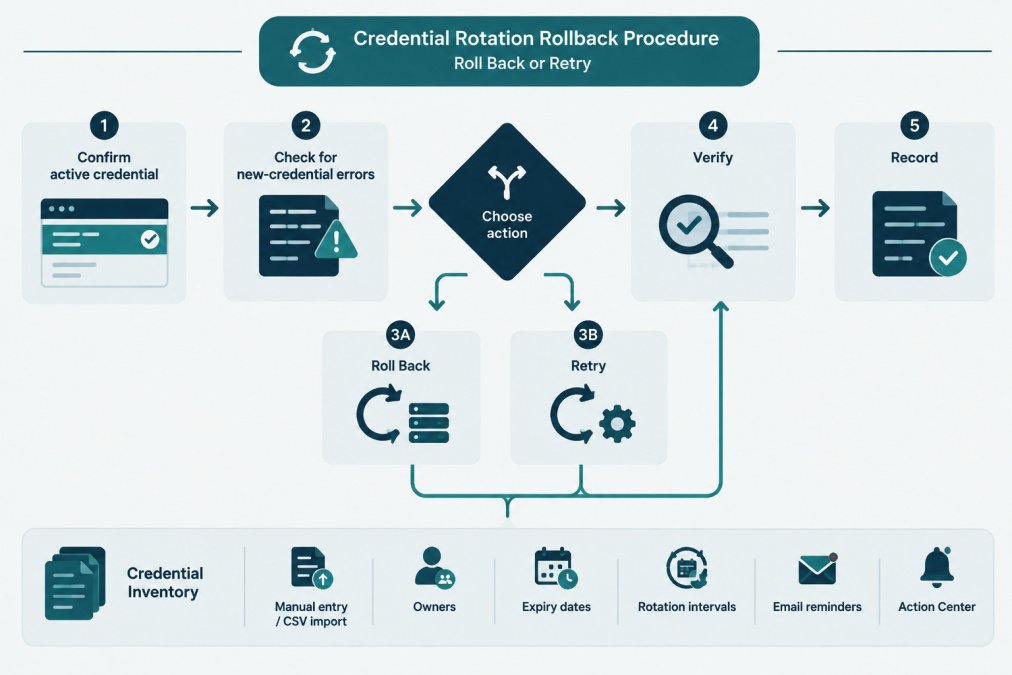
Roll back when:
- The new credential fails in several consumers and the cause is not clear.
- The old credential is still enabled in the provider.
- You need service restored quickly and can finish the rotation later.
Retry when:
- The failure is limited to one consumer that has not received the new value.
- The new credential works elsewhere and the gap is a missed configuration update.
Steps for a rollback:
- Confirm the old credential is still enabled in the provider. If it has been revoked, a rollback is not possible; follow the retry path or the recovery steps in the next section.
- Point the stale consumers back to the old identifier.
- Check that each consumer authenticates successfully.
- Do not delete the new credential yet. Leave it available for the retry.
Steps for a retry:
- Identify the consumer that did not receive the new credential.
- Update its configuration to the new identifier, following the same change process your team uses for other config changes.
- Confirm each consumer's last successful call uses the new identifier.
- Only after every consumer is confirmed, disable the old credential in the provider.
Likely mistakes:
- Disabling the old credential before every consumer is confirmed.
- Retrying without checking the cause, which can repeat the same failure.
- Forgetting that a rollback leaves the new credential in place. Note the state in your records so the next rotation does not start from a confused baseline.
AWS Secrets Manager Rotation Failure Recovery Steps
Teams that store credentials in AWS Secrets Manager and rely on its rotation feature can troubleshoot a failed rotation by checking the secret's version state against what the application reads.
Prerequisites:
- IAM permissions to view the secret's version history and rotation status.
- The name or ARN of the secret, and the list of applications that read it.
Steps:
- Check the rotation status for the secret in the AWS console or with the AWS CLI. Look for the most recent rotation attempt and any error it reports.
- Review the version stages attached to the secret. Secrets Manager uses labels such as the current and pending versions to track which value is active. Confirm which version carries the current label.
- Check the rotation function's logs in CloudWatch for the failed step. Errors often come from the function's permissions or from the target service rejecting the new value.
- Confirm each application reads the version it should. Applications that cache secrets may need a restart or a cache refresh.
- If the rotation left the secret in an inconsistent state, follow the rotation function's documented recovery path rather than editing version labels by hand. Consult the AWS Secrets Manager documentation for the current steps: AWS Secrets Manager rotation documentation
Watch out: Moving version labels manually can break the link between the secret and the service it protects.
Verify: Each application should authenticate using the current version, and the rotation status should show a completed attempt.
How to Verify Credentials After Rotation
A rotation is not finished until every consumer is confirmed to work with the new credential and nothing is still using the old one. Verification has two sides: the consumer's view (can it authenticate?) and the provider's view (which credential is actually being used?). Checking only one side is the most common reason a "successful" rotation fails hours later.
Prerequisites
- The credential identifier (key ID, secret name or ARN, certificate serial) for both the old and new values.
- Read access to the provider's audit or usage logs, not just its configuration page.
- A way to make a low-risk call from each consumer, such as a read-only endpoint or a health check that exercises the credential.
Checks to run, in order
- Provider-side state. Confirm the new credential is enabled and the old one is still enabled (not yet disabled). If the provider exposes version stages or labels, confirm which version carries the current label. In AWS Secrets Manager, for example, the
AWSCURRENTandAWSPENDINGstaging labels identify which version is active and which is mid-rotation; see the AWS Secrets Manager rotation documentation for how your rotation type uses them. - Consumer-side identifier match. For each consumer, read the configuration it actually loaded, not the file in source control. A deployment pipeline that restored an older config, or an environment variable set at container start, can leave a consumer on the old value even though the repository looks correct.
- Authentication canary. Make one low-risk, preferably read-only call per consumer and confirm success. Record the timestamp of the last successful call per consumer.
- Provider audit log for old-credential usage. Query the provider's audit or access logs for calls made with the old identifier after the rotation window. This is the only reliable way to catch a consumer you forgot; filter by the old key ID or serial and look for hits in the last hour.
- Error rate over a window. Watch authentication errors in consumer logs for at least one cache lifetime after the change. A short spike right after the swap is normal; errors that continue past the cache TTL are not.
- Endpoint connectivity. Confirm the consumer can reach the endpoint it calls. A correct credential still fails if a firewall rule, DNS record, proxy or TLS trust store blocks the connection, a separate failure mode from a bad credential.
Handling cached credentials
Many clients cache a credential for minutes or hours. A consumer can look healthy simply because it has not retried yet, and can fail later when the cache expires. Before you declare success, either wait out the cache TTL or force a refresh (restart the process, clear the cache, or trigger a config reload). Note the TTL in your runbook so the next person knows how long to wait.
Common causes of a failed check
- A consumer that reads from a cached value and has not yet retried.
- A deployment pipeline that restored an old configuration file.
- A second copy of the credential in a place nobody remembered, such as a CI variable, a cron job's environment, or a partner's integration.
Watch out: Do not disable the old credential until the provider audit log shows no calls with the old identifier for a full cache lifetime. Disabling early is the single most common way a rotation turns into an outage.
Record the verification result
For each consumer, record the identifier in use, the timestamp of the last successful call, and whether the provider audit log shows any old-credential usage. This record lets the next person confirm the rotation actually completed and feeds the post-mortem if something fails later.
Build a Credential Rotation Runbook Template
A runbook turns recovery from guesswork into a repeatable procedure. Keep it short enough that someone can follow it during an incident.
Runbook sections:
- Scope: The credential name, its provider and its owner.
- Consumers: A list of every system that uses it, with the configuration location for each.
- Pre-change state: The credential identifier in use before rotation, and the time of the last successful call.
- Rotation steps: The order in which consumers are updated.
- Rollback criteria: The conditions that trigger a rollback, such as an error rate above an agreed threshold.
- Verification steps: The checks from the previous section.
- Disablement step: When and how the old credential is disabled.
- Recovery contacts: Who to call when the rotation fails.
Keep the runbook in the same place as your credential inventory so the owner and expiry date are visible next to the procedure. A credential inventory template with owner, expiry and rotation fields can help you start.
Record the Recovery and Prevent the Next Handoff Failure
Once service is restored, the recovery is only half done. A failed rotation almost always reveals a gap in ownership, dependency mapping or documentation, and the record is how the next person avoids the same gap.
Post-mortem template for a failed rotation
Keep it to one page. The goal is a record someone can read six months later, not a long document.
- Summary. One or two sentences: which credential, which rotation attempt, what broke, how it was resolved.
- Timeline. When the rotation started, when the first failure appeared, when it was detected, when recovery began, when service was restored. Use timestamps from logs, not memory.
- Blast radius. Which consumers failed, which kept working, and which were never checked. This is where a dependency map pays off.
- Root cause. The specific mechanism, not a general label. "The billing job read a cached value with a 12-hour TTL and was not restarted" is useful; "configuration issue" is not.
- Detection gap. How long between the failure and someone noticing? If the answer is "a customer told us," that is the finding.
- Recovery path. Rollback or retry, and why. Note whether the old credential was still enabled at the time.
- Final state. Which identifier each consumer now uses, whether the old credential is disabled, and who approved the closing state.
- Actions. One to three concrete changes: add a consumer to the inventory, shorten a cache TTL, add a verification step to the runbook, assign an owner. Each action needs an owner and a date.
Map dependencies before the next rotation
The most common reason a rotation fails is a consumer nobody remembered. Before the next rotation, build a dependency map for the credential:
- Direct consumers. Services that read the credential from a vault, config service or environment variable.
- Indirect consumers. Services that receive the credential through another service, a queue, a shared config file or a partner integration.
- Cached copies. Places where the value is held in memory or on disk with a TTL, including sidecars, cron jobs and build agents.
Record the map next to the credential in your inventory, with the configuration location for each consumer, and add new systems to the map in the same change that introduces them. A credential inventory template with owner, expiry, rotation interval and consumer fields is a practical starting point.
Prevent the next handoff failure
- Confirm the owner field is current. A credential with no clear owner is the most common reason a rotation stalls, because nobody is accountable for the consumer list or the verification step.
- Update the consumer list whenever a new system starts using the credential. Treat it as part of the change, not a follow-up task.
- Set a reminder for the next rotation date so it does not depend on memory, and include the verification window in the reminder.
KeyGuardRail can hold these lifecycle records, owner, expiry, rotation interval, audit history, in one place. It does not perform the rotation or store the secret, so the recovery steps above still happen in your provider and your systems. For more on how ownership and expiry tracking fit together, see credential lifecycle monitoring.
Frequently Asked Questions
What does rotating credentials mean?
Rotating a credential means replacing an existing secret, such as an API key, database password or service account token, with a new one and updating every system that uses it. The old credential is then disabled or revoked. Rotation limits how long a leaked or long-lived secret stays useful. It is performed in the provider or vault that issues the credential, and KeyGuardRail records the lifecycle metadata, owner and dates of that work. It does not perform the rotation itself.
Should you roll back or retry a failed credential rotation?
Retry when the new credential is valid and the failure was a transient problem, such as a timeout or a propagation delay. Roll back when consumers are failing with the new credential and the old one is still valid. The deciding factor is which credential works right now, and whether the old one has already been disabled. If the old credential has been revoked, rollback may require issuing a fresh credential instead.
How do I verify an application is using the new credential?
Check the application's logs or metrics for authentication successes tied to the new credential's identifier, not just for the absence of errors. Confirm that the old credential shows no recent use in the provider's access logs. Run a read-only test call from each consumer. Verification should cover every environment and every consumer listed in the inventory, not only the primary service.
What should you record after recovering from a credential rotation failure?
Record the credential name, owner, the time the failure was detected, the state you found (which credential was active), the action taken (rollback or retry), the verification evidence, and any follow-up such as an updated runbook step. Store this as a dated entry in your audit history so that the next person can see what changed and why.
