
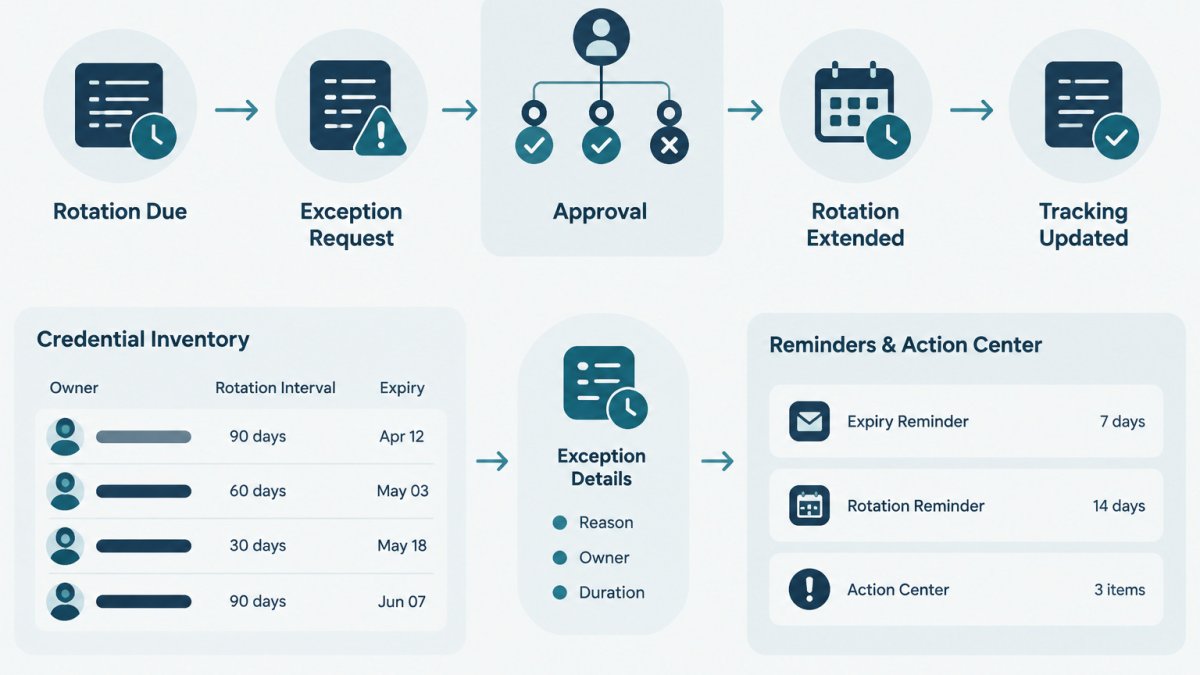
Last Updated: November 8, 2026
Quick Summary
A rotation exception approval is a documented, time-limited decision to delay rotating a credential past its planned date. Each one should record who approved the delay, why it was needed, and when the credential must be reviewed again. Without that record, a delayed rotation looks like an oversight rather than a managed decision.
- Ask whether the delay has a concrete reason and a fixed end point before approving.
- Set both a hard expiry date and an earlier review date for every exception.
- Require a different person from the credential owner to approve the exception.
- Limit renewals and escalate once an exception is renewed a second time.
- Record decisions and dates in a register without storing any secret values.
Table of Contents
- What a Credential Rotation Exception Is
- Deciding When an Exception Is Justified
- Building a Credential Rotation Exception Request Template
- The Credential Rotation Approval Process, Step by Step
- Setting an Expiry and a Review Schedule
- Keeping a Credential Rotation Audit Trail
- Recording Your First Exception in Your Inventory
- Frequently Asked Questions
What a Credential Rotation Exception Is
A credential rotation exception is a documented, time-limited decision to delay rotating a credential past its planned rotation date.
Credentials here include API keys, service account passwords, access tokens and certificates. Each has an owner, a rotation interval and usually an expiry date.
Exceptions are normal: a vendor integration may not support a new key yet, or a release freeze may block a change.
Deciding When an Exception Is Justified
Not every delayed rotation deserves an exception. A useful test is whether the delay has a concrete reason and a fixed end point. If either answer is no, schedule the rotation rather than defer it.
Common reasons that can justify an exception include:
- The provider does not yet support rotating the credential without downtime
- A planned change window is weeks away and the risk of rotating early is higher than the risk of waiting
- A dependent system owned by another team cannot accept a new value yet
Reasons that usually do not justify an exception include "we have not got round to it," "the team is busy," or "nobody remembered." Those are scheduling problems.
Before approving, ask three questions: What breaks if the rotation happens now? What is the actual exposure if it waits? When will the reason go away? If the honest answer to the third is "never," the credential probably needs a different fix.
Building a Credential Rotation Exception Request Template
A consistent request form makes approvals faster and reviews easier. The template below uses fictional values. Replace the placeholders with your own data and keep actual secret values out of the form.
Exception request ID:      EXC-2026-014
Credential name:           payments-sandbox-api-key (fictional)
Provider:                  Example Payments (fictional)
Owner:                     Jordan Lee, Platform team
Scheduled rotation date:   2026-10-30
Requested delay until:     2026-12-15
Reason:                    Partner integration does not accept a new key
                           until its next release
Current risk notes:        Sandbox only, no production data, scoped to test account
Compensating controls:     Restricted to one service account, access logged
Approver:                  Priya Desai, Engineering Manager
Decision:                  Approved / Rejected / Approved with changes
Review date:               2026-12-15
Follow-up owner:           Jordan Lee
Keep the form short.
The Credential Rotation Approval Process, Step by Step
A clear approval path stops exceptions from being approved informally in chat, because each rotation exception approval follows the same recorded steps. The steps below apply to most small teams.
- Owner submits the request. The credential owner completes the request template and states the requested end date.
- Owner checks the facts. Confirm the current expiry date, the rotation interval and the systems that depend on the credential.
- Approver reviews the risk. The approver checks the reason, the exposure and the compensating controls.
- Decision is recorded. The approver approves, rejects or approves with changes. A reason is written down in every case.
- Expiry and review are set. The exception receives a hard end date and a review date.
- Inventory is updated. The credential record shows the new expiry and links to the approved request.
- The rotation is completed or renewed. Before the end date, the owner rotates the credential or submits a new request with fresh reasoning.
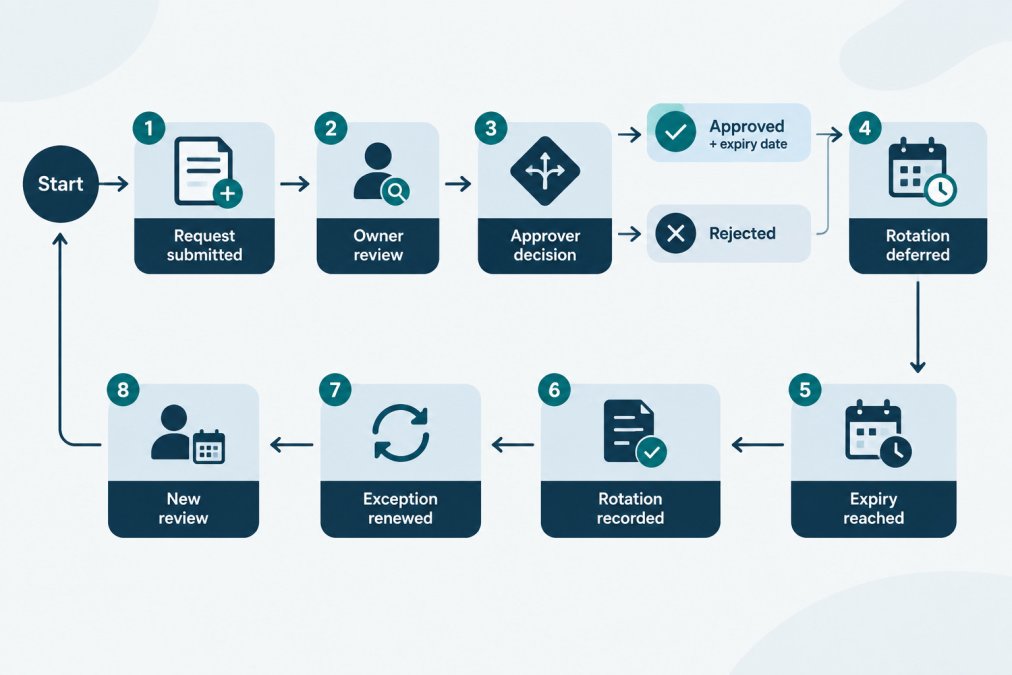
Step 7 is where many processes fail. An exception with no follow-up quietly becomes a permanent exception. Treat the expiry date as a deadline, not a suggestion.
Who Should Approve and Why
The approver should be someone who can accept the risk on behalf of the business. In a small team, that is often an engineering manager or a platform lead.
For credentials that touch customer data or payments, add a second approver, such as a security or operations lead. Keep the approver list short. Too many signatures slow decisions and push people toward skipping the process.
Setting an Expiry and a Review Schedule
Every approved exception needs two dates and a small set of fields that make it trackable. The expiry date is the latest point the credential may stay unrotated. The review date is an earlier checkpoint where the owner confirms progress. Without both, an exception drifts into a permanent state that nobody owns.
A practical pattern is to set the review date at the midpoint of the exception, or about two weeks before expiry, whichever comes first. The owner uses the review to confirm one of three outcomes: the rotation is scheduled, the blocker is gone, or the exception needs a new decision. If none of those is true, the exception should be escalated rather than silently extended.
The fields an exception register needs
A register is just a table, but the columns matter. The following schema is a starting point for a spreadsheet, a ticketing system, or a metadata record in a credential inventory. Values are fictional.
| Field | Example value | Why it exists |
|---|---|---|
| Exception ID | EXC-2026-014 | Stable reference for tickets and audit evidence |
| Credential name | payments-sandbox-api-key | Links the exception to the inventory record |
| Credential type | API key | Drives risk tier and rotation method |
| Environment | Sandbox | Production exceptions need tighter review |
| Owner | Jordan Lee, Platform team | Single accountable person, not a group alias |
| Approver | Priya Desai, Engineering Manager | Who accepted the risk |
| Original rotation date | 2026-10-30 | Baseline the exception is measured against |
| Exception expiry | 2026-12-15 | Hard deadline for rotation or renewal |
| Review date | 2026-11-15 | Earlier checkpoint for progress |
| Status | Approved | One of: Requested, Approved, Rejected, Expired, Closed |
| Risk tier | Low / Medium / High | Set by the prioritization rules below |
| Compensating controls | Scoped to test account, access logged | What reduces exposure while deferred |
| Renewal count | 0 | Flags exceptions that keep coming back |
| Evidence link | Ticket or document URL | Where the approval and rotation proof live |
Keep the register in the same system as the credential inventory where possible. The free credential inventory template includes owner and expiry fields that can hold this information, and KeyGuardRail's manual metadata entry and CSV import/export let a small team keep the register alongside the credential record without storing any secret values.
Renewal rules that stop permanent exceptions
An exception that is renewed without change is a scheduling problem wearing a costume. Set a rule before the first renewal request arrives. A common pattern is:
- First renewal: allowed with a written reason and a shorter window than the original.
- Second renewal: requires a named remediation plan with dates, not just a reason.
- Third renewal: escalates to a more senior approver or a decision to accept the risk permanently and record it as such.
Track the renewal count in the register. A credential that reaches its second renewal is a signal that the underlying blocker, a vendor limitation, a missing automation, an ownership gap, needs its own fix. That fix may be a ticket, a vendor conversation, or a decision to retire the credential entirely.
Reminders and escalation
Set reminders for the review date, not only the expiry date. Reminders that arrive only at expiry leave no time to act. A workable cadence for a small team is:
- A reminder to the owner at the review date.
- A reminder to the owner and approver one week before expiry.
- An escalation to the approver on the expiry date if the status is still Approved and no rotation is recorded.
KeyGuardRail's lifecycle email reminders can cover the review and expiry dates for credentials recorded in the inventory; the escalation step itself is a process decision the team makes. If the team uses a ticketing system, mirror the same dates there so the exception appears in the queue the owner already watches.
Watch out: if the register and the credential inventory disagree about the expiry date, the exception is effectively invisible. Reconcile the two after every approval and every rotation.
Keeping a Credential Rotation Audit Trail
An audit trail shows what changed, who approved it and when. For exceptions, the trail should include the original request, the approval or rejection, every date change, the compensating controls in place, and the eventual rotation or renewal.
Do not store secret values in the trail. Record that a rotation happened and when, not the old or new key. Copying values into tickets or logs creates a new exposure.
Prioritizing exceptions by credential and exposure
Not every exception carries the same risk. Before approving, score the credential on a few dimensions and use the score to decide how much scrutiny the exception gets.
| Dimension | Lower risk | Higher risk |
|---|---|---|
| Environment | Sandbox, test | Production, customer-facing |
| Privilege | Read-only, scoped | Admin, broad write, billing |
| Exposure | Internal network only | Public internet, third-party vendor |
| Credential type | Short-lived token | Long-lived API key or certificate |
| Blast radius | One service | Shared across multiple systems |
| Data sensitivity | Test data | Customer or payment data |
A credential that scores high on two or more dimensions should get a shorter exception window, a second approver, and a named compensating control. A sandbox key with a single dependent service can reasonably get a longer window with one approver.
Metrics that show whether the process works
A register is only useful if someone reads it. Track a small set of numbers monthly and review them with the approvers:
- Open exceptions by risk tier. A rising count of high-tier exceptions is a signal that rotation is being blocked systematically, not occasionally.
- Overdue exceptions. Exceptions past their expiry date with no rotation recorded. This number should be zero; anything else is a process failure.
- Average exception age. How long exceptions stay open. A creeping average means renewals are becoming the default.
None of these metrics require secret values. They come from the register fields already described: status, risk tier, dates, and renewal count. KeyGuardRail's audit history and Action Center can help a small team see which records have changed and which credentials need attention, but the metrics above are a reporting habit the team owns.
Mapping evidence to what a reviewer asks
When an outside reviewer or an internal auditor asks about a deferred rotation, they usually want four things: the decision, the reason, the compensating control, and the proof the credential was eventually rotated or retired. Keep those four items linked from the register row so the answer is a single lookup rather than a search across chat and tickets.
- Decision: the approval record with approver name and date.
- Reason: the written justification, including the blocker and its expected resolution.
- Compensating control: what reduced exposure while the rotation was deferred, such as scoping, logging, or network restriction.
Teams that need a record for an outside reviewer should check the exact requirements in the audit scope they face, as these vary by framework and organization. For a repeatable review cadence and its evidence, see How to Run API Key Access Reviews for Compliance.
Watch out: an audit trail that lives only in chat history is not a trail. If the approval happened in a direct message, copy the decision into the register the same day, with the approver's name and the date.
Recording Your First Exception in Your Inventory
Recording your first exception is a good way to test the process. Pick one credential that is already past its planned rotation or close to it. Then:
- Confirm the owner and the current expiry date
- Complete the request template with a real reason and a fixed end date
- Get a documented decision from an approver
If you are starting from zero, From signup to your first inventory explains how to set up a workspace and add a first inventory without sharing secret values.
Common mistakes at this stage include setting an expiry that is too far away, leaving the owner field blank, and forgetting to update the inventory after approval. Check each record once a month for the first few months.
Frequently Asked Questions
What is a credential rotation exception?
A credential rotation exception is a documented, time-limited decision to delay rotating a credential past its planned rotation interval. It is usually needed when a rotation would break an integration, a provider is unavailable, or a maintenance window is not yet scheduled. The exception should name the credential, the owner, the reason, the compensating steps taken in the meantime, and a firm expiry date. Without an expiry, a deferral quietly becomes permanent, which is the main risk this workflow is designed to prevent.
How long should a credential rotation exception last?
Keep exceptions short and tied to a specific blocker, such as a planned release or a vendor change. The right length depends on your rotation policy and the credential's risk, so set the duration in your own policy rather than copying a fixed figure. Record the expiry date at approval time and review any exception that is close to expiring. If the blocker is still present, submit a new request with fresh justification rather than silently extending the original.
Who should approve a credential rotation exception?
The credential owner should review the request, and a second person with authority over the affected system should approve it. Separating the requester from the approver keeps the decision accountable. In a small team, this can be the engineering lead for the service plus whoever is responsible for the platform or security practices. Document both names in the record so the audit trail shows who agreed to the deferral.
How can a small team track credential rotation exceptions?
Keep a simple register with one row per exception: credential name, owner, approver, reason, compensating controls, approval date, expiry date, and status. Review open rows on a fixed cadence and before each expiry. KeyGuardRail can hold credential metadata, owners and expiry dates, and records the lifecycle history, but the actual rotation or revocation still happens in your existing provider or vault and is then recorded in the tool.
