
Last Updated: October 29, 2026
Quick Summary
API key access reviews are the periodic process of confirming that every credential still has a valid owner, a legitimate business purpose, and no more permission than the work requires. A defensible review records a date, a name and a decision for each credential, and follows four steps: scope and reconcile the inventory, confirm ownership and business need, check scope, usage and expiry, then decide, remediate and record.
- Reconcile the inventory against provider consoles and log every unlisted key as an exception with an owner.
- Flag orphaned credentials for revocation rather than reassigning them to a manager who never used the key.
- Score each key on data sensitivity, privilege level and exposure surface to set its review cadence.
- Every credential gets one outcome: retain, reduce scope, rotate, or revoke, with the decision-maker and date recorded.
- A review is not complete until a named reviewer signs off with scope covered and outcome counts.
Table of Contents
- Why API Key Access Reviews Belong in Your Compliance Story
- Build the Foundation With an API Key Inventory Template
- Your API Key Access Review Checklist, Step by Step
- Set Review Cadence by Risk and Key Type
- Write an API key rotation policy the review can enforce
- Keep an API Key Audit Trail That Holds Up
- Map Review Evidence to the Controls You Report Against
- Start Your First Review With a Credential Inventory
- Frequently Asked Questions
Why API Key Access Reviews Belong in Your Compliance Story
API key access reviews are the periodic process of confirming that every credential in your estate still has a valid owner, a legitimate business purpose, and no more permission than the work requires.
What separates a defensible review from a rubber stamp is evidence. An auditor asking "who approved this key, when was it last rotated, and who decided it should stay active?" wants a record with a date, a name and a decision attached.
What an access review actually proves
An access review proves three things: that someone with authority looked at each credential, that the decision to keep or remove it was recorded, and that the decision was carried out. It does not prove the key is safe. It proves the organisation can account for it.
Teams that conflate the two tend to over-promise in audit conversations and under-document in practice. The NIST Special Publication 800-53 control catalogue frames access reviews as an accountability control rather than a technical safeguard, which is the correct mental model.
Build the Foundation With an API Key Inventory Template
You cannot review what you have not listed. An API key inventory is a structured record of every credential your team holds, containing metadata about each one but never the secret value. It is the working document the review runs against.
Start with a credential inventory template that already carries the fields a review needs, then adapt it to your providers. If you would rather work from a ready-made structure, the free credential inventory template covers the same fields in a form you can fill in and keep alongside your provider records.
The fields every inventory row needs
A row that cannot answer the review questions is a row that will be skipped. Each entry should carry:
- Credential identifier (a label or provider key ID, never the secret)
- Provider and environment (production, staging, sandbox)
- Accountable owner (a named person, not a team alias)
Your API Key Access Review Checklist, Step by Step
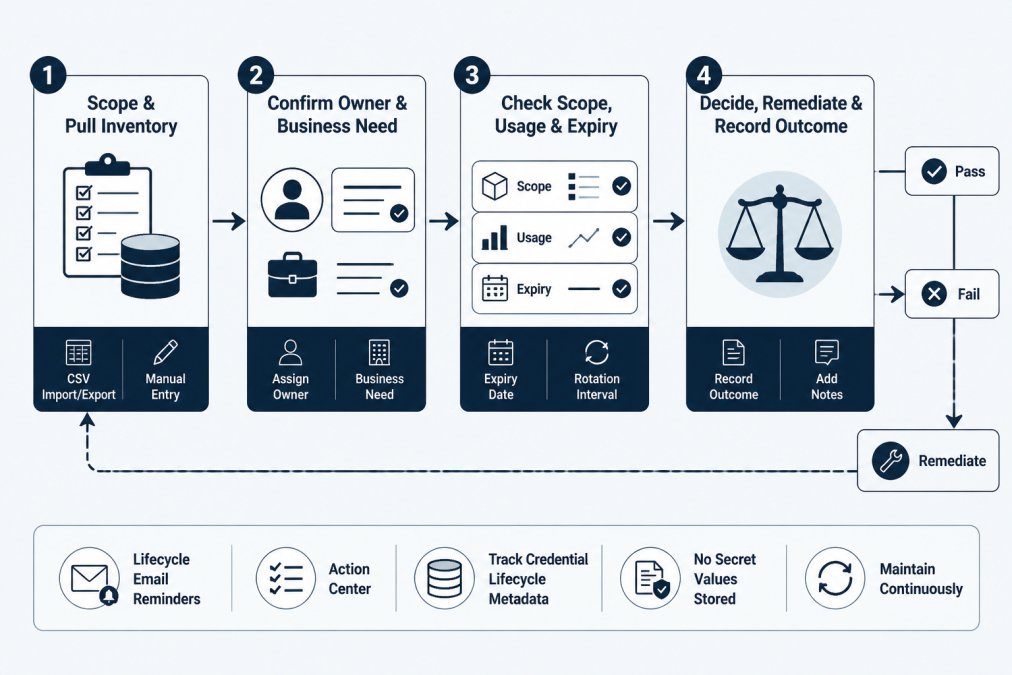
A repeatable review follows four steps in order, and each step produces something the next one needs. Skipping ahead is the most common reason reviews produce no usable evidence.
Step 1: Scope the review and pull the inventory
Prerequisites: a current inventory export, a list of providers in use, and a defined review period.
Pull the inventory and reconcile it against your provider consoles.
Verification: the reconciled count matches the provider count, or every gap has an entry in the exception log with an owner and a target date.
Likely mistake: treating the provider console as the source of truth for ownership.
Step 2: Confirm ownership and business need
For each credential, the owner confirms in writing that the key is still needed and describes what depends on it. An owner who cannot explain the dependency is a signal, not a formality. Use a short reviewer checklist so every owner gets the same questions:
- Is this credential still required for a named workload, integration, or process?
- What breaks if it is revoked today?
- Who is the accountable person if the current owner leaves?
Orphaned credentials, those whose owner has left or changed teams, should be flagged for revocation rather than reassigned by default. For practical guidance on assigning and tracking owners, see how to assign owners to API keys.
Watch out: reassigning an orphaned key to a manager who has never used it produces a name in a field and no real accountability. If no one can describe the dependency, revoke rather than reassign.
Recovery: if an owner cannot be reached within the review period, mark the credential as orphaned in the exception log, set a revocation target date, and notify the system owner.
Step 3: Check scope, usage and expiry
Compare each key's granted scopes against what the workload actually calls. For a deeper walkthrough, see how do you audit API key permissions.
Check expiry dates and rotation intervals against policy. A key that has passed its rotation interval without rotation is a finding regardless of whether anything has gone wrong.
Verification: every credential has a recorded scope assessment (match, over-scoped, or unused) and a rotation status (current, overdue, or not applicable).
Step 4: Decide, remediate and record
Every credential gets one of four outcomes: retain, reduce scope, rotate, or revoke. Record the decision, the decision-maker and the date. Remediation happens in the provider; the record of it happens in your tracking system.
| Outcome | When it applies | Evidence to record |
|---|---|---|
| Retain | Owner confirmed, scope correct, rotation current | Owner sign-off, review date |
| Reduce scope | Key is used but over-permissioned | Old and new scope, change reference |
| Rotate | Interval passed or exposure suspected | Rotation date, provider reference |
| Revoke | No owner, no use, or purpose ended | Revocation date, approver |
Sign-off is the part teams skip. A review is not complete until a named reviewer confirms that every credential in scope has an outcome recorded and every exception has an owner and a target date.
Recovery: if remediation fails or is deferred, return the row to the inventory with an open status and a target date. A review with unresolved items is normal; a review with untracked items is not.
The reviewer checklist in one page
A reviewer working through a single system can use this condensed checklist:
- Inventory reconciled against provider console; gaps logged.
- Every credential has a named accountable owner.
- Owner has confirmed business need in writing.
- Scope assessed against usage logs; over-scoped keys flagged.
- Rotation status checked against policy; overdue keys flagged.
- Outcome recorded for every credential (retain, reduce, rotate, revoke).
- Exception log updated with owner and target date for every open item.
- Sign-off record completed with reviewer name, date, scope, and outcome counts.
That checklist is the minimum evidence set for a defensible review. It does not require a dedicated platform, though a tracking system makes the records easier to keep alongside the inventory.
Set Review Cadence by Risk and Key Type
Review frequency should follow blast radius, not calendar convenience. A production key with write access to customer data and a read-only key on a sandbox deserve different schedules.
Classify keys before you schedule them
Cadence only works if the classification is explicit. Score each credential on three dimensions and record the score in the inventory:
- Data sensitivity: does the key reach customer data, financial records, personal information, or only non-sensitive configuration?
- Privilege level: can it write, delete, or administer, or is it read-only?
- Exposure surface: is it used by an internet-facing service, an internal batch job, or a developer laptop?
A key that scores high on any two dimensions belongs in the highest review tier; a key that scores low on all three can sit in the lowest. The point is that the classification is written down and defensible when an auditor asks why one key is reviewed quarterly and another annually.
A practical cadence table
| Risk tier | Typical characteristics | Review cadence | Rotation interval (example) |
|---|---|---|---|
| High | Production, write or admin scope, sensitive data, internet-facing | Quarterly | 90 days or on personnel change |
| Medium | Production read-only, internal services, limited data | Every six months | 180 days |
| Low | Sandbox, development, short-lived, non-sensitive | Annually or on change | 365 days or on change |
The rotation intervals in the table are examples, not requirements. Your policy should state its own intervals and the review should test against them. Cadence and rotation interval are separate decisions: cadence is how often you check, rotation is how often the secret changes.
Machine identities and vendor-owned keys
Machine identities and service accounts need the same treatment as human-held keys, and often get less. A service account with no named owner is an orphaned credential whether or not a person ever held it.
Vendor-owned keys, where a third party holds or uses a credential to access your systems, need a different cadence trigger.
Adjust cadence when risk changes
Cadence should not be static. A key that moves from a sandbox to production, or from read-only to write, should be reclassified and moved to the higher tier at the next review.
Concrete API key expiration policy examples can help set intervals that survive contact with a real team. Write the cadence decision and the expiration policy together, because a key that expires before its next review will never be reviewed in its expired state.
Write an API key rotation policy the review can enforce
A rotation policy that cannot be checked during a review is decoration.
State the interval in the policy, then let the review test it. If the inventory shows a last-rotation date older than the policy allows, the finding writes itself.
Keep the policy short enough that an engineer can apply it without a meeting. Two pages covering key types, intervals, ownership and the escalation path for missed rotations is usually enough.
Keep an API Key Audit Trail That Holds Up
An audit trail is a chronological record of who changed what, when, and why. It holds up when each entry can be tied to a person, a date and a decision, and when the record cannot be quietly edited after the fact.
The CIS Controls framework treats logged accountability as a foundational control for the same reason: a decision nobody can trace is a decision nobody made.
What each review record should contain
- Reviewer name and role
- Review date and the period covered
- The credential identifier and its owner at time of review
Store this alongside the inventory, not in a separate spreadsheet that drifts. KeyGuardRail keeps lifecycle metadata and audit history without holding secret values, so the record of a rotation sits next to the credential it belongs to while the secret itself stays in your vault or provider.
Map Review Evidence to the Controls You Report Against
Auditors do not ask for "an access review." They ask whether a specific control operated throughout the period. The work is translating your review records into the language of the framework you report against.
| Control theme | What the auditor wants | Review artefact that answers it |
|---|---|---|
| Access authorisation | Proof access was approved | Owner sign-off with date |
| Least privilege | Evidence scope was assessed | Scope comparison per key |
| Credential management | Rotation occurred as required | Last-rotation date against policy |
| Timely removal | Access ended when purpose did | Revocation record with approver |
| Monitoring | Reviews happened on schedule | Review completion log by period |
Map once, then reuse the mapping every cycle. The ISO/IEC 27001 information security standard and similar frameworks reward consistent evidence over exhaustive evidence, so a small set of well-kept records beats a large set of partial ones.
Measure the review itself, too: completion rate against scope, number of open findings, and time to remediation. Those three numbers tell you whether the process is working far better than the document describing it.
Start Your First Review With a Credential Inventory
The first review is always the hardest, because the inventory does not exist yet and every gap is a surprise. Scope it to one system, build the rows, and run the four steps end to end.
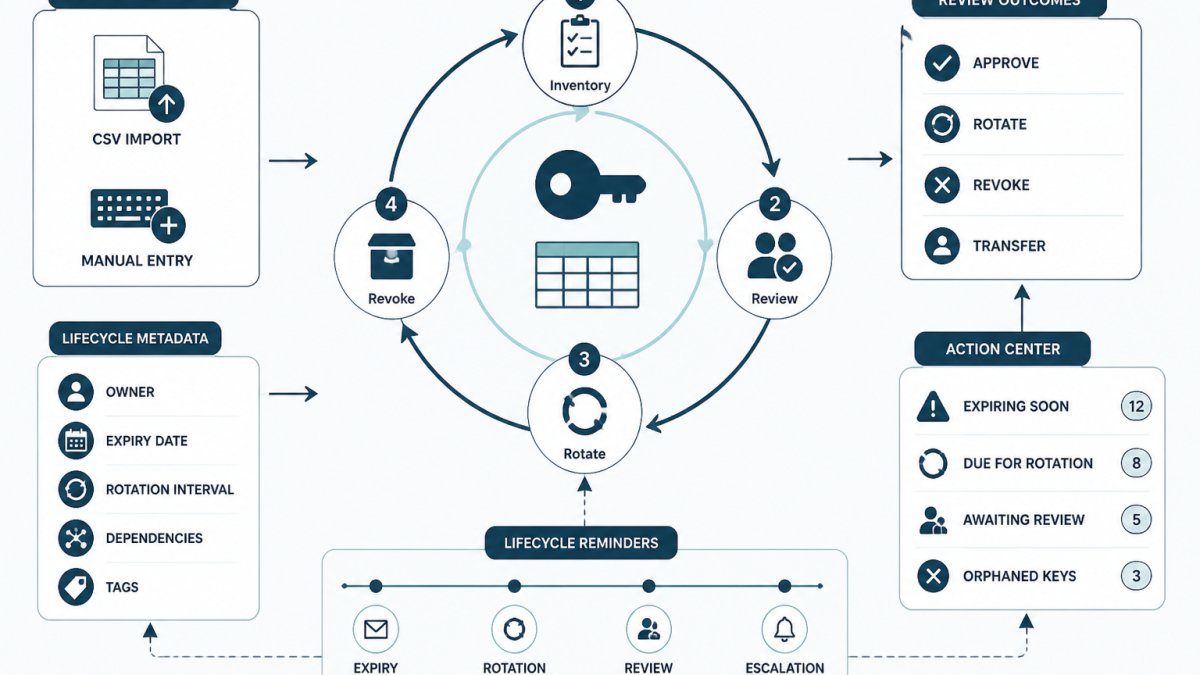
KeyGuardRail supports that first pass with manual metadata entry or CSV import, accountable ownership fields, expiry and rotation tracking, lifecycle email reminders, an Action Center for open items, and an audit history that records the work without storing secret values. Set up a workspace and import your first inventory without sharing a single credential value, and use credential lifecycle monitoring to keep the review cycle running between audits.
The takeaway is unglamorous: a review is only as good as the inventory behind it and the ownership recorded in it.
Frequently Asked Questions
How often should teams review API key access?
There is no single mandatory interval, so set cadence by risk. A practical starting point: review keys that touch sensitive data, production systems or third-party billing quarterly; review lower-risk internal integration keys annually; and always trigger an off-cycle review when an owner leaves, a key's scope changes or a rotation deadline is missed. Record the cadence you chose and the reasoning behind it, because the consistency of the review is what an auditor or compliance reviewer can actually check.
What evidence should an API key access review record?
Each review record should identify the key (by a non-secret reference such as a label or internal ID, never the credential value), the accountable owner, the reviewer, the date, the decision (keep, reduce scope, rotate, revoke), and the remediation ticket or change reference. Add the next review date and any exception with its approver. This gives you an API key audit trail that shows who confirmed what and when, and lets you prove remediation happened rather than just that a review was scheduled.
How should a team handle an API key with no known owner?
Treat an orphaned credential as a finding, not a formality. First check usage logs and the provider console to see whether it is still active. If it is unused, revoke it in the provider and record the revocation. If it is active but unowned, assign a temporary accountable owner, give them a short window to confirm the business need, and escalate if nobody claims it. The review record should show the orphaned state, the investigation, and the final decision so the gap is documented rather than silently closed.
How do API key access reviews support compliance?
Access reviews are the evidence layer behind access-control expectations: they show that access is periodically confirmed, that owners are accountable, and that unused or excessive access is removed. Map each review record to the specific control you report against in your own framework, and keep the evidence with the decision and the remediation. KeyGuardRail supports this by tracking ownership, expiry dates, rotation intervals and auditable lifecycle history without storing secret values, while rotation and revocation still happen in your provider.
