
Table of Contents
- Why Assigning Owners to API Keys Matters
- Human Owners vs. Service Accounts: Which Should Own Your Keys
- Step-by-Step: Assigning and Recording Key Ownership
- Building an API Key Inventory Template
- Establishing an API Key Ownership Policy
- Creating an API Key Offboarding Checklist
- Planning Your API Key Rotation Schedule
- Common Mistakes When Assigning Key Ownership
- Frequently Asked Questions
How to Assign Owners to API Keys
Last Updated: October 21, 2026
Why Assigning Owners to API Keys Matters
Unowned API keys are a silent operational risk. Without a clear owner, no one is responsible for rotating a key, watching its expiration, or revoking it during offboarding.
Learning how to assign owners to API keys closes this accountability gap.
Ownership also speeds up decisions. When a suspicious key surfaces, the owner can explain its use case, confirm whether it should exist, and act. Without ownership, the team wastes hours tracking down who created it.
The process is straightforward but needs intentional design: a clear policy, a documented inventory, and a workflow that sticks.
Human Owners vs. Service Accounts: Which Should Own Your Keys
API keys fall into two ownership categories: human-owned and service-account-owned. Choosing the right model for each key determines how you'll manage rotation, offboarding, and accountability.
Human-owned keys are assigned to a specific person: a developer, platform engineer, or operations lead.
Service-account-owned keys belong to an automated system, application, or role. A Kubernetes service account, a Lambda execution role, or a CI/CD bot might own an API key.
The distinction matters for rotation and offboarding. A human owner can rotate a key manually but may forget or delay; a service account owner typically triggers rotation through automation, reducing missed deadlines.
A practical rule: if the key represents a person's access to an external service, assign it to that person.
Step-by-Step: Assigning and Recording Key Ownership
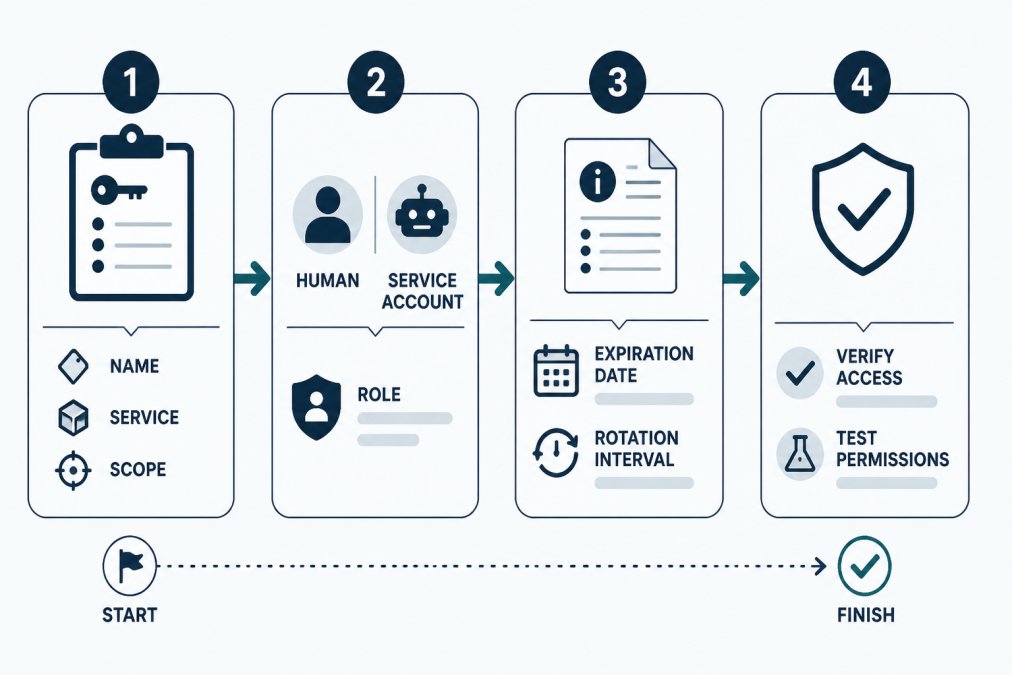
Understanding how to assign owners to API keys requires four deliberate steps: documenting the key, selecting an owner, recording the metadata, and verifying access. This workflow ensures every key has a clear owner and a documented audit trail.
Step 1: Document the Key in Your Inventory
Before you assign an owner, the key must exist in your inventory. Create a record for each API key with its name, the service it authenticates to, its creation date, and the scope or permissions it grants, for example, "read-only access to monitoring data" or "deploy permissions to staging environment."
Use a structured format: a spreadsheet, a dedicated inventory tool, or a CSV file. The key detail is a unique identifier (its name or a reference ID) so you can track it consistently.
Include context: which team uses the key, which application needs it, and whether it's critical to production. This helps the owner judge its rotation urgency. If you're starting from scratch, the free credential inventory template provides a ready-made structure you can customize for your team.
Step 2: Select the Owner and Define Their Role
Identify who should own the key. Ask: Who created it? Who uses it daily? Who should know if it's compromised? That person is often the right owner.
For human owners, choose someone who understands the key's purpose and has the authority to rotate or revoke it. For service-account owners, identify the specific account or role that will hold the credentials.
Document the owner's role or title alongside their name so future team members understand why this person owns the key and who to contact if they leave.
If multiple people share responsibility for a key, designate one as the primary owner and document others as stakeholders.
Step 3: Record Ownership and Metadata
Add the owner's name, role, and contact information to your inventory record. Include the key's expiration date if known, its rotation interval (for example, "rotate every 90 days"), and the date ownership was assigned.
Add a brief note explaining why this person owns the key: "Sarah manages all monitoring integrations" or "This service account runs the nightly backup process." It helps future owners understand the key's purpose without reverse-engineering it.
Document the date you assigned ownership. Tools like credential lifecycle monitoring can automate reminders to owners when rotation is due and maintain a complete audit history of ownership changes.
Step 4: Verify Access and Permissions
Confirm the owner has the permissions to use, rotate, or revoke the key. For human owners, ensure they can access the service where the key lives (for example, the AWS console, GitHub, or a third-party API dashboard).
Test the key if possible: make a small API call to confirm it works. This catches configuration errors early and confirms the owner knows how to use it.
If the owner is new to the role, walk them through the rotation or revocation workflow: where the key is stored, how to generate a replacement, and how to record the rotation in your inventory. This upfront training prevents confusion during offboarding or emergencies.
Building an API Key Inventory Template
An inventory template creates a consistent structure for documenting keys and their ownership. Use this template to track every key your team manages.
| Field | Purpose | Example |
|---|---|---|
| Key Name | Unique identifier for the key | prod-datadog-api-key |
| Service | The system the key authenticates to | Datadog, GitHub, AWS |
| Owner Name | Person or service account responsible for the key | Sarah Chen / ci-deploy-bot |
| Owner Role | The owner's title or function | Platform Engineer / CI/CD Service Account |
| Created Date | When the key was generated | 2026-03-15 |
| Expiration Date | When the key expires or should be rotated | 2026-09-15 |
| Rotation Interval | How often the key should be rotated | 90 days, 180 days, or never |
| Permissions/Scope | What the key can do | Read-only monitoring data, deploy to staging |
| Status | Active, rotated, revoked, or pending rotation | Active |
| Last Rotated | The date of the most recent rotation | 2026-06-10 |
| Notes | Business context or special instructions | Used only in CI/CD pipeline, not production |
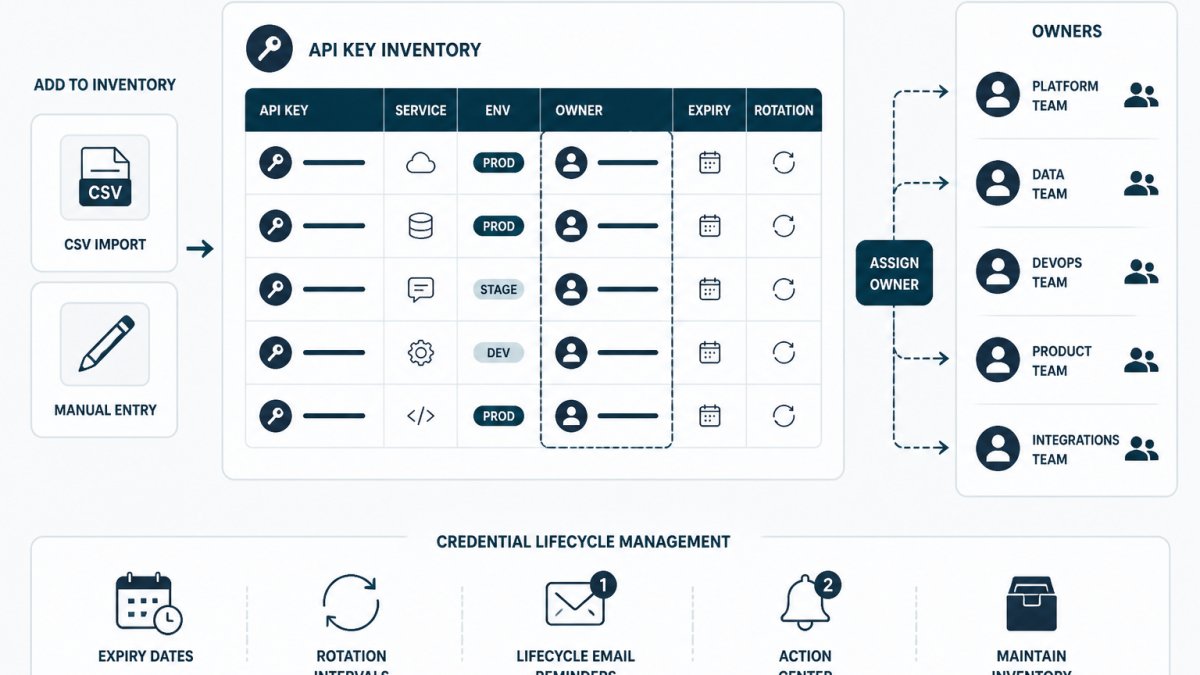
Start with a spreadsheet or CSV file. As your inventory grows, consider a dedicated tool that supports CSV import and export, ownership tracking, expiration reminders, and audit history. KeyGuardRail helps small technical teams track credential lifecycle metadata without storing secret values.
Review your template quarterly. Add fields if your team needs to track more, for example, whether a key is shared or which team uses it. Keep it simple enough that owners can complete it in minutes, but detailed enough to support rotation and offboarding.
Establishing an API Key Ownership Policy
A written policy ensures every team member knows who owns each key, when it should be rotated, and what happens when someone leaves. It creates consistency and prevents orphaned keys.
Your policy should cover these points:
- Ownership assignment: Every API key must have a named owner within one week of creation. The owner must be documented in the inventory.
- Rotation schedule: Define rotation intervals by key type. For example, keys used in CI/CD might rotate every 90 days, while keys used in internal tools might rotate every 180 days. Service account keys may have longer intervals if automation handles rotation.
- Offboarding: When an owner leaves, their keys must be reassigned or revoked within 48 hours. Document the handoff in the inventory.
- Access control: Only the key owner or a designated manager can rotate or revoke a key. This prevents accidental or unauthorized changes.
- Incident response: If a key is suspected to be compromised, the owner must revoke it immediately and notify the security team.
- Audit and review: Conduct a quarterly review of all keys and their owners. Identify orphaned keys (keys with no owner or an inactive owner) and assign them to someone or revoke them.
Make the policy specific to your organization: the tools you use, who enforces it, and the consequences of not following it.
Communicate the policy to everyone who creates or uses API keys and have them acknowledge it in writing. This creates accountability and ensures everyone understands their role in managing credentials.
Creating an API Key Offboarding Checklist
When a team member leaves, their API keys must be transferred or revoked. An offboarding checklist ensures nothing is missed.
- Identify all API keys owned by the departing person
- For each key, decide: reassign it to another owner or revoke it?
- If reassigning: notify the new owner, confirm they understand the key's purpose, and update the inventory
- If revoking: delete or disable the key in the service where it lives (for example, the AWS console or GitHub settings)
- Update the inventory to reflect the new owner or revocation date
- Confirm the old owner no longer has access to the service or system the key authenticates to
- Document the offboarding action and date in the inventory audit trail
- For service account keys: confirm that the departing person is no longer listed as a user or administrator of the service account
Assign one person (usually a platform engineer or ops lead) to own the offboarding process. They should have access to the inventory and to all the services where keys live. Run the checklist for every departing team member, even if they didn't directly manage credentials. Some keys may be shared or inherited, and the checklist catches those cases.
Planning Your API Key Rotation Schedule
Rotation prevents keys from becoming stale or exploited. A rotation schedule defines how often each key should be replaced.
The rotation interval depends on the key's risk profile and use case.
Common rotation intervals:
- 90 days: High-risk keys (production API keys, deployment credentials, third-party integrations)
- 180 days: Medium-risk keys (internal tools, monitoring systems, less-critical integrations)
- Annual or longer: Low-risk keys (rarely used, internal-only, non-critical systems)
- No rotation: Keys that cannot be rotated (legacy systems, external constraints). Document why rotation isn't possible.
For each key in your inventory, assign a rotation interval and a rotation owner.
Set up reminders to make rotation visible and predictable, not a surprise. Calendar alerts, Slack bots, or email reminders can all trigger owners when rotation is due.
Test the rotation process before the deadline. Generate a new key, update a staging system to use it, and confirm everything works.
Document each rotation in your inventory: the date it happened, who performed it, and the new key's expiration date.
Common Mistakes When Assigning Key Ownership
Teams often stumble on the same ownership challenges. Recognizing these patterns helps you avoid them.
Assigning ownership to the wrong person. Some teams assign all keys to a single person, often the most senior engineer, to simplify management.
Forgetting to document ownership. Keys exist in many places: cloud provider consoles, third-party dashboards, CI/CD platforms, local configuration files.
Assigning ownership but not accountability. Ownership on paper is useless if the owner doesn't know they're responsible.
Rotating keys without updating ownership records. After rotation, teams generate a new key but forget to update the inventory.
Ignoring keys that can't be rotated. Some systems don't support key rotation: legacy APIs, external vendors, or custom integrations.
Frequently Asked Questions
How do you assign an owner to an API key?
Document the key in your inventory system with its name, service, and creation date. Identify the person or service account responsible for its lifecycle. Record the owner's name, role, and contact information. Set an expiration date and rotation interval. Verify the owner has appropriate permissions in both the API provider and your organization. Use a tracking tool or spreadsheet to maintain this ownership record and audit history.
Should API keys belong to a person or a service account?
Human owners work best for credentials used by people or small teams; they provide clear accountability and easier rotation during personnel changes. Service accounts suit automated systems, CI/CD pipelines, and long-lived integrations where no single person manages the credential. Many teams use both: a service account owns the key, but a person owns responsibility for monitoring and rotating the service account's credentials. Choose based on who or what actually uses the key and who needs to be notified when rotation is due.
What information should an API key inventory include?
Track the key name, the service or platform it accesses, its owner (person or service account), creation and expiration dates, rotation interval, scope or permissions, and where it is stored. Include the owner's team, email, and backup contact. Document the business purpose and any dependencies. Record the last rotation date and who performed it. This metadata helps you prioritize rotation work, audit access, and handle ownership changes during team transitions or offboarding.
How should teams handle API key ownership when someone leaves?
Before departure, identify all keys the person owns. Transfer ownership to a designated successor or team member, or retire the key if it is no longer needed. Update your inventory to reflect the new owner and their contact details. Have the new owner rotate the key in the provider to ensure they have current access. Document the handoff in your audit history. For keys tied to automated systems, verify the service account still functions after the personnel change. This prevents orphaned credentials and ensures continuity.