
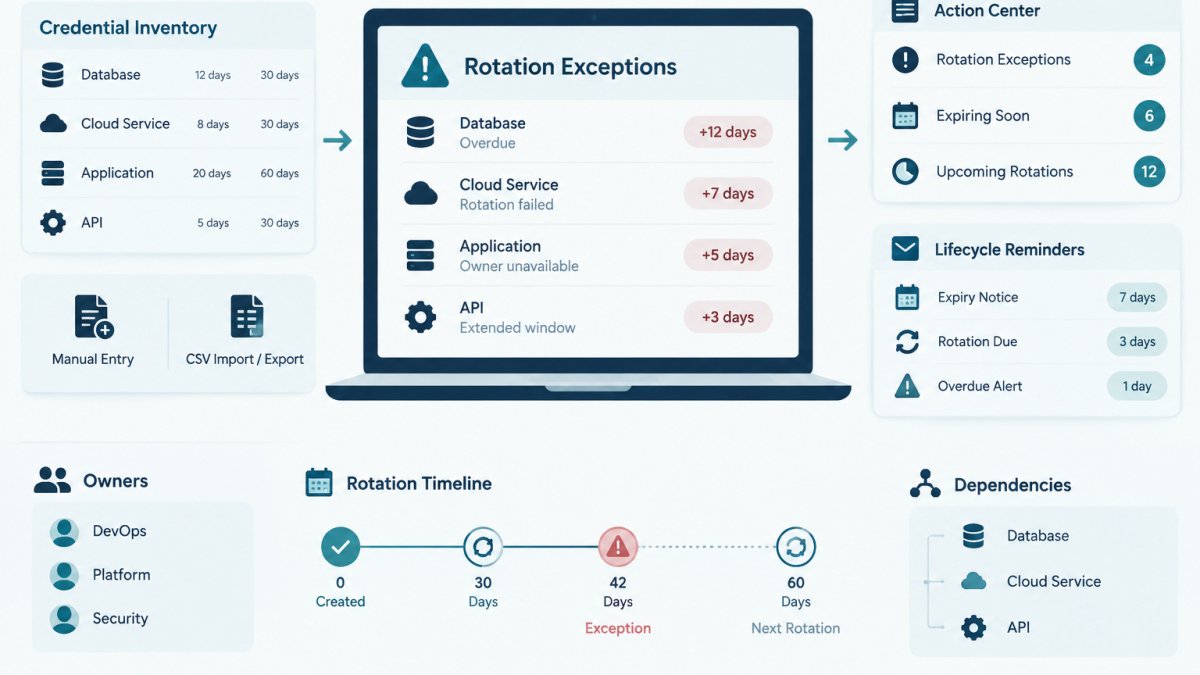
Quick Summary
A credential rotation exception is a documented decision to keep a credential in use past its planned rotation date. To track rotation exceptions, record each one with a named credential, a stated reason, a named approver, and an end date, then review the register on a fixed cadence.
- Each exception record should include a named credential, stated reason, approver, and end date.
- Start from your credential inventory and flag every credential past its rotation due date.
- Rank open exceptions by privilege level, environment, and external exposure.
- Set a maximum exception duration and require new approval for every renewal.
- Keep closed exceptions in the register with the rotation completed date and evidence link.
Table of Contents
- What a Credential Rotation Exception Is
- Information Every Exception Record Should Include
- Building a Credential Exception Register
- Approval, Expiry and Escalation Rules
- Tracking Overdue Credentials and Reviewing Open Exceptions
- Keeping an Audit Trail That Explains Each Delay
- Scheduling Your First Exception Review This Week
- Frequently Asked Questions
What a Credential Rotation Exception Is
A credential rotation exception is a documented decision to keep a credential in use past its planned rotation date.
Exceptions are normal. Some integrations need a maintenance window, and some providers take time to issue new keys.
A useful exception has four parts:
- A named credential that identifies exactly what is being deferred
- A stated reason for the delay
- A named approver who accepted the risk
Without these four parts, the record is just a note. With them, the team can see what is open, who is responsible, and what happens next.
Information Every Exception Record Should Include
Each exception record needs enough detail that someone reading it months later can understand the decision without asking the original author. Keep fields consistent so records can be filtered, sorted, and exported.
Use these fields as a starting point:
- Exception ID: A unique reference such as EXC-0042
- Credential name: The name used in your credential inventory, not a secret value
- Provider or system: The service that issued the credential
Example (fictional):
| Field | Value |
|---|---|
| Exception ID | EXC-0042 |
| Credential | billing-webhook-signing-key |
| Owner | Platform team, on-call engineer |
| Original due | March 3 |
| End date | April 15 |
| Reason | Downstream partner has not confirmed support for the new key |
| Approver | Engineering lead |
| Status | Open |
Building a Credential Exception Register
A credential exception register is the single list of every open exception, plus the closed ones you keep for history. It can live in a spreadsheet, a ticketing system, or a tool that tracks credential metadata. The format matters less than keeping every open rotation exception in one place with the same fields.
Start from your credential inventory
Prerequisites: an exportable credential inventory with, at minimum, a credential name, owner, provider, environment, expiry date, and rotation interval. If you do not have one yet, the credential inventory template gives you the columns the register needs to inherit.
- Export the inventory to CSV or a spreadsheet.
- Flag every credential past its rotation due date by comparing the due date against today.
- Decide which flagged credentials need an exception. Some can be rotated now; others need a documented deferral.
- Create one record per exception using the schema below.
- Store the register where the team can see it and link it from the operations page or runbook.
- Review on a fixed cadence. Weekly works for most small teams; daily for production credentials with external exposure.
A concrete exception schema
Use consistent field names so the register can be filtered and reported on. A workable schema:
| Field | Type | Example (fictional) |
|---|---|---|
| Exception ID | string | EXC-0042 |
| Credential name | string (from inventory) | billing-webhook-signing-key |
| Provider or system | string | payments-partner.example |
| Environment | enum | production |
| Credential type | enum | API key / service account / certificate / password |
| Owner | person or team | Platform team |
| Original rotation due date | date | 2025-03-03 |
| Exception start date | date | 2025-03-04 |
| Exception end date | date | 2025-04-15 |
| Reason | short text | Partner has not confirmed support for the new key |
| Approver | person | Engineering lead |
| Compensating controls | short text | Access restricted to two service accounts; request logging enabled |
| Risk tier | enum | high / medium / low |
| Status | enum | open / escalated / closed |
| Renewal count | integer | 0 |
| Rotation completed date | date | (blank until rotated) |
| Evidence link | URL or ticket ID | TICKET-1187 |
Prioritize exceptions by credential and exposure
Not every exception deserves the same attention. Rank open exceptions using factors that change the blast radius if the credential is misused:
- Privilege level: admin or write-capable credentials outrank read-only ones.
- Environment: production outranks staging, which outranks local development.
- External exposure: credentials usable from the public internet outrank ones reachable only inside a private network.
A simple scoring approach is to assign each factor a small point value (for example 1-3) and sum them into a risk tier. The exact weights are a judgment call; the value is that two reviewers reach roughly the same ranking. Document the scoring rule next to the register.
Report on the register, not just store it
A register that is never summarized becomes a graveyard. Track a small set of metrics so the team can see whether exceptions are shrinking or accumulating:
- Open exceptions by risk tier and by owner.
- Overdue exceptions: past their end date with no rotation and no renewal.
- Median exception age in days, and the oldest open exception.
Connect the register to operational systems
A spreadsheet works to start, but exceptions age better when they are wired into the tools the team already uses:
- Ticketing: one ticket per exception, linked from the register, so approvals and reviews have a timestamped history.
- Identity and access management: when an exception covers a service account, confirm the account's group membership and permissions still match what the approval assumed.
- Secrets management: if the credential lives in a vault, record the vault path in the register (never the secret value) so the rotation step is unambiguous.
Watch out: a register that lives only in one person's spreadsheet is a single point of failure. If the owner leaves, the exceptions leave with them unless the register is shared and linked from the runbook.
Keep closed exceptions
Closed exceptions should stay in the register with a rotation completed date and the evidence link. That history makes later audits and handoffs easier and lets you answer questions like "how often do we defer this credential type?"
Approval, Expiry and Escalation Rules
Every exception needs a rule for who can approve it, how long it can last, and what happens when it expires.
Set these rules in writing:
- Approval authority: Name the roles allowed to approve exceptions. A credential owner should not approve their own deferral.
- Maximum duration: Set a limit, such as 30 or 60 days, for any single exception. Renewals should require a new approval.
- Required justification: Require a specific reason. "Busy" is not a reason. "Partner API version 2 is not live until May" is.
Some teams set different rules by credential type: a production database password may require a shorter maximum duration than a test API key.
For a broader look at tools that send reminders before credential deadlines, see credential expiration reminder tools for IT teams, which compares approaches for tracking rotation deadlines.
Tracking Overdue Credentials and Reviewing Open Exceptions
An overdue credential is one past its rotation due date with no completed rotation and no approved exception.
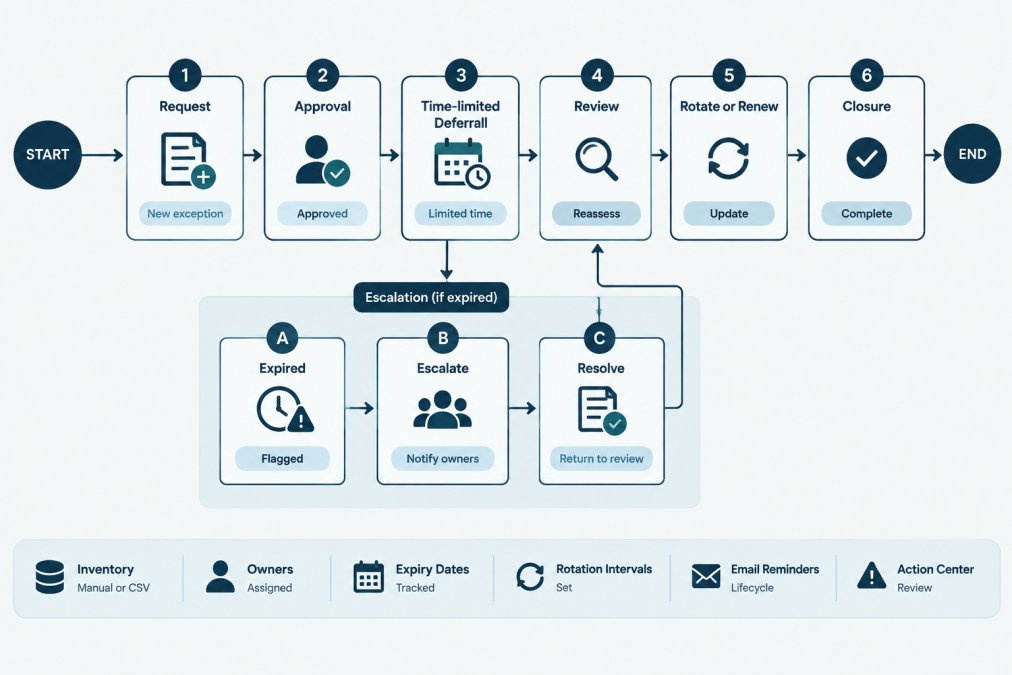
A simple review routine works well:
- Sort the register by end date. The earliest deadlines come first.
- Check each open exception. Is the reason still valid? Has the blocking issue been resolved?
- Rotate what you can. If the blocker is gone, schedule the rotation.
- Renew or escalate what you cannot. Renewals need a new approval and a new end date.
- Record the outcome. Update the status and add notes.
When reviewing, ask whether the compensating controls are still in place.
To check past rotation activity before a review, it helps to walk through the logs.
Watch out: An exception renewed without review can keep a credential in use for many months.
Keeping an Audit Trail That Explains Each Delay
An audit trail for exceptions shows what was decided, by whom, and why, and links that decision to evidence that the compensating controls were in place. A good trail lets an auditor or new team member follow the decision without guessing.
What to keep for every exception
- The original and updated record, with dates.
- The approval: who approved, when, and in what system.
- The reason for the deferral in plain language.
Store the trail where it cannot be silently edited. A ticket system with history, or a tool that keeps an audit log, is better than a shared spreadsheet where anyone can overwrite a cell. Do not record secret values in the trail; name the credential, not its contents.
Map evidence to the controls you are answering for
Audit requirements vary by framework, so check which controls apply to your environment before deciding how long to keep records. The NIST Cybersecurity Framework and the NIST SP 800-53 control catalog are commonly used references for access control, audit logging, and configuration management; your own framework may use different names for the same ideas.
A practical way to make the trail audit-ready is to tag each exception record with the control it touches. For example:
| Control area | What the exception record should show |
|---|---|
| Access control | Who approved the deferral, and that the credential's permissions did not expand during the exception |
| Audit logging | That request or use logging was enabled for the credential while the exception was open |
| Configuration management | The planned rotation date, the actual rotation date, and the reason for the gap |
| Change management | The ticket or change record that authorized the deferral |
This mapping does not replace a formal control assessment, and it does not by itself demonstrate compliance. It gives an auditor a clear path from the exception to the evidence.
Evidence that survives a handoff
Exceptions often outlive the person who approved them. Write each record so a reader who has never met the approver can follow it:
- Use plain language in the reason field, not internal shorthand.
- Link to the ticket, the access policy, and the logging configuration rather than pasting screenshots that can go stale.
- Note any assumption the approval depended on (for example, "approved on the basis that the key is only callable from the internal network").
Watch out: an exception approved on the basis of a compensating control that was later removed is effectively an unapproved exception. Review the controls, not just the end date.
Keep the trail reviewable
A weekly or monthly review should leave a trace: who reviewed, what they checked, and what changed. That trace is the difference between a register that is maintained and one that is merely stored. KeyGuardRail's audit history records changes to credential metadata; the underlying approvals and rotation work still happen in your ticketing and provider systems, and links to those records belong in the exception entry.
Scheduling Your First Exception Review This Week
You do not need a full system to start. A first review can be completed in one session.
- Pull your credential inventory. Identify every credential past its rotation date.
- Create an exception record for each one you cannot rotate today. Fill in the fields listed earlier.
- Assign an approver for each record. Confirm the approver is not the credential owner.
- Set an end date no more than 30 days out. Shorter is safer for the first round.
- Put a recurring review on the calendar. Weekly is a good starting cadence.
- Share the register with the team. Make sure owners know which of their credentials are on it.
After the first review, the register becomes a regular part of operations rather than a one-time cleanup. Over time, the open list should shrink as exceptions close with completed rotations.
Frequently Asked Questions
What is a credential rotation exception?
A credential rotation exception is a documented, time-limited decision to keep a credential in use past its scheduled rotation date. It is not a permanent waiver. A good exception names the credential, its owner, the reason it cannot be rotated on time, the compensating steps the team is taking in the meantime, and the date by which it must be rotated or re-approved. KeyGuardRail records lifecycle metadata such as owners, expiry dates and rotation intervals, and users record the rotation work they complete in their existing providers. The exception decision itself should live wherever your team keeps change records.
What information should a credential rotation exception record include?
At minimum, record the credential identifier (not its value), the system it belongs to, the accountable owner, the original rotation due date, the approved new deadline, the business or technical reason for the delay, the approver and approval date, the compensating controls in place, and the risk rating. Also note the ticket or change reference and the review date. Missing fields are the most common reason exceptions fail audit questions, because a reviewer cannot tell who decided, why, and whether the decision is still valid.
How do you track overdue credentials and rotation exceptions?
Keep one register with a status for every exception, and compare each expiry date against today's date on a fixed schedule. An exception that passes its approved deadline should move to an overdue status and trigger escalation to the approver. Lifecycle reminders in KeyGuardRail can flag expiry and rotation dates for credentials in your inventory, but the decision to extend, rotate or revoke remains with your team, and the outcome should be recorded in your register.
How often should teams review open rotation exceptions?
Review open exceptions at a cadence shorter than the typical approval period, and sooner for high-risk credentials. Many teams run a short recurring review and a deeper monthly check, but the right interval depends on how many exceptions you hold and how quickly they expire. Whatever cadence you choose, write it down, name who runs the review, and keep the review notes so you can show a reviewer that the process ran.
