
Last Updated: October 23, 2026
Quick Summary
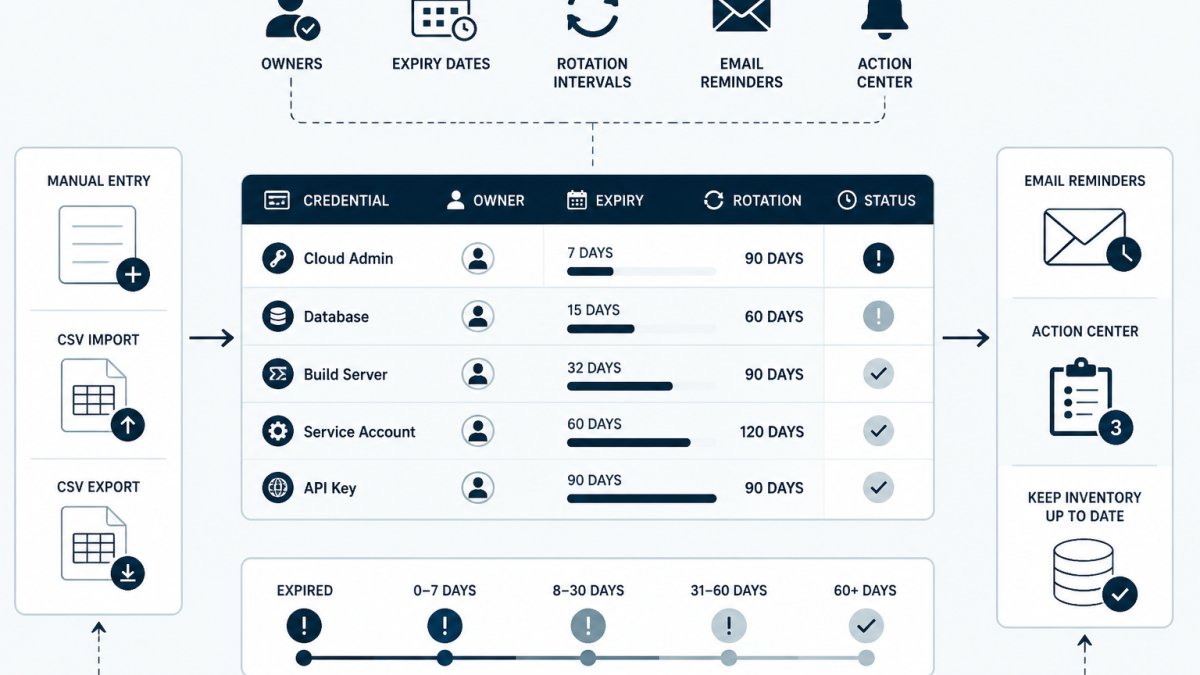
Credential expiration reminder tools record lifecycle metadata such as owner, expiry date and rotation interval, then prompt the right person before a deadline passes. They do not store secret values, so they complement a vault rather than replace it. Judge them on coverage of API keys, service accounts and certificates, named ownership, reminder lead time and audit history.
- Record five fields per API key: label, owning system, accountable person, creation date and rotation date.
- Set the rotation interval at creation time, with reminders arriving 21 days before expiry.
- A record owned by a team alias has no human attached, so reminders land in a shared inbox nobody acts on.
- During offboarding, filter the register for every credential naming the departing person, then reassign and verify zero remain.
- Almost no reminder tool rotates credentials for you; rotation still happens in the provider console or vault.
Table of Contents
- Why Credential Expiration Tracking Breaks Down on Small IT Teams
- What Credential Expiration Reminder Tools Actually Need to Do
- API Key Expiration Tracking: What to Record and Where
- Certificate Expiration Monitoring for Internal and Public Endpoints
- Credential Rotation Best Practices That Fit Real Maintenance Windows
- Build a Credential Inventory Template Your Team Will Actually Maintain
- Ownership, Handoffs, and Offboarding: Preventing Missed Expirations
- Conclusion
- Frequently Asked Questions
Why Credential Expiration Tracking Breaks Down on Small IT Teams
Credential expiration tracking fails on small IT teams for a structural reason: the person who created a credential is rarely the person who remembers it exists. A developer spins up an API key for a staging integration, moves on, and the key quietly ages in a config file nobody owns.
Work is distributed, but memory is not. A certificate expires on a Saturday, a webhook fails, and the first alert comes from a customer rather than a monitoring system.
What Credential Expiration Reminder Tools Actually Need to Do
A credential expiration reminder tool records lifecycle metadata (owner, expiry date, rotation interval) and prompts the right person before a deadline passes. It does not store the secret value itself, a reminder tool that also holds secrets becomes a second vault to secure and audit.
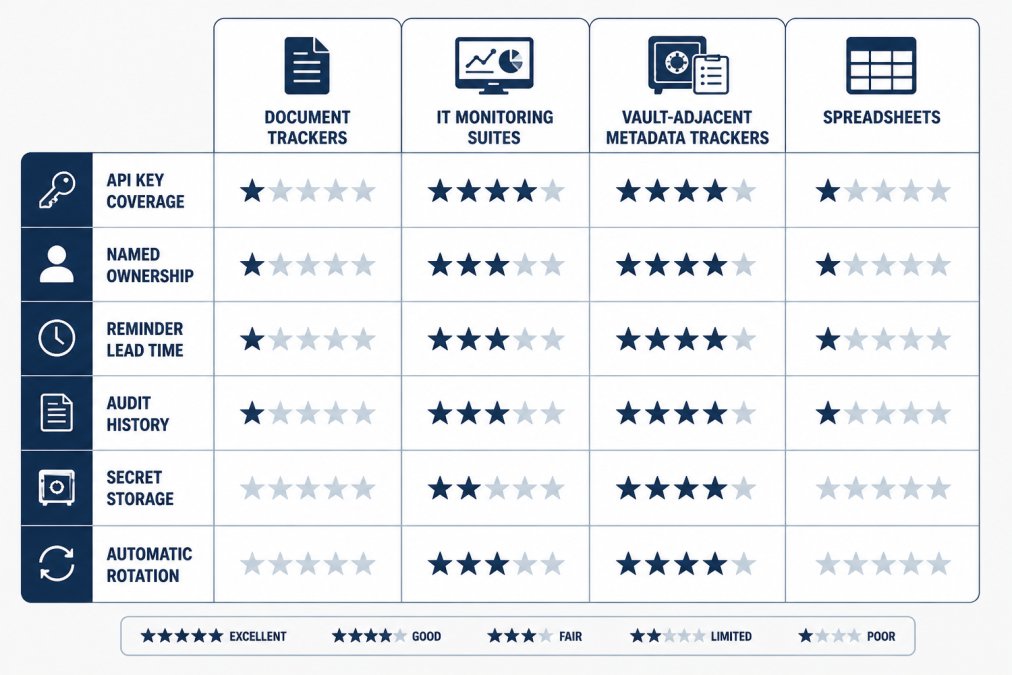
The market splits into four rough categories, and each covers a different slice of the problem:
- Document expiration trackers: strong on contracts, licences and certifications; thin on API keys and service accounts.
- IT monitoring suites: good at certificate expiry alerting inside existing infrastructure; heavy to configure for a small team.
- Vault-adjacent metadata trackers: track ownership and expiry without holding secret values, complementing the vault.
The IT-Specific Coverage Question
Most comparison content targets office managers tracking certifications and vendor contracts. An IT team's credential population looks different:
- API keys issued by SaaS providers and payment processors, often with no expiry at all unless the team sets one.
- Service-account passwords and tokens used by CI jobs, schedulers and integration middleware.
- Digital certificates, both public-facing (browser-validated) and internal (service-to-service mTLS, internal CAs).
A tool that only understands "document + expiry date" will hold these rows but will not model rotation intervals, environment, consumer lists, or the difference between an auto-renewing certificate and an API key. When evaluating a tool, ask to see a record for a service-account token, not just a contract.
Security Safeguards to Check Before You Import Anything
A credential register maps where your sensitive material lives, so it is itself worth protecting. Four controls matter:
- Metadata-only by design. The tool should never ask for the secret value. If a field invites you to paste a key, that is a design warning, not a feature.
- Access control. Can you limit who sees which records, or at minimum restrict the whole register to the operations team? A register readable by every employee is a reconnaissance aid.
- Audit history. Every create, edit, ownership change and rotation record should be attributable to a person and a timestamp. This is what makes the register useful during a review.
- Export and exit. You should be able to get your data out as CSV without a support ticket. Lock-in on an inventory is a maintenance risk.
NIST Special Publication 800-57 on key management frames key lifecycle in terms of defined cryptoperiods, which is a useful mental model: every credential should have a planned lifetime, not an indefinite one. Note that this is a recommendation framework, not a mandate for most private organizations; treat it as a design reference.
Selection Criteria for IT Teams
Judge any tool against six criteria before trialling it. Coverage: does it handle API keys, service-account credentials, digital certificates and integration tokens, or only documents? Ownership: can every record carry a named accountable person rather than a team alias? Reminder scheduling: can you set notification lead time per credential type, with escalation when nobody acts? Audit history: does it record who rotated what and when? Secret handling: does it require credential values, or only metadata? Import and export: can you load an existing inventory from CSV and get your data back out?
For teams with more than a handful of certificates, add a seventh: does the tool distinguish credentials that renew automatically (for example, certificates issued through an ACME client) from those that require a human? Mixing the two in one reminder stream creates alert fatigue, and alert fatigue is how real expirations get missed.
Comparison Table: Document Trackers vs. IT-Focused Tools
| Capability | Document Trackers | IT Monitoring Suites | Vault-Adjacent Metadata Trackers | Spreadsheets |
|---|---|---|---|---|
| API key and service-account coverage | Limited | Partial | Yes | Manual only |
| Named owner per credential | Sometimes | Rarely | Yes | Manual only |
| Configurable reminder lead time | Yes | Yes | Yes | No |
| Audit history of rotations | Rarely | Partial | Yes | No |
| Stores secret values | No | No | No | Risk of accidental storage |
| Automatic provider rotation | No | No | No | No |
| Distinguishes auto-renewing certificates | Rarely | Sometimes | Configurable | Manual only |
Choosing by Team Size and Credential Mix
A five-person team with a dozen API keys and two certificates does not need an enterprise suite; a maintained register with dated reminders is sufficient, and the main risk is abandonment. A fifty-person platform team with internal CAs, dozens of service accounts and a change-approval process needs per-credential ownership, escalation and audit history, because the failure mode shifts from "nobody remembered" to "nobody was accountable." Match the tool to your failure mode, not the longest feature list.
API Key Expiration Tracking: What to Record and Where
API key expiration tracking works when the register captures five fields per key: a human-readable label, the owning system or integration, the accountable person, the creation date, and the expiry or planned rotation date. Add the provider name and environment so a reader can find the key later.
Record the metadata in one shared place, not the repository where the key is used. A config file tells you where a key lives, not who owns it or when it was last rotated.
A fictional example entry:
- Label: billing-sync-prod
- Provider: example-payments-api
- Environment: production
Never paste the key value into the register. If a spreadsheet is the interim tool, restrict access and exclude the secret column entirely. Keys that appear in logs, tickets or shared documents should be treated as exposed and rotated, not merely noted.
Certificate Expiration Monitoring for Internal and Public Endpoints
Certificate expiration monitoring covers two populations: public-facing certificates that browsers validate, and internal certificates used for service-to-service authentication. Both expire, but they fail differently. A public certificate failure is visible and loud; an internal one often surfaces as a mysterious authentication error in one service.
Inventory every certificate with its common name, issuing authority, expiry date, the endpoint or service it protects, and the person responsible for renewal.
Let's Encrypt documentation on certificate lifetimes and renewal explains why short-lived certificates are becoming standard, which raises the frequency of renewal work.
Monitoring options range from enterprise platforms to scheduled checks. One practitioner discussion describes using Microsoft System Center Operations Manager to alert three weeks before expiry, which works well for organizations already running that stack.
Credential Rotation Best Practices That Fit Real Maintenance Windows
Credential rotation best practices start with scheduling rotation inside windows your team already works in.
Three habits make rotation stick:
- Batch by system, not by date. Rotate credentials for one integration together so testing happens once.
- Set reminder lead time from the change process, not the calendar. If a change needs approval, the reminder must arrive before the approval queue, not after.
- Record the completion, not the intention. A register entry marked rotated with a date and a name is auditable; a ticket marked "planned" is not.
OWASP Secrets Management Cheat Sheet recommends defined rotation periods and automated reminders as baseline controls, while noting that the rotation itself must happen wherever the secret is stored.
KeyGuardRail supports this workflow by tracking rotation intervals and sending lifecycle email reminders, with an Action Center showing what is due.
Build a Credential Inventory Template Your Team Will Actually Maintain
A credential inventory template works when it is short enough to fill in during a normal ticket and structured enough to query later. Start with these columns and resist adding more until the first version is in use:
- Credential label
- Type (API key, service account, certificate, integration token)
- Provider or issuing authority
A free credential inventory template covers these fields and can be imported directly. Teams that prefer to start from a spreadsheet can export to CSV and bring the data into KeyGuardRail later.
The maintenance question is the real test. A register survives if updating it is part of an existing ritual: the rotation ticket, the onboarding checklist, the offboarding runbook.
Ownership, Handoffs, and Offboarding: Preventing Missed Expirations
Missed expirations cluster around transitions: a person leaves, a project changes hands, a contractor's engagement ends. Ownership assignment addresses this, but only if handoffs update the register as part of the process. This is where small IT teams lose the most ground.
Why a Team Alias Is Not an Owner
A record owned by "platform-team@" has no human attached to it. When the reminder fires, it lands in a shared inbox that everyone reads and nobody acts on.
A useful rule: every credential should have a primary owner and, for anything production-facing or business-critical, a named backup. The backup keeps the reminder from becoming a dead end when the primary owner is on leave or has changed roles.
Offboarding Procedure
Prerequisites: a current register with an owner field populated, access to the identity system that governs the departing person's accounts, and authority to reassign ownership.
- Pull the owner list. Before the engineer's last working day, filter the register for every credential where they are the named primary or backup owner.
- Reassign each record. Set a new primary owner and confirm the new owner can actually reach the provider console or vault path needed to rotate the credential. Access without rotation rights is not ownership.
- Rotate or revoke what the person could reach. Credentials the departing person created or held access to should be rotated as part of offboarding, not left until their scheduled expiry. Record the rotation in the register with a date and a name.
- Verify. After reassignment, re-run the owner filter and confirm zero records still point at the departing person. This verification step is the one teams skip, and it is the one that catches the record someone added last week.
- Record the handoff. Note in the register that ownership changed and when. That note is what makes the next review auditable.
Likely mistakes: reassigning to a team alias to clear the filter quickly; forgetting backup owners; and reassigning a credential to someone who has read access to the register but no rights in the provider. Recovery is the same procedure run again with the owner field corrected, plus a rotation for anything the departing person could have accessed after the original offboarding date.
Project Handoffs and Orphaned Credentials
A credential can outlive the project that created it. When a project closes or transfers, review the register for credentials whose only consumer was that project.
CISA guidance on identifying and mitigating security risks emphasizes knowing what accounts and credentials exist as a precondition for controlling them, which is precisely what an owned register provides. Treat that as a general principle rather than a specific mandate for your environment.
Keeping Ownership Current Between Transitions
Handoffs are the high-risk moments, but ownership also drifts quietly through reorgs and role changes.
KeyGuardRail keeps audit history of lifecycle changes, so a handoff is visible rather than implied, useful when someone asks who last touched a credential and when. Reassignment and rotation themselves happen in your identity system, provider console or vault; the platform records that they were done and by whom.
Conclusion
Credential expiration is a memory problem disguised as a technical one. The teams that stay ahead of it keep a short register of every credential with a named owner, set reminder lead times that match their actual change process, and record rotations as completed work rather than planned intentions. Tools help, but the register is only as good as the ritual that maintains it.
Frequently Asked Questions
Should credential expiration tracking be separate from a secrets vault?
A vault stores secret values; it is not designed to be a shared calendar of who owns which credential and when it expires. Many teams keep secrets in a vault or cloud provider and track lifecycle metadata separately. That separation keeps the blast radius small: the tracking tool holds names, owners, and dates, not the secrets themselves. KeyGuardRail works this way, holding metadata only while rotation and revocation happen in the provider. If your vault already covers expiry reporting well, document that and skip the extra tool.
What is the difference between tracking credential expiry and rotating credentials?
Tracking records that a credential exists, who owns it, and when it expires or is due for rotation. Rotating is the act of issuing a new secret and retiring the old one in the provider, such as AWS IAM, Azure, or a database. A reminder tool tells you when to act; it does not perform the rotation. Keep the two steps linked in one workflow: reminder fires, owner rotates in the provider, then records the completion date and audit note in the tracker.
How can teams prevent credentials from being missed during staff handoffs?
Assign every credential a named owner and a backup owner, and review the inventory during offboarding before access is removed. A handoff checklist should list the credentials the departing person owned, the new owner, and any upcoming expiry dates within the next 90 days. Record the transfer in the audit history so the change is traceable. Tools that support ownership fields and lifecycle history make this faster than a spreadsheet, but the checklist matters more than the tool.
How often should teams review credential expiry dates?
Review the full inventory at least quarterly, and check the upcoming-expiry view weekly or as part of existing on-call or maintenance routines. Set reminder lead times based on how long rotation takes: a database credential used by several services may need two weeks of notice, while a single API key may need two days. Adjust lead times after the first rotation cycle based on what actually happened, and record the change so the next owner understands the schedule.
