
Last Updated: November 4, 2026
Quick Summary
Preventing API key leakage in source code means keeping credentials out of the codebase entirely: load values from environment variables at runtime, add .env and key files to .gitignore, and run pre-commit secret detection to reject commits. Repository scanning then catches what already pushed, and revoking in the provider is the first response to any confirmed leak.
- A hard-coded secret becomes part of every copy of that file, making it the hardest exposure to remove later.
- Anything shipped to a browser is public, so keep credentials server-side and send them in headers rather than URLs.
- Deleting a key from the latest commit does not remove it from history, clones, forks, or CI caches.
- After a leak, revoke the credential in the provider first and investigate second.
- Assign one accountable person per credential, not a team alias, so someone can rotate and revoke it.
Table of Contents
- Where API Keys Leak From Source Code
- Keep Secrets Out of Version Control
- GitHub Secret Scanning and Repository Scanners
- What to Do After an API Key Leak
- API Key Rotation Best Practices
- Use an API Key Inventory Template to Track Ownership
- Build Your Credential Inventory Before the Next Commit
- Frequently Asked Questions
Where API Keys Leak From Source Code
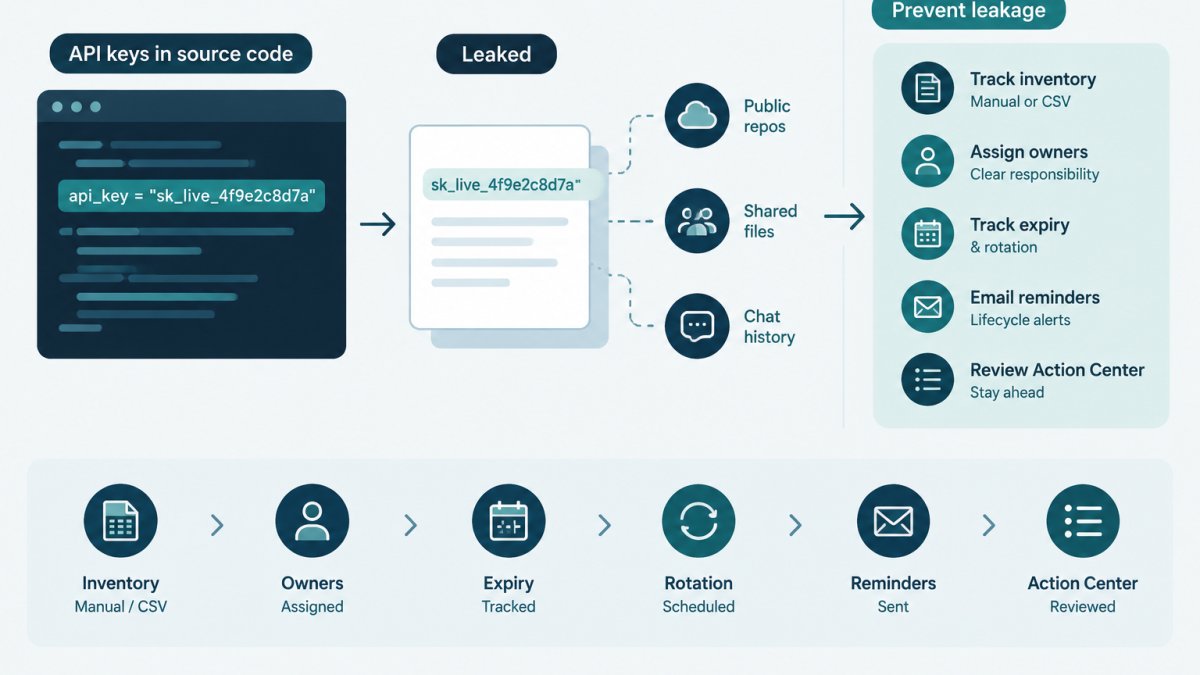
API key leakage in source code is the exposure of a live credential through a file, log, or build artifact others can read, most often a hard-coded string, a committed config file, or a client-side bundle or request log.
The pattern repeats across small teams: a developer pastes a token into a config file to test an integration, commits before review catches it, and nobody notices until the credential surfaces somewhere it should not.
Below, we'll show where these exposures come from and how to close each route, starting with the two most common.
Hard-Coded Secrets and Configuration Files
A hard-coded secret is a credential written directly into application code as a string literal (Use of hard-coded password).
Configuration files carry the same risk in a form that feels safer than it is.
Watch out: the common mistake is committing a "temporary" key with a comment saying it will be replaced. Temporary keys outlive the sprint, and the comment does not stop the value from being cloned into every fork.
Client-Side Bundles, Query Parameters and Logs
Anything shipped to a browser is public. A key in front-end JavaScript, a mobile bundle, or a build artifact can be read by anyone who opens developer tools.
Request and access logs are the quiet route.
The fix is architectural: keep credentials server-side, send them in headers rather than URLs, and scrub sensitive fields before anything reaches a log sink.
Keep Secrets Out of Version Control
Keeping secrets out of version control means the credential never enters a commit. Two controls do most of the work: loading values from the environment at runtime, and blocking the commit before it is created.
Environment Variables and Configuration Files
Environment variables keep secret values outside the codebase and repository. The application reads a value such as DATABASE_URL or PAYMENTS_API_KEY at runtime from the environment the process runs in.
A common approach is a local .env file for development, loaded by the framework and never committed.
Environment separation matters: a development key and a production key should never share a value, so a leak in one environment does not expose the other.
Ignore Rules and Pre-Commit Checks
Ignore rules are the first barrier. Add .env, *.pem, *.key, and any local credential file to .gitignore before the first commit.
Pre-commit hooks are the second. A hook runs a secret detection tool against staged changes and rejects the commit when it matches a known credential pattern. The controls are complementary: ignore rules stop files you expected, and pre-commit checks catch the string someone pasted into a file you did not expect.
| Control | What it blocks | Where it runs |
|---|---|---|
.gitignore rules |
Known credential files | Before staging |
| Pre-commit hook | Detected secrets in staged changes | On commit |
| Repository scanning | Secrets already pushed | On push and after |
| Secrets manager | Plaintext storage in code | At runtime |
GitHub Secret Scanning and Repository Scanners
GitHub secret scanning inspects pushed commits for patterns matching known credential formats and alerts the repository owner. Repository scanners apply the same idea across other hosts and can run on a schedule or in CI/CD. These tools detect; they do not fix. An alert tells you a credential-shaped string reached the remote, and the response is still a human decision about whether it is live.
Validating Alerts and Handling False Positives
Alert fatigue is the real risk with any scanner. A pattern match on a test fixture, a documentation example, or a placeholder like sk_test_xxxxxxxx is a false positive, and a team that chases every one will start ignoring the alerts that matter. Validation is a short triage:
- Read the matched string and confirm whether it is a real value or a placeholder.
- Check whether the credential is live in the provider's console.
- Confirm which environment and which owner the key belongs to.
- Mark false positives with a documented reason so the next alert is faster to clear.
Tuning matters as much as triage. Add allowlist entries for known test fixtures and documentation examples rather than suppressing the rule globally, and keep the allowlist in the repository so it is reviewed like code. A suppression with no recorded reason is indistinguishable from a missed alert six months later.
Git History, Forks and Caches
Deleting a key from the latest commit does not remove it from repository history, clones, forks, or CI caches.
A safe sequence for a shared or public repository:
- Revoke the key in the provider first. History cleanup does not invalidate a live credential.
- Identify every commit that touched the value, not just the most recent one.
- Rewrite history with a tool designed for it, coordinating with anyone who has an active clone or fork, because rewriting changes commit hashes.
- Force-push the rewritten history and ask collaborators to re-clone rather than pull.
- Check forks and mirrors separately, a rewrite on the upstream repository does not reach existing forks.
- Verify by searching the rewritten history and a fresh clone for the value before closing the incident.
Watch out: rewriting history on a repository with active collaborators without warning causes merge pain and can leave the old value in someone's local clone. Announce the rewrite window, and treat any fork you do not control as still exposed until the key is revoked.
Where Scanners Fit in the Lifecycle
Scanners are one control among several, and they sit late in the path. Ignore rules stop known credential files before staging; pre-commit hooks catch pasted strings before the commit exists; repository scanning catches what already pushed; a secrets manager keeps values out of code at runtime. A scanner alert is a signal that an earlier control missed, so record every confirmed exposure and its resolution, the same record an inventory keeps for ownership and rotation.
What to Do After an API Key Leak
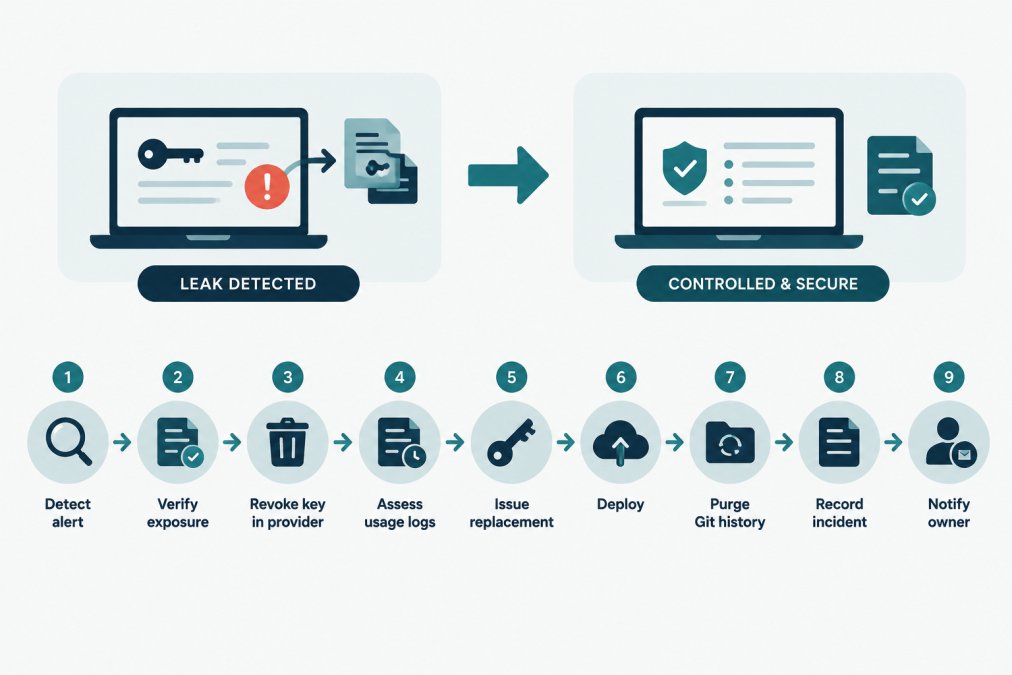
After an API key leak, revoke the credential in the provider first and investigate second. A key that is still valid is still usable by whoever found it, and every minute spent reading logs before revocation extends the exposure window. This section gives the full sequence, including prerequisites, verification checks, and recovery paths.
Prerequisites Before You Start
You need three things before the first step: provider console access for the account that issued the key, repository admin rights if the value reached a shared remote, and a named incident owner who can make the revoke-or-wait call. Without any of these, the steps stall.
The Response Sequence
- Detect and confirm. Take the alert or report and verify the key is real and live. Check the provider console for the key's status and last-used timestamp. A key that was already revoked is a documentation task, not an incident.
- Revoke in the provider. Disable the credential at the source, not just in the repository. Deleting the file does not invalidate the key; only the provider can.
- Assess access and usage. Pull the provider's audit or usage log for the exposure window. Look for calls from unexpected IP ranges, unusual endpoints, or volumes that do not match the service's normal pattern. Record what you find, or that you found nothing, because the absence of anomalous use is itself evidence.
- Issue a replacement. Create a new key with the narrowest scope the service needs. Do not reuse the old key's broad permissions out of convenience.
- Deploy the replacement. Update the environment configuration and confirm the service recovers. Verify with a health check or a known-good request, not just a successful deploy log.
- Purge the value from history. Remove it from Git history where the repository is shared or public. See the note below on why deletion from the latest commit is not enough.
- Record the incident. Note the key, owner, exposure window, revocation time, replacement key, and resolution. This record is what makes the next audit answerable.
- Notify the owner and affected parties. Tell the credential owner and, where the key guarded customer or partner data, follow your organization's notification policy. Do not promise a conclusion before the usage review is complete.
- Review for recurrence. Ask how the value reached the remote and which control should have caught it, ignore rule, pre-commit hook, or scanner. Fix that control, not just the key.
Verification and Recovery
After revocation, verify the old key is rejected by making a test call with it and confirming an authentication error.
Watch out: the most common recovery mistake is rotating the key but leaving the old value in Git history.
For a full method of mapping where secrets have spread across CI/CD and agent tooling, see how to audit secrets sprawl in agents and CI/CD.
API Key Rotation Best Practices
API key rotation is the scheduled replacement of a credential with a new value, followed by retirement of the old one. Rotation limits how long any single leaked key stays useful.
A workable rotation policy has four parts:
- A defined interval per credential class. High-privilege keys rotate more often than read-only integration keys.
- Dual-key overlap. Issue the new key, deploy it, confirm traffic, then revoke the old one. Never revoke before the replacement is live.
- Rollback criteria. Decide in advance what signals a failed rotation so the team reverts instead of guessing.
NIST SP 800-57 on key management is the reference many teams map their written policy against, and NIST SP 800-53 control guidance covers the access and audit controls around it. For a policy-to-practice walkthrough that includes dual-key overlap and rollback criteria, read API key rotation: NIST policy and AWS walkthrough.
Rotation without a record is hard to prove later. Credential lifecycle monitoring tracks rotation intervals and expiry dates as metadata, keeps an auditable history of the work, and sends lifecycle email reminders before a deadline passes.
Use an API Key Inventory Template to Track Ownership
An API key inventory is a record of every credential in use, with its provider, owner, expiry date, and rotation interval. It is the difference between knowing your exposure and guessing at it.
Ownership is the field teams skip and later regret.
The fields worth capturing for each entry:
| Field | Purpose | Example value |
|---|---|---|
| Credential name | Human-readable label | payments-api-prod |
| Provider | Where it is issued | Payment provider console |
| Owner | Accountable person | Named engineer |
| Environment | Separation of scope | Production |
| Expiry date | Deadline tracking | Date the key lapses |
| Rotation interval | Planning cadence | 90 days |
| Last rotated | Audit evidence | Date of last change |
To start with a working structure, download the credential inventory template, a free CSV with fields for providers, owners, expiry dates, and rotation policies, including fictional examples and import guidance. If assigning owners is the part that stalls, how to assign owners to API keys walks through accountability and handoffs.
KeyGuardRail supports manual entry and CSV import/export for exactly this inventory, keeps credential metadata separate from secret values, and requires no credential values to use the platform.
Build Your Credential Inventory Before the Next Commit
Preventing API key leakage in source code comes down to a small set of habits applied consistently.
The teams that handle a leak well are rarely the ones with the best scanner.
Start the inventory before the next commit rather than after the next incident. A short list of credentials with named owners and expiry dates is enough to make the first alert a routine task instead of a crisis.
Frequently Asked Questions
How do you prevent API keys from leaking into source code?
Keep secret values out of tracked files entirely. Load them from environment variables or a secrets manager at runtime, add .env and credential files to .gitignore, and run a pre-commit hook that blocks staged secrets. Scope each key to the minimum permissions and environment it needs, and scan repositories on every push. Prevention is a set of layers, not one tool: ignore rules, hooks, scanning, scoped permissions and a documented rotation schedule each catch a different failure mode.
What should you do if an API key is exposed in a repository?
Treat the key as compromised the moment it is visible, even in a private repo. Revoke it in the provider first, then issue a replacement, update the consuming service and deploy. Removing the commit is not enough because Git history, forks and clones may retain the value. After remediation, purge the secret from history where feasible, record the incident and its owner, and schedule the next rotation. A written checklist keeps these steps from being improvised under pressure.
Do environment variables make API keys completely secure?
No. Environment variables keep secrets out of source code, which removes one common leak path, but they can still appear in process listings, crash dumps, CI logs and misconfigured debug output. Treat them as a baseline control, not a guarantee. Pair them with scoped permissions, a secrets manager for production values, log redaction and periodic rotation. The goal is to reduce exposure paths and detect problems quickly, not to claim a single method is airtight.
How can teams track API key owners and rotation dates?
Maintain an inventory that records, for each credential, a non-secret identifier, the system it belongs to, an accountable owner, its environment, expiry date and rotation interval. A spreadsheet works at small scale; a dedicated tool such as KeyGuardRail stores lifecycle metadata without holding secret values and sends reminders before expiry. Review the inventory quarterly and whenever someone leaves the team. Unowned keys are the ones most likely to be forgotten and left active long past their rotation date.
