
Last Updated: November 5, 2026
Quick Summary
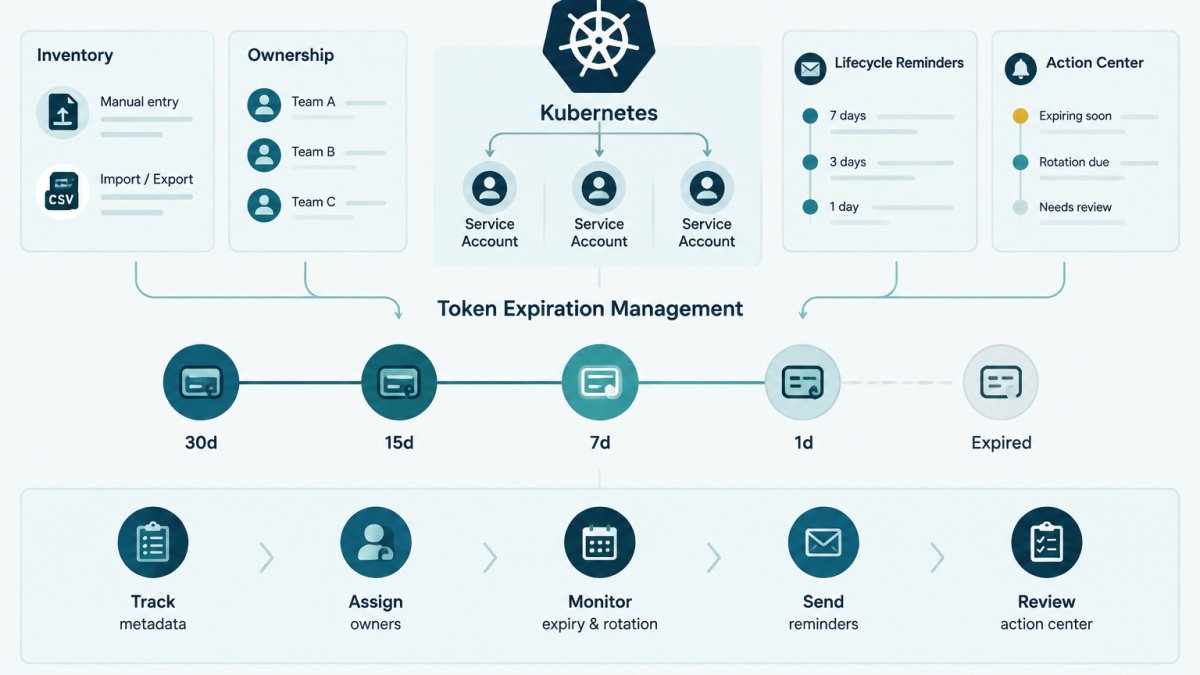
Token expiration management is the ongoing work of recording when each Kubernetes service account token expires, who owns it, and when it was last rotated. Current clusters issue short-lived bound tokens, but legacy token Secrets do not expire on their own and need manual review. Tracking owners and dates in one inventory keeps those credentials from lapsing unnoticed.
- Assign a named person or team as owner of every service account.
- Legacy token Secrets do not expire by default and need manual review.
- Bound tokens are refreshed by the kubelet before they expire.
- Record each rotation with the date and the person who performed it.
- Start with one namespace, then adjust the review interval over time.
Table of Contents
- Why Service Account Token Expiration Needs an Owner
- How Kubernetes Token Expiration Works
- Kubernetes Service Account Token Expiration Check
- Kubernetes Service Account Token Rotation Steps
- A Service Account Token Expiration Example
- Tracking Expiry Dates, Owners and Rotation Records
- Setting Up Your First Expiration Review Cycle
- Frequently Asked Questions
Service account token expiration management is the work of tracking when each token expires, who owns it, and when it was last rotated. Kubernetes can issue short-lived tokens, but a cluster still holds many credentials that someone must watch. KeyGuardRail helps small technical teams track credential lifecycle metadata without storing secret values.
This guide explains how token expiry works in Kubernetes, how to check it, how to rotate tokens, and how to record the results. Every example uses fictional names and placeholders.
Why Service Account Token Expiration Needs an Owner
A token that nobody owns is a token that nobody rotates. Expiry dates pass quietly, and the first sign of trouble is often a failed deployment at an inconvenient time.
Assigning a named owner to each service account solves this. The owner is the person or team who answers when the token expires, who approves a rotation, and who decides whether the account should still exist.
A simple ownership record needs four fields:
- Service account name (for example,
payments-syncin a fictional namespace) - Owner (a person or team, not a shared inbox)
- Expiry or review date
- Last rotation date and who performed it
How Kubernetes Token Expiration Works
Older Kubernetes versions created long-lived tokens stored as Secrets. Current Kubernetes releases favor bound service account tokens, which are issued through the TokenRequest API with a limited lifetime and an intended audience (Service Accounts).
Bound tokens are typically delivered to pods through a projected volume. The kubelet refreshes the projected token before it expires, so workloads that read the file from disk keep working without manual intervention.
Check the official Kubernetes documentation on service account admin tasks for the current behavior in your cluster version, because defaults have changed across releases.
Projected service account tokens and their lifetimes
Projected tokens carry an expiration time in their claims. The lifetime is set in the pod spec and can be tuned, but very short lifetimes increase refresh activity, and very long ones keep exposure high for longer. Choose a lifetime that matches the workload's risk profile and document the reason.
Kubernetes Service Account Token Expiration Check
Before you rotate anything, confirm what exists. A practical check has three steps.
- List service accounts in each namespace you own.
- Identify which accounts have long-lived token Secrets versus projected tokens.
- Record expiry or review dates in your inventory.
Example commands (replace the fictional namespace and names):
kubectl get serviceaccounts -n example-team kubectl get secrets -n example-team --field-selector type=kubernetes.io/service-account-token Expected result: a list of accounts, with any legacy token Secrets flagged for review.
Likely mistake: assuming a projected token has no expiry because you cannot see it. Check the pod spec, not just the Secret list.
Kubernetes Service Account Token Rotation Steps
Rotation replaces a credential before it expires or after a suspected exposure. The exact steps depend on how the token is delivered, and the most valuable thing you can do is make rotation boring and repeatable rather than a manual scramble.
Prerequisites: cluster access with permission to edit the target workloads, the owner's approval, and a maintenance window if the workload cannot reload its credentials. Confirm the current token lifetime and delivery method before you change anything.
Rotating a projected (bound) token
Bound tokens are refreshed by the kubelet, so "rotation" usually means changing the requested lifetime or audience and rolling the workload so pods pick up the new configuration.
- Inspect the pod spec to find the projected volume and its
expirationSecondsandaudiencevalues. - Update the projected volume or pod spec with the new lifetime or audience, if needed.
- Roll the deployment so pods start with the new configuration.
- Verify that the workload authenticates successfully against the API or target service.
- Record the rotation in your inventory: date, owner, and reviewer.
Verification: check that pods are running and that the service logs a successful authentication after the roll. Recovery: if authentication fails, roll the deployment back to the previous revision and review the audience and lifetime settings.
Migrating from a legacy token Secret to a bound token
Many clusters still carry long-lived token Secrets from older versions. Moving off them without downtime is a migration, not a single delete. A common pattern:
- Inventory every workload that mounts or references the legacy Secret.
- Add a projected volume with the intended audience and lifetime alongside the existing mount, and update the client to read the projected path.
- Roll and verify authentication against the new path while the legacy Secret still exists as a fallback.
- Once every consumer is confirmed on the projected token, remove the legacy mount and delete the Secret.
- Record the migration date and the new review interval in your inventory.
Watch out: deleting the legacy Secret before all consumers are migrated is the most common cause of a surprise outage during this work; confirm each consumer individually rather than trusting a single successful deployment.
Automating rotation in CI/CD
The manual steps above are fine for a handful of accounts, but they do not scale. The gap most guides leave open is wiring rotation into a pipeline so it happens on a schedule and leaves a record.
A practical pattern keeps the pipeline responsible for the mechanical change and a human responsible for approval:
- A scheduled pipeline job (for example, a nightly or weekly run) checks which service accounts are due for rotation based on the recorded interval.
- The job opens a change request or pull request that updates the projected volume lifetime or audience, rather than applying it directly.
- The owner approves, the pipeline rolls the workload, and the job writes the rotation date and reviewer back to the inventory.
- A failed verification step halts the pipeline and notifies the owner instead of leaving the workload in an unverified state.
Keeping the credential change inside your existing cluster tooling leaves the inventory as the record of what is due. Your pipeline, not KeyGuardRail, performs the rotation and touches the cluster. If you are still assembling the inventory this pipeline depends on, start from the credential inventory template.
Revoking a token after suspected exposure
Revocation is different from routine rotation. For a bound token, deleting the service account or the pod that holds it invalidates the token; for a legacy Secret, deleting the Secret removes the credential. Either way, the record matters: note the reason, the time, and who confirmed the old credential is no longer accepted. A rotation that is not recorded is indistinguishable from one that never happened.
A Service Account Token Expiration Example
Consider a fictional team, Team Ledger, that runs a reports-sync service account in a test namespace. The account uses a legacy token Secret with no expiry tracking.
The team lists the account, confirms the Secret exists, and moves the workload to a projected token with a one-hour lifetime. After the roll, the logs show successful API calls.
They record the change in their inventory with the owner's name, the rotation date, and a review date 90 days later. The example is illustrative and does not describe a real deployment.
Tracking Expiry Dates, Owners and Rotation Records
A spreadsheet or CSV works well for small teams, but a list of dates is not the same as a system that warns you before a date arrives.
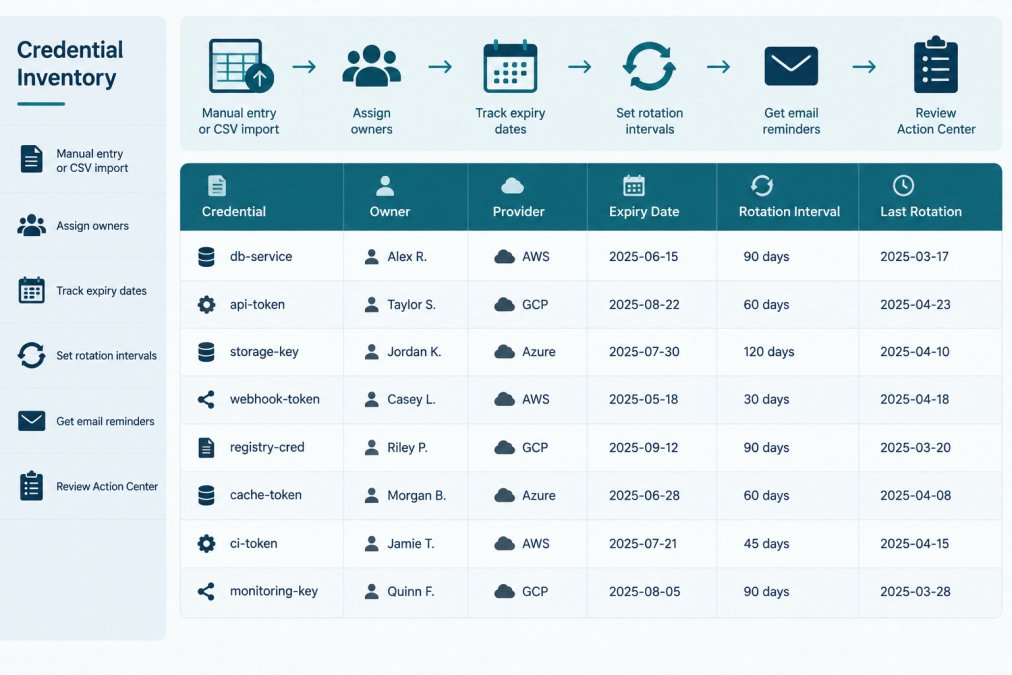
| Credential (fictional) | Owner | Provider | Expiry or review | Rotation interval | Last rotation recorded |
|---|---|---|---|---|---|
| reports-sync token | Team Ledger | Kubernetes | Review in 90 days | 90 days | Recorded by platform team |
| billing-webhook key | Finance Ops | Payment provider | Expires Q1 | 180 days | Recorded by finance lead |
KeyGuardRail tracks this metadata, sends lifecycle email reminders, and keeps an audit history of recorded rotations. For a starting template, see our credential inventory template. You can also see how to assign owners to API keys in a practical way.
Alerting on tokens nearing expiration
A useful next step is to check, on a schedule, which recorded dates are approaching, so that a due date is seen before it passes.
One possible approach is to use the cluster's API and a monitoring stack your team already runs:
- A scheduled job lists service accounts and their associated token Secrets, and reads the expiration claim from any projected token it can inspect.
- For each credential with a recorded expiry or review date, the job compares that date to today and emits a metric, for example, days remaining, tagged with the owner and service account name.
- Your monitoring system (Prometheus and Grafana are common choices) alerts when days remaining drops below a threshold you set, such as 14 days for a 90-day interval.
- The alert routes to the named owner, not a shared inbox, so the person who answers for the credential is the person who sees the warning.
Watch out: a metric that only exists inside the cluster will not warn you about credentials held outside it, payment keys, integration tokens, and certificates need to feed the same alerting view, which is why the inventory should be the single place dates are recorded.
Choosing a review interval
There is no universal correct interval. A workable approach is to set the interval from the credential's blast radius and how easily it can be rotated: a token used by a single internal job can rotate more often than a shared integration key that requires a vendor-side change. Document the reason for each interval so the next owner understands it. Many small teams start with a monthly review for the first quarter, then lengthen it once the process is routine.
Keeping the record honest
The audit history is only useful if it reflects reality. Record the rotation date and the person who performed it at the time of the change, not at the next review. When a credential is retired, mark it retired rather than deleting the row, so the history of what existed and who owned it survives staff changes and handoffs.
Setting Up Your First Expiration Review Cycle
Start small. Pick one namespace or one team, inventory its service accounts, and assign owners. Run a review once a month for the first quarter, then adjust the interval to match how fast your credentials change.
A simple first cycle:
- List all service accounts in the scope
- Mark each as projected token, legacy Secret, or external credential
- Assign a named owner to every row
- Set an expiry or review date
- Schedule the first review and reminder
- Record each completed rotation with the date and person
To set up the workspace and import your first inventory, follow the signup to first inventory guide. Users who prefer a ready-made file can start with the credential inventory template. To get started with lifecycle monitoring, see the getting-started page, or create a free workspace to begin recording your own inventory.
Frequently Asked Questions
How does expiration work for Kubernetes service account tokens?
Modern Kubernetes issues service account tokens through the TokenRequest API and projected volumes, and these tokens are time-limited and bound to an audience. The kubelet refreshes projected tokens before they expire, so workloads that read the mounted file get a current token. Legacy token Secrets do not expire automatically unless someone deletes or rotates them. Check your cluster version and the official documentation for the exact default lifetimes in your environment, since these settings can differ between distributions.
How can I check when a service account token expires?
For projected tokens, decode the JWT payload from the mounted token file and read the exp claim, which is a Unix timestamp. Do this only in a secure shell and never paste tokens into tickets, chat or logs. Record the resulting expiry date in your credential inventory. Treat this as a manual check: KeyGuardRail does not discover or read tokens automatically.
What is the difference between a projected service account token and a token Secret?
A projected token is issued on demand, expires, and is audience-bound. A token Secret is a stored object that holds a long-lived token until someone deletes it. The Kubernetes documentation recommends projected tokens for workloads. Migrating away from token Secrets is a planned change with owners, dates and a verification step, not a single command.
