
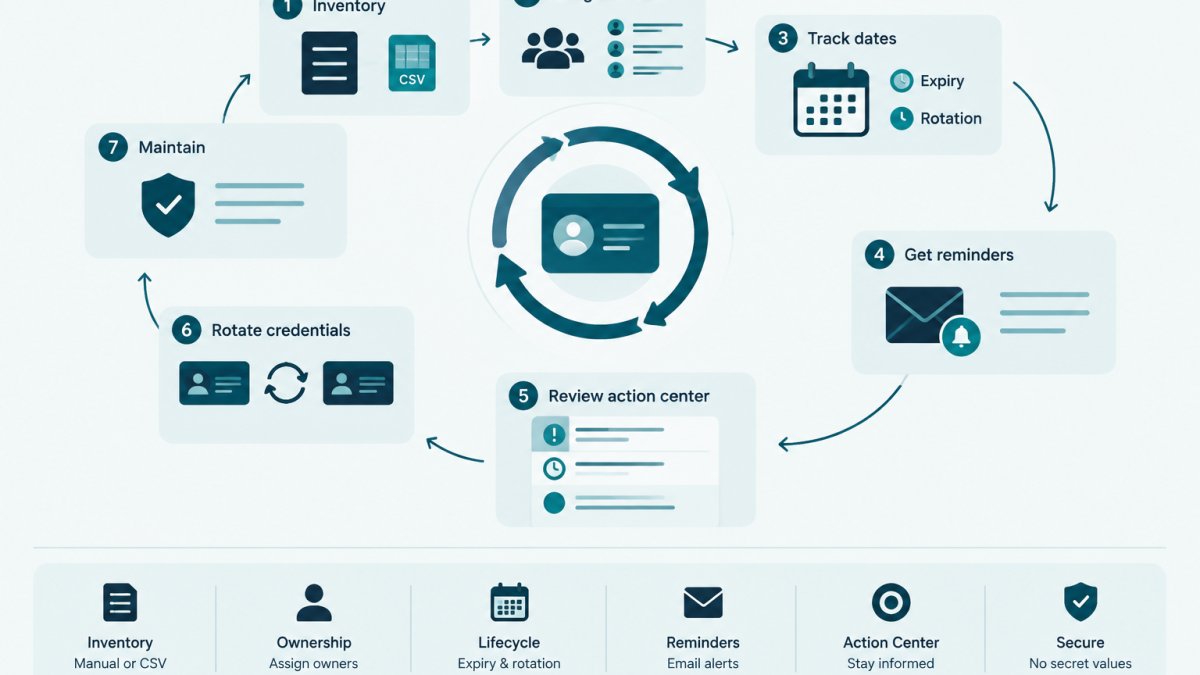
Last Updated: November 12, 2026
Quick Summary
Plan your first credential rotation cycle by building a metadata-only inventory, assigning one named owner and mapping consumers for every credential, then sequencing rotations by risk tier so low-risk keys go first. Run each rotation through the same checklist, verify before revoking, and record outcomes during the cycle so the post-cycle review produces a baseline.
- Keep secret values out of the inventory file entirely; it records metadata only.
- Rotate low-risk credentials in Phase 1 and high-risk ones last in Phase 3.
- Expand from pilot to Phase 2 only when explicit pilot criteria are met, not on a date.
- Create the replacement credential before revoking the old one to keep a rollback path.
- Record rotation date, verification result and recovery action during the cycle, not after.
Table of Contents
- What a First Credential Rotation Cycle Actually Involves
- Step 1: Build the Credential Inventory Before You Rotate Anything
- Step 2: Assign Owners and Map Credential Consumers
- Step 3: Set a Risk-Based Credential Rotation Schedule
- Step 4: Follow an API Key Rotation Checklist for Each Credential
- Step 5: Plan Zero-Downtime Credential Rotation With Overlap Windows
- Step 6: Apply Credential Rotation Best Practices to Verification and Rollback
- Step 7: Review the Cycle and Record What Happened
- Frequently Asked Questions
What a First Credential Rotation Cycle Actually Involves
A credential rotation cycle is the full loop of replacing a credential, confirming the new one works, and recording the change.
This guide walks through a seven-step first cycle for small technical teams, covering what to do, what to check, and where the cycle usually breaks.
Most teams treat rotation as a single event. It is a project with a beginning, a middle, and an audit trail at the end.
Step 1: Build the Credential Inventory Before You Rotate Anything
Rotation without an inventory is guesswork. The first step is a plain list of every credential in scope, not a full secrets migration.
Start narrow: pick one provider or team for the first cycle, then expand. Cataloging everything at once often stalls halfway.
A free credential inventory template gives a ready-made CSV with the fields below, plus fictional example rows and import guidance.
Example Inventory Columns
| Column | Example value | Why it matters |
|---|---|---|
| Credential name | billing-api-prod |
Human-readable label for the record |
| Provider | Example cloud vendor | Where the credential lives |
| Type | API key, service account, root password | Drives the rotation interval |
| Owner | platform-team |
Accountable person or group |
| Consumers | invoice-sync job |
What breaks if this rotates |
| Expiry date | 2027-03-01 | Feeds the reminder schedule |
| Rotation interval | 90 days | Sets the next due date |
| Last rotated | Not yet | Baseline for the first cycle |
Keep secret values out of this file entirely. The inventory records metadata only, so it can live in a repo or shared sheet without exposing anything.
Step 2: Assign Owners and Map Credential Consumers
An unowned credential is the most common finding in a first inventory.
Consumer mapping matters just as much. Consumers are the jobs, apps, and people that read a credential.
A practical walkthrough of assigning owners to API keys covers accountability and handoffs in more depth.
Watch out: a team alias with no named contact usually means nobody acts on reminders.
Step 3: Set a Risk-Based Credential Rotation Schedule
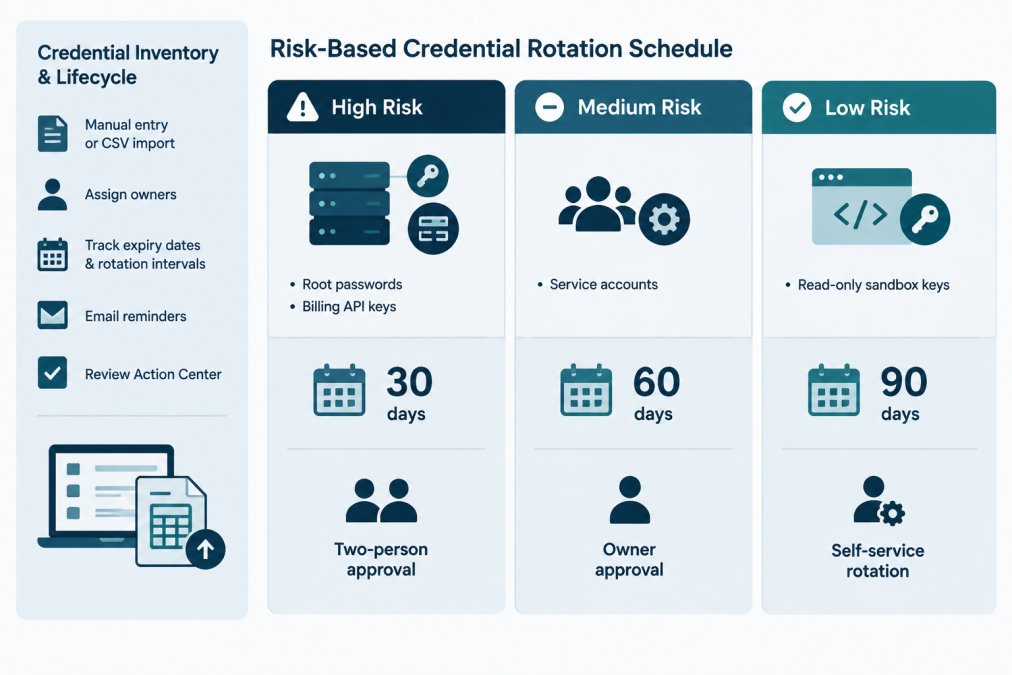
A risk-based credential rotation schedule ties the interval to what the credential can reach, how many consumers depend on it, and how hard recovery is if rotation goes wrong. For a first cycle, the schedule is also a rollout plan: sequence work so the first failures are cheap.
Start with a risk tier, then a first-cycle phase
Use two separate decisions. The risk tier sets the long-term interval. The phase sets when the credential enters the first cycle.
| Risk tier | Typical credentials | Long-term interval | First-cycle phase |
|---|---|---|---|
| High | Root or admin passwords, billing API keys, production database superuser accounts | 30 days, two-person approval | Phase 3 (last) |
| Medium | Service accounts for internal tooling, integration keys for SaaS-to-SaaS sync | 60 days, owner approval | Phase 2 |
| Low | Read-only sandbox keys, non-production API keys, scoped tokens for local tooling | 90 days, self-service | Phase 1 (pilot) |
A 30/60/90-day model is a starting point, not a rule. The 30/60/90-day rotation policy guide shows how to map each key type to an interval and assign deadlines. Adjust intervals to your provider's documented limits and your team's on-call capacity.
A sample four-week first-cycle calendar
The calendar below is fictional and assumes a small team with roughly 20-40 credentials in scope. Compress or stretch it to your size, but keep the phase order.
| Week | Focus | Concrete output |
|---|---|---|
| Week 1 | Inventory and ownership for Phase 1 credentials only | Every Phase 1 row has a named owner and a listed consumer |
| Week 2 | Rotate Phase 1 (low-risk) credentials | Each rotation recorded with date, owner, and verification result |
| Week 3 | Rotate Phase 2 (medium-risk) credentials; review Phase 1 failures | Rollback or retry decisions logged for any Phase 1 failure |
| Week 4 | Rotate Phase 3 (high-risk) credentials with two-person approval; run the post-cycle review | Baseline metrics captured for the next cycle |
Pilot criteria: when to expand from Phase 1 to Phase 2
Do not expand coverage on a calendar date alone. Expand when the pilot meets explicit criteria. A workable set for a first cycle:
- Every Phase 1 credential was rotated at least once without an unplanned service interruption.
- Every Phase 1 rotation has a recorded verification result.
- At least one failure occurred and was recovered using the documented rollback or retry path, if nothing failed, the pilot was too small to prove the process.
If the pilot fails these criteria, fix the process before adding medium-risk credentials. Expanding on schedule while the pilot is unstable multiplies the failure surface.
How the schedule changes by credential type
The same calendar does not fit every credential. A few concrete adjustments:
- API keys: usually the easiest to rotate because most providers let you create a second key before revoking the first. Keep the overlap short and update consumers through your configuration or vault system.
- Service accounts: the hard part is finding every consumer. Budget extra time in Week 1 for dependency mapping; a service account used by a scheduled job may not appear in application config.
- Database passwords: rotation often requires a coordinated restart or connection-pool drain. Schedule these outside batch windows and keep the old password valid until connections have cycled.
Watch out: a calendar without a named executor per week is a wish. Assign one accountable person per phase, even if the work is shared.
Where to record the schedule
The schedule belongs in the same inventory that holds owners and expiry dates, not a separate spreadsheet that drifts. KeyGuardRail lets you track rotation intervals and expiry dates as metadata and sends lifecycle email reminders. The actual rotation still happens in the provider; KeyGuardRail records that it happened.
Step 4: Follow an API Key Rotation Checklist for Each Credential
A repeatable checklist stops the first cycle from becoming improvisation. Run the same sequence for every credential.
- Confirm the owner and consumers are recorded.
- Create the replacement credential in the provider.
- Update every consumer with the new value through your vault or config system.
- Restart or redeploy affected workloads.
- Confirm the new credential works.
- Revoke the old credential.
- Record the rotation date and outcome.
The order matters. Revoking before consumers are updated causes an outage. Creating the new key first gives a rollback path.
Step 5: Plan Zero-Downtime Credential Rotation With Overlap Windows
Zero-downtime credential rotation means both the old and new credential work during a short overlap window. Consumers switch over, then the old one is revoked.
Keep the overlap as short as the workload allows. Long windows leave two valid credentials in circulation, widening exposure.
- Short overlap: minutes, for stateless services that redeploy fast.
- Medium overlap: hours, for batch jobs and scheduled exports.
- Long overlap: days, only where a consumer cannot be updated quickly.
Document the overlap length per credential type in the inventory. The next cycle inherits it.
Step 6: Apply Credential Rotation Best Practices to Verification and Rollback
Verification proves the new credential works before the old one dies. Rollback restores the old one if it does not.
When a rotation fails, decide between rollback and retry rather than improvising. A short decision guide on rollback versus retry helps teams pick the right recovery path.
Watch out: deleting the old credential to "clean up" before verification passes removes the only fallback.
Step 7: Review the Cycle and Record What Happened
The first cycle ends with a review, not a celebration. Compare what you planned against what happened, and turn the comparison into a baseline for the next cycle. Without numbers, the review becomes a memory exercise and the second cycle repeats the first cycle's mistakes.
Capture per-credential records during the cycle, not after
A review is only as good as the records it reads. For each credential, record during the rotation, not from memory afterward:
- Rotation date and the owner who performed it.
- Whether verification passed, and which consumer was used to verify.
- Any recovery action taken (rollback, retry, manual fix) and how long recovery took.
A short walkthrough shows how a recorded rotation and audit history look in practice. KeyGuardRail keeps this lifecycle metadata separate from secret values, so the audit trail exists without the secrets ever leaving the provider.
Measurable success criteria for a first cycle
Define the metrics before the cycle starts so the review has something to compare against. A workable set for a small team:
| Metric | What it measures | Example target for a first cycle |
|---|---|---|
| Rotation completion rate | In-scope credentials rotated at least once | 100% of Phase 1 and Phase 2; Phase 3 may slip with a documented reason |
| Verification pass rate | Rotations where the new credential worked on first try | Track the number; do not set a target until you have a baseline |
| Unplanned service interruptions | Outages or degraded jobs caused by rotation | Zero is the goal; record every one that occurs |
| Mean time to recover | Time from failed verification to working state | Record the actual figure; use it to set the next cycle's target |
| Owner coverage | In-scope credentials with a named owner and contact | 100% before Phase 2 begins |
| Recorded outcomes | Rotations with a logged result | 100% |
These are starting points, not universal targets. A team rotating 10 low-risk keys and one rotating 200 service accounts will land on different numbers. Pick a small set, measure it honestly, and compare the next cycle against it.
A 45-minute post-cycle review agenda
Keep the first review short and structured. A workable agenda:
- Walk the metrics table. Read each number aloud and note where it differs from the plan.
- Review each failure. For every failed rotation, confirm the recovery action was logged and identify whether the cause was a missing consumer, a bad overlap window, or a process gap.
- Check the inventory for drift. Did any credential get rotated without being in the inventory, or appear in the inventory but not exist in the provider? Both are inventory gaps to fix before the next cycle.
- Decide what changes. Pick at most two process changes for the next cycle, for example, a longer overlap window for batch jobs, or a second approver for a credential type that caused trouble.
- Set the next cycle's dates. Put the next rotation due dates into the inventory so reminders fire on time.
Watch out: a review that produces a long list of improvements and no owner for any of them changes nothing. Assign one person to each change and a date to check it.
What to do with the baseline
The baseline is the output of the first cycle. Store it alongside the inventory, the same record that holds owners, expiry dates, and rotation intervals.
KeyGuardRail's audit history keeps per-credential lifecycle records in one place, and the Action Center lets you review items that need attention. The review itself is still a human conversation; the tooling just makes sure the records exist when it happens.
Frequently Asked Questions
Which credentials should a small team rotate first?
Start with credentials that are both high-impact and well understood: root or administrative accounts, access keys with broad permissions, and API keys used in production integrations. Rotate one credential type end to end before expanding. A first cycle that covers five well-documented credentials and produces a clean audit trail teaches more than a rushed sweep of fifty. Use your credential rotation schedule to sequence the rest by risk level and dependency count.
How often should API keys and service account credentials be rotated?
There is no single correct interval. Many teams set shorter cycles for high-risk credentials, such as administrative keys or keys with broad scope, and longer cycles for low-risk, tightly scoped credentials. The right frequency depends on exposure, blast radius, and how much operational effort rotation takes. Document the interval you choose per credential, record the reasoning, and revisit it after the first cycle once you know your real rotation success rate and recovery time.
How can a team rotate credentials without disrupting dependent services?
Map every consumer of the credential before you start, then use an overlap window: create the new credential, deploy it to consumers, verify traffic works, and only then revoke the old one. Test in a staging environment where possible and keep a rollback plan. Zero-downtime credential rotation depends on knowing dependencies in advance, not on speed. A credential inventory that lists consumers and owners is the prerequisite for this approach.
What should teams record after rotating a credential?
Record the credential identifier, the owner who performed the rotation, the date, the new expiry or next rotation date, and any incidents or rollbacks. Keep this metadata separate from the secret value itself. This record becomes your audit trail and feeds the next cycle's schedule. If you use KeyGuardRail, you record the completed rotation there after doing the work in your provider, so the lifecycle history stays consistent across cycles.
