
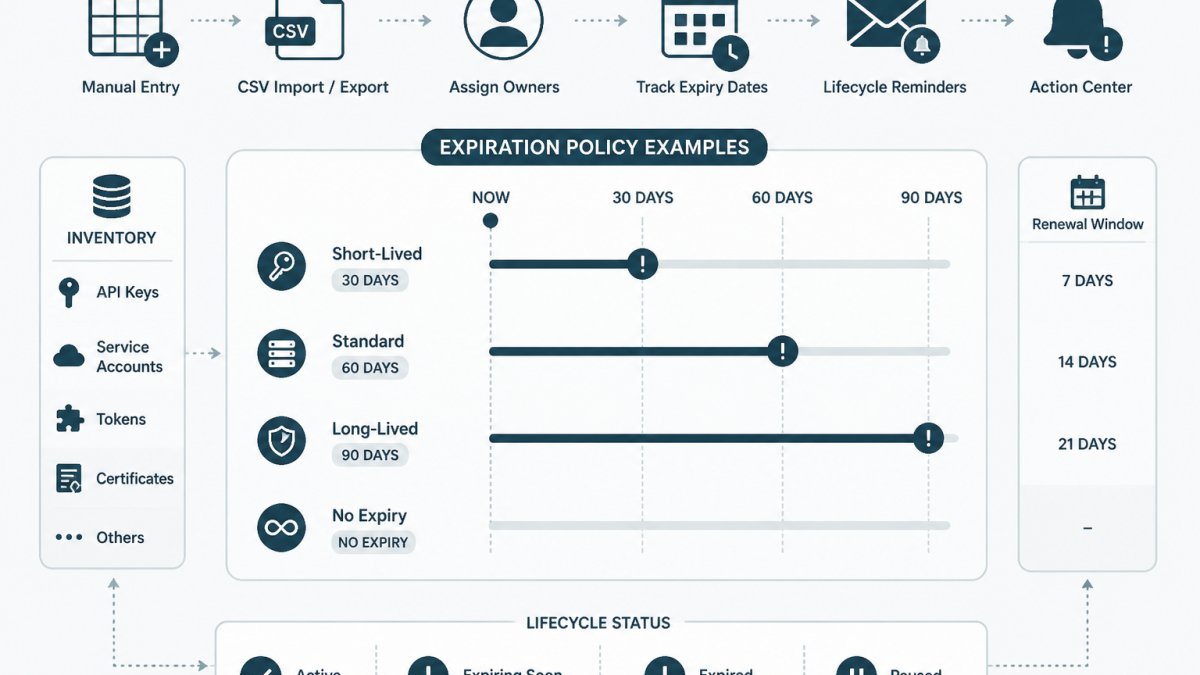
Last Updated: October 23, 2026
Quick Summary
An API key expiration policy sets a validity period by key type and risk: production write or delete keys expire after 30 days, while read-only and development keys can last 180 days. Every key needs one named owner, an expiry date recorded at issue time, a rotation interval, and a defined scope.
- Record the expiry date when a key is issued, not during a later audit.
- A 30-day rotation you complete reliably beats a 7-day rotation you skip.
- Deploy and verify the new key before revoking the old one to avoid downtime.
- Stagger rotations across the month so one failure does not cascade.
- Document exceptions in writing with an approver and a review date.
Table of Contents
- What a Good API Key Expiration Policy Looks Like
- How to Choose an Expiration Period by Key Type and Risk
- API Key Expiration Policy Template
- API Key Expiration Best Practices
- Building an API Key Rotation Schedule
- API Key Rotation Checklist
- Expiration vs Rotation vs Revocation vs Token Lifetime
- Enforcing the Policy and Handling Exceptions
- Frequently Asked Questions
What a Good API Key Expiration Policy Looks Like
An API key expiration policy is a written rule set that defines how long each credential may stay valid, who owns it, how it gets renewed, and what happens when it lapses.
Most teams already have an informal expiration policy: keys get rotated when something breaks or when someone remembers. Readers ready to act on the policy fields can set up a workspace and import their first inventory without sharing secret values.
The Four Fields Every Policy Needs
Every entry in a credential inventory needs four fields to be enforceable. Skip any one and the policy becomes a suggestion.
- Owner: one named person, not a team alias. Shared ownership is the same as no ownership.
- Expiry date: the calendar date the key stops being valid, recorded at issue time.
- Rotation interval: how often the key should be replaced, expressed in days or months.
- Scope and environment: what the key can reach (read, write, delete) and whether it lives in production or development.
A common mistake is recording the rotation interval but not the expiry date. Rotation is the planned replacement; expiry is the hard stop. A key can be scheduled for rotation every 90 days and still carry a 12-month expiry date, and both numbers need to be visible.
How to Choose an Expiration Period by Key Type and Risk
There is no universal number. The right validity period depends on what the key can do and where it runs; a read-only sandbox key and a write-capable production key should not share a lifetime.
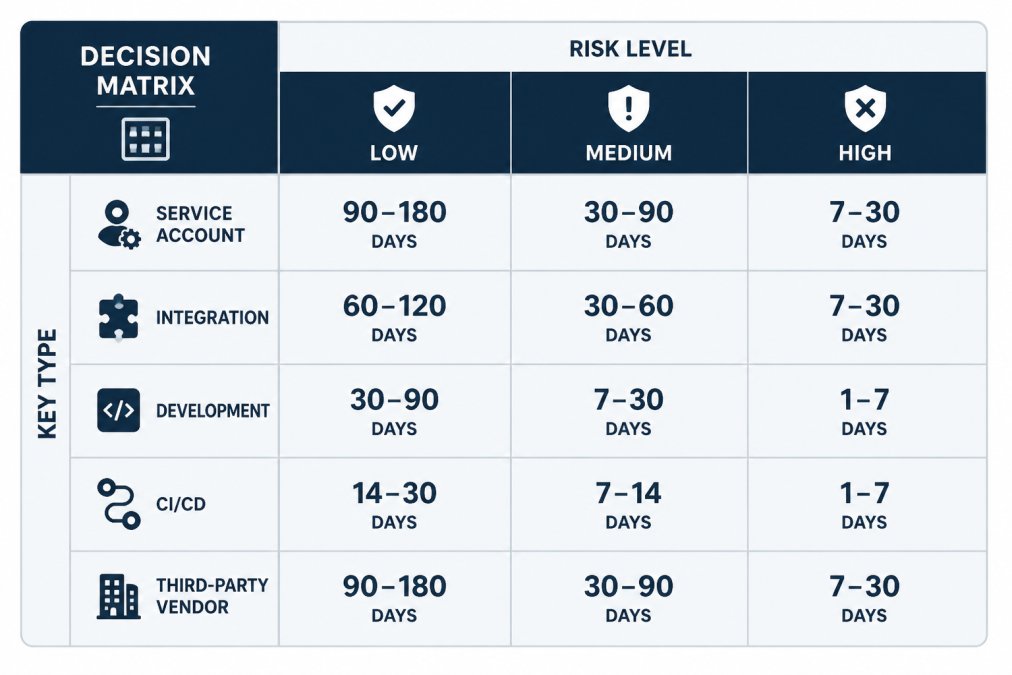
Work from two axes: key type and risk level. Key type tells you how the credential is used (service account, integration, development, CI/CD, third-party vendor). Risk level reflects the blast radius if misused: read access to non-sensitive data is low, write or delete access to production is high.
A long-lived key that can delete production data is a standing invitation; a short-lived read-only key is a minor inconvenience if it leaks. Treating all keys the same produces tight rules on harmless keys and loose rules on dangerous ones.
A Decision Table You Can Copy
The table below is a starting point, not a mandate. Adjust the ranges to match how often each system can tolerate a credential change without downtime.
| Key Type | Risk Level | Suggested Validity | Suggested Rotation | Notes |
|---|---|---|---|---|
| Development sandbox | Low | 180 days | 180 days | Short-lived, disposable |
| Read-only integration | Low | 180 days | 90 days | Low blast radius |
| Service account, internal | Medium | 90 days | 90 days | Automate if possible |
| CI/CD pipeline | Medium | 90 days | 60 days | Rotate with release cycle |
| Third-party vendor | Medium | 90 days | 90 days | Confirm vendor support |
| Production write/delete | High | 30 days | 30 days | Shortest practical window |
A 30-90 day band covers most production credentials, but the number that matters is the one your team can actually sustain. A 30-day rotation you complete reliably beats a 7-day rotation you skip.
API Key Expiration Policy Template
The template below is a fill-in-the-blank policy document. Replace the bracketed placeholders with your own values. It is deliberately short; a policy nobody reads is worse than none.
API Key Expiration Policy: [Team or Service Name]
Scope: This policy applies to all API keys, API tokens, service account credentials, and integration secrets issued for [system or product].
Ownership: Every credential has exactly one named owner recorded in the inventory.
The template works best alongside a structured inventory. A free credential inventory template with fields for providers, owners, expiry dates, and rotation policies gives the policy somewhere to live, with fictional examples and import guidance so the first entries are not guesswork. A free credential inventory template with fields for providers, owners, expiry dates, and rotation policies gives the policy somewhere to live, with fictional examples and import guidance so the first entries are not guesswork. Teams moving from a spreadsheet to a tracked workspace can follow the steps to create a Free workspace and maintain an inventory through manual entry or CSV import/export without sharing secret values.
API Key Expiration Best Practices
Good expiration practice comes down to visibility and accountability. A key with no recorded owner and no recorded date is effectively permanent, whatever the written policy says.
- Record metadata, never the secret. The inventory should hold the provider, owner, expiry date, rotation interval, and scope. It should not hold the key value itself. Secret values belong in your existing vault or provider console.
- Set expiry at issue time. Add the expiry date when the key is created, before it is deployed.
- Prefer short lifetimes for high-risk keys. Production write and delete access warrants the tightest window the system can tolerate.
For broader context beyond expiration, the API key management best practices guide covers generation, storage, and access control alongside lifecycle rules. Vendor documentation is worth checking for specifics: AWS IAM access key rotation guidance explains how access keys are managed in that platform, and Google Cloud service account key rotation documents the equivalent process for service account keys. The OWASP secrets management cheat sheet is a useful reference for storage and handling principles.
Building an API Key Rotation Schedule
A rotation schedule is a calendar of planned replacements, ordered by expiry date and risk. The guide on how to track API key expiry covers a step-by-step method.
Sort the inventory by expiry date, soonest first, and group keys by owner so each person sees their own upcoming work.
Three practical rules keep the schedule realistic:
- Stagger rotations. Do not rotate every production key on the same day. Spread them across the month so a single failure does not cascade.
- Tie rotations to existing rituals. Rotating CI/CD keys with the release cycle, or vendor keys with the quarterly review, reduces the chance the task gets dropped.
- Confirm the new key works before revoking the old one. Deploy the replacement, verify authentication, then revoke. This is the core of rotation without downtime.
Lifecycle reminders help here. KeyGuardRail sends email reminders ahead of expiry and rotation dates, and its Action Center surfaces what needs attention, so the schedule does not depend on someone checking a spreadsheet.
API Key Rotation Checklist
Use this checklist for each rotation. It covers prerequisites, the steps, verification, and recovery.
Prerequisites
- Owner confirmed and available
- New key generated in the provider console
- New key stored in the vault, not in the inventory
Steps
- Deploy the new key to the consuming system
- Verify authentication and authorization succeed
- Monitor for errors during the changeover window
Verification
- The system authenticates with the new key only
- The old key is confirmed revoked
- The inventory reflects the new expiry date
If something goes wrong
- Roll back to the old key if it has not yet been revoked
- If the old key was already revoked, regenerate and redeploy
- Record the incident and the recovery step taken
Expiration vs Rotation vs Revocation vs Token Lifetime
These four terms get used interchangeably, which causes real confusion when a policy is being written. They describe different things.
Each has a different failure mode. A missed expiration is an outage; a missed rotation is a longer-than-intended validity period; a missed revocation is a live credential in the wrong hands. Token lifetime is handled by the authentication system, not a manual schedule.
| Term | What It Means | Typical Unit | Failure Mode |
|---|---|---|---|
| Expiration | Hard stop after which the key fails | Days or months | Outage |
| Rotation | Planned replacement before expiry | Days or months | Extended validity |
| Revocation | Immediate invalidation | Immediate | Live orphaned key |
| Token lifetime | Validity of a short-lived token | Minutes or hours | Session errors |
Enforcing the Policy and Handling Exceptions
A policy that is not enforced is a wish. The guide on assigning owners to API keys covers how to make ownership stick, the foundation of enforcement.
Start with a regular review. A short weekly or monthly pass over the inventory, sorted by expiry date, catches keys approaching their deadline before they become urgent.
Exceptions are inevitable: some vendor keys cannot be rotated on the standard interval, and some legacy systems break if a credential changes too often. Handle them the same way every time:
- Document the exception in writing, with the key, the reason, and the approver.
- Set a review date so the exception does not become permanent by default.
- Apply compensating controls where possible, such as tighter scope or closer monitoring.
Emergency access deserves its own line in the policy. The NIST digital identity guidelines discuss credential lifecycle and authenticator management in more depth if the policy needs a standards reference.
Enforcement is where a tracking tool earns its place. KeyGuardRail keeps ownership, expiry, and rotation metadata in one place, sends lifecycle reminders, and maintains an auditable history of who changed what. It does not rotate or revoke keys or store secret values; those actions stay in the provider. What it removes is the guesswork about which keys are due and who owns them. If you want to see how that works in practice, credential lifecycle monitoring walks through setting up your first tracked credentials, and you can create a free workspace to try it with your own inventory.
For a small team, start with the four fields, pick expiration periods by risk, and enforce the schedule with a regular review. A short policy that is followed beats an elaborate one that is filed away.
Frequently Asked Questions
Do API keys expire automatically?
It depends on the provider. Some services let you set an expiration date at key generation and enforce it automatically; others issue non-expiring keys by default and rely on you to rotate them manually. Check your provider's documentation for the default expiration setting before you assume a key will stop working. Where automatic expiry is available, turn it on and record the expiry date in your credential inventory so the date is visible outside the provider console.
How long should an API key remain valid?
There is no universal number, but a common starting point is 30 to 90 days for production keys with write access, and longer for read-only or low-risk development keys. The right period depends on how often the key is used, how hard it is to rotate without downtime, and what the key can reach. Pick the shortest lifetime your team can actually rotate on schedule, then shorten it as rotation becomes routine.
What is the difference between API key expiration and rotation?
Expiration is a fixed end date after which the key stops working. Rotation is the act of replacing a key with a new one before that date, then retiring the old key. Expiration without rotation causes outages; rotation without expiration leaves old keys valid indefinitely. A working policy pairs both: a rotation schedule that fires before the expiry date, and a checklist that confirms the old key is disabled after the new one is in use.
How can a team track API key expiration dates?
Keep a credential inventory that records, for each key, an owner, the environment, the expiry date, the rotation interval, and the last rotation date. A spreadsheet works for small teams; the free credential inventory template is a starting point. The important part is that the inventory lives outside the provider console and outside any vault, so expiry dates are visible to the people who own them, not just the engineer who created the key.
