
Table of Contents
- 1. Generate Keys With Sufficient Entropy
- 2. Implement API Key Management Best Practices for Storage
- 3. Assign Clear Ownership and Build Your API Key Inventory Template
- 4. Establish an API Key Rotation Policy
- 5. Use an API Key Rotation Checklist to Prevent Downtime
- 6. Monitor Key Usage and Detect Anomalies
- 7. Revoke and Retire Keys Systematically
- Frequently Asked Questions
Last Updated: October 21, 2026
API key lifecycle management is the practice of tracking credentials from creation through retirement so they rotate on schedule and get revoked when no longer needed.
This guide covers seven practical steps for API key lifecycle management, from generating and storing keys to assigning ownership, scheduling rotation, and documenting the work. The approaches scale from small teams to larger ones juggling credentials across cloud platforms.
1. Generate Keys With Sufficient Entropy
Entropy is the measure of unpredictability in a key. A high-entropy key is drawn from a large, uniformly random space, so an attacker cannot guess it by pattern or brute force. A low-entropy key, a short string, a timestamp, a predictable prefix, collapses that space.
The practical question for a lifecycle owner is how much entropy a credential needs and whether the provider delivered it.
How much entropy is enough
A useful rule of thumb: a key should have at least 128 bits of entropy from a cryptographically secure random source, roughly 22 URL-safe base64 characters or 32 hex characters.
When you generate keys yourself, service account tokens, application secrets, webhook signing secrets, use the platform's cryptographic random source, not a general-purpose random function. In Python, secrets.token_urlsafe(32) draws from the OS CSPRNG; random.random() does not.
Verifying what a provider actually does
Most API providers generate keys for you, so your job is verification rather than implementation. Established platforms typically publish this, for example, AWS access key documentation and Google Cloud service account key documentation describe how keys are created and what format they take.
A second verification step is format inspection: a short alphanumeric string, an embedded timestamp, or a predictable incrementing pattern is a warning sign.
Common mistakes
- Generating keys in application code at startup. This produces a new key on every restart, breaking rotation tracking and inventory. Generate once, record it, distribute it through your secrets manager.
- Reusing a key across environments. A development key copied into production inherits the development key's exposure. Generate per environment.
- Truncating or reformatting provider-issued keys. Some providers sign or checksum their keys; altering the string can invalidate or weaken it. Store the key exactly as issued.
Entropy is a property of generation, not storage. Once a key exists, no amount of vaulting or monitoring improves its randomness.
2. Implement API Key Management Best Practices for Storage
Where you store an API key determines how easily an attacker can steal it.
The baseline practice is simple: never hardcode keys.
Environment variables work for small teams and straightforward deployments: easy to set, widely supported, no extra infrastructure.
Always fetch keys over HTTPS, never HTTP, and keep them encrypted in transit and at rest when they move between systems.
3. Assign Clear Ownership and Build Your API Key Inventory Template
A key without an owner is a key nobody rotates, monitors, or revokes when compromised. Start by building an inventory of every API key your team uses: service name, purpose, creation date, expiration, and most importantly, the owner, the person responsible for rotating the key before expiration and revoking it when no longer needed.
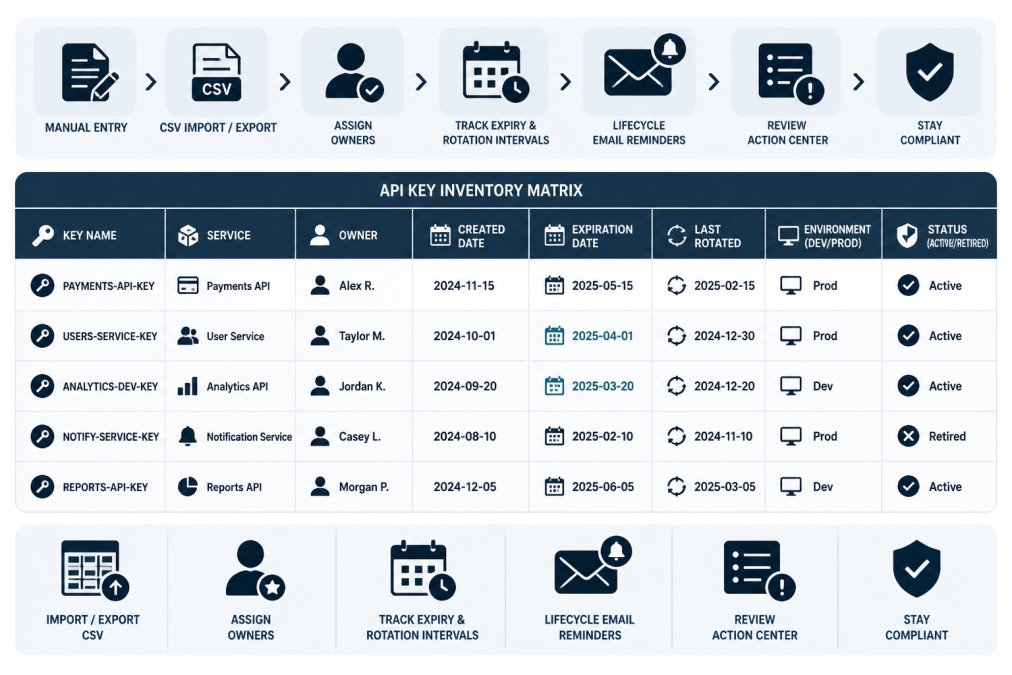
An inventory template should capture these fields:
| Field | Purpose | Example |
|---|---|---|
| Key Name | Descriptive identifier | prod-stripe-api-key |
| Service | Which provider or system | Stripe, AWS, GitHub |
| Owner | Responsible engineer or team | Alice Chen, Platform Team |
| Created Date | When the key was generated | 2026-01-15 |
| Expiration Date | When the key expires | 2026-07-15 |
| Rotation Interval | How often it should rotate | Every 6 months |
| Last Rotated | Date of most recent rotation | 2026-01-15 |
| Environment | Dev, staging, or production | Production |
| Status | Active, retired, or compromised | Active |
Start with a spreadsheet or CSV if you don't have a dedicated tool. We've published a free credential inventory template with these fields ready to use; you can adapt it to your team's needs and import it into a tracking system later.
4. Establish an API Key Rotation Policy
A rotation policy answers three questions in writing: how often each class of key rotates, who is accountable, and what evidence proves it happened. Without all three, rotation drifts into ad-hoc work that happens when someone remembers, or when an outage forces it.
Setting intervals by key class
A single interval for every key is easy to state and hard to defend. A more useful policy classifies keys by blast radius. The intervals below are common starting points, not mandates, adjust to your risk tolerance and operational capacity.
| Key class | Example | Suggested interval | Rationale |
|---|---|---|---|
| Production, sensitive data | Payment processor, production database | 30-90 days | Highest exposure; compromise has direct business impact |
| Production, low sensitivity | Read-only metrics or status APIs | 90-180 days | Lower blast radius; longer interval reduces toil |
| Staging and development | Sandbox credentials | 180 days or on offboarding | Isolated from production data |
| Service-to-service | Internal API tokens | 90 days, or shorter if the platform supports short-lived tokens | Machine credentials are often over-privileged |
| Personal / individual | Developer-owned integration keys | On role change or offboarding, plus scheduled interval | Ownership changes are the dominant risk |
Two constraints shape these choices. First, some providers impose their own maximum key lifetime or recommend a cadence, check their documentation and treat their requirement as a floor, not a target.
The rotation procedure that avoids downtime
The most common rotation failure is a hard cutover: revoke the old key, deploy the new one, and discover the application was still using the old key somewhere.
Prerequisites: the key is recorded in your inventory with an owner, the provider supports multiple active keys for the same account or service, and you can deploy configuration changes to every consumer of the key.
- Generate the replacement key in the provider's console or API. Do not revoke the old key yet.
- Record the new key in your secrets manager and update the inventory entry, new key ID, creation date, planned cutover date.
- Migrate consumers one at a time. Update the application configuration, secret reference, or environment variable to point at the new key. Deploy to one instance or environment first.
- Verify the new key is in use. Check the provider's activity log for requests authenticated by the new key ID, and confirm the application is healthy.
- Roll out to remaining consumers. Repeat the migrate-and-verify step for each application, environment, or region.
- Monitor for stragglers. Any traffic on the old key after cutover means a consumer was missed.
- Revoke the old key once it shows no activity for a defined observation window, commonly 24 to 72 hours for production, shorter for staging.
- Record the rotation in the inventory: date, who performed it, old and new key IDs, any issues encountered.
Likely mistakes and recovery:
- Revoking before all consumers migrated. Recovery means reissuing a key and repeating the migration under pressure. The dual-key overlap exists to prevent this, do not skip the observation window.
- Missing a consumer that reads the key from a cached config. Search deployment configuration and secret references for the old key ID, not just application code.
- Forgetting to update the inventory. The next rotation will be scheduled against stale metadata. Make the inventory update part of the checklist.
Emergency rotation
The scheduled procedure assumes time. Emergency rotation, a suspected compromise, a key exposed in a log or repository, or an engineer leaving with access, compresses the sequence: revoke first and accept a brief outage if necessary, then reissue and migrate. Document the decision and timeline in the inventory entry so the incident is auditable.
Measuring whether the policy works
A policy you cannot measure is a policy you cannot enforce. Track a small set of indicators regularly:
- Keys past their rotation due date, the count and the oldest overdue key. This is the single most useful signal that the policy is being followed.
- Rotation compliance rate, the percentage of keys rotated within their interval over the last period.
- Time to rotate after a trigger, for emergency rotations, elapsed time from detection to revocation.
For teams tracking credentials in a centralized system, these indicators emerge naturally from the metadata you record: expiry dates, rotation intervals, ownership, and audit history. Credential lifecycle monitoring tools can surface overdue items and send lifecycle email reminders before a key is due, but rotation itself happens in the provider, the record of the work is what makes the policy measurable.
A rotation policy is only as good as the inventory behind it. If you have not built the inventory yet, start there, the credential inventory template and getting-started guide above cover the fields to capture and how to record ownership and rotation intervals.
5. Use an API Key Rotation Checklist to Prevent Downtime
Rotating a key sounds simple, generate a new one, use it, delete the old one, but the sequence matters. A misstep leaves the application unable to authenticate.
Here's a safe rotation checklist:
- Generate the new API key in the provider's console or API
- Store the new key in your secrets manager or environment variable storage
- Deploy the application with the new key (or update the configuration)
The critical step is verification before revocation. If you revoke the old key while the application is still using it, requests fail immediately. Monitoring logs for 5-10 minutes after deployment catches this before it becomes an outage.
6. Monitor Key Usage and Detect Anomalies
A key unused for weeks might be forgotten, abandoned, or compromised and dormant. A key suddenly making requests from a new IP address or at unusual hours might indicate unauthorized access. Most API providers offer usage logs or activity dashboards; check them regularly for keys unused recently (retirement candidates), keys used more than expected, or keys accessed from unexpected locations.
7. Revoke and Retire Keys Systematically
Revoking a key immediately stops it from working. Retiring a key means deactivating it, documenting why, and ensuring it's no longer needed anywhere in your infrastructure.
Revocation should happen immediately when a key is suspected compromised, and systematically otherwise: when a team member leaves, rotate and revoke their personal API keys; when a service is decommissioned, revoke all its keys; when a key reaches end-of-life per your rotation policy, generate a new one and revoke the old one.
Before revoking, verify the key isn't in use. Search your codebase for the key value or its identifier, check deployed applications, and confirm with the owner that it's safe. A revoked key still expected by an application causes an outage.
API key lifecycle management is fundamentally about visibility and accountability: knowing what keys exist, who's responsible, when they expire, and whether they're still in use. For teams managing credentials across multiple services and environments, recording this metadata in a centralized location makes the process auditable and repeatable. Create a free workspace to start tracking your inventory today, or use the credential inventory template to begin with a spreadsheet.
Frequently Asked Questions
How often should API keys be rotated?
Rotation frequency depends on your risk profile and compliance requirements. Most teams rotate keys quarterly or semi-annually for standard integrations. High-risk credentials, those with broad permissions or access to production systems, should rotate more frequently, often monthly or even weekly. Short-lived tokens reduce exposure windows further. Document your rotation interval in your API key rotation policy and set calendar reminders or automated alerts to prevent expiration surprises.
What should a team do when an API key is no longer needed?
Revoke the key immediately in your provider (cloud platform, API service, or third-party application). Document the revocation date and reason in your credential inventory. Verify that no applications or processes still depend on it before removal. Update your audit trail to show who revoked it and when. Remove it from environment variables, configuration files, and any documentation. This systematic approach prevents orphaned credentials from becoming security liabilities and keeps your inventory accurate.
How can a team track API key owners and expiration dates?
Maintain a centralized inventory that records each key's owner, creation date, expiration date, and rotation interval. Use a spreadsheet template, CSV file, or dedicated credential lifecycle tool to capture this metadata. Assign one owner per key, not a team or shared mailbox, so accountability is clear. Set up email reminders 30 days before expiration. Review your inventory monthly to catch gaps and ensure all active credentials have assigned owners. This visibility prevents surprise outages from expired keys and makes rotation planning predictable.
What are the best practices for key management in a multi-cloud environment?
Treat each cloud platform's credentials separately in your inventory, even if they serve the same application. Document which keys belong to AWS, Azure, Google Cloud, or other providers. Use environment-specific naming conventions (dev-aws-key-001, prod-gcp-key-002) to avoid confusion. Rotate keys on each platform according to the same schedule to simplify tracking. Store secrets in each provider's native secret manager, not in shared central storage, to maintain security boundaries. Audit access across all platforms regularly to spot unusual activity or orphaned keys.