
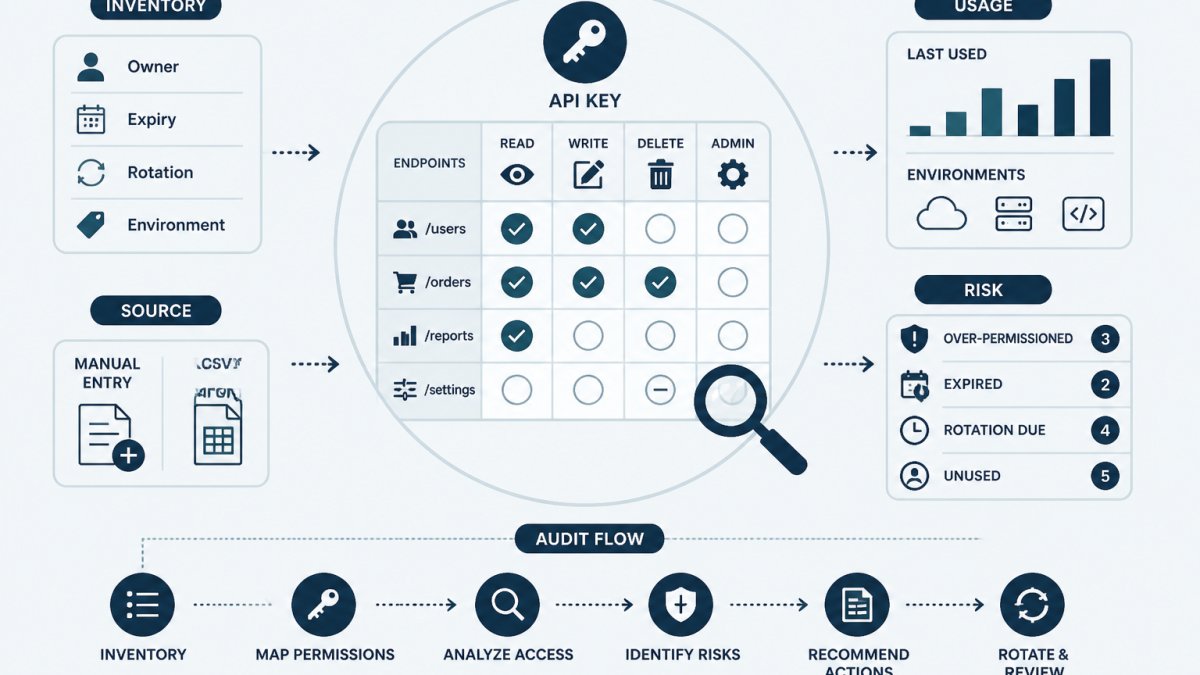
Last Updated: October 26, 2026
Quick Summary
To audit API key permissions, build a complete inventory of every credential first, then review each key's exact scope string, named owner and last-used date against the provider's own documentation. Record findings per key, triage by excessive scope and absent ownership, and remediate by narrowing scope on a replacement key before revoking the old one.
- Record scope strings verbatim from the console; paraphrased scopes cannot be re-verified later.
- Every key needs a named person as owner, not a team alias.
- Treat keys with no last-used data as unverified and rotate them, not as inactive.
- Remediate by deploying a narrowed replacement key, verifying traffic, then revoking the old key.
- Assign a separate review owner for the inventory and schedule the next review before the current one ends.
Table of Contents
- Start With an Inventory Before You Audit Anything
- How to Review API Key Access: Scope, Owner and Last Use
- An API Key Permissions Audit Checklist You Can Reuse
- An API Key Inventory Template That Survives Team Changes
- Remediating Safely: Change Scopes, Verify, Then Revoke
- API Key Rotation Best Practices After a Permission Change
- Keeping Permission Reviews From Drifting Back
- Build Your First Credential Inventory This Week
- Frequently Asked Questions
Start With an Inventory Before You Audit Anything
You cannot audit what you cannot list.
This guide walks through a practical workflow: build the inventory, read scopes and roles accurately, review ownership and last use, remediate safely, and keep the review from decaying.
Start by defining scope. Include cloud provider keys, service account credentials, CI/CD tokens, third-party integration keys, and webhook signing secrets. Record metadata only, never the secret value itself.
A free credential inventory template gives you the field structure to capture providers, owners, expiry dates, and rotation policies before the review starts.
How to Review API Key Access: Scope, Owner and Last Use
Reviewing API key access means answering three questions per credential: what can it do, who is accountable for it, and when was it last used. Answer those and you have the raw material for every remediation decision.
Many teams find that the last-used date is the hardest field to populate. Provider consoles vary: some show a last-used timestamp per key, others expose it only through audit logs, and some show nothing at all.
The review should produce a written record per key. That record is what makes the audit defensible later.
Reading Scopes and Roles Without Guessing
Scope names differ across providers, and guessing leads to wrong conclusions. Read the provider's own documentation for the exact meaning of each scope or role before recording a finding.
Record the scope string verbatim alongside your interpretation. When a reviewer later asks why a key was flagged, the verbatim scope plus a link to the provider's documentation answers the question without re-investigation.
Finding the Owner and the Purpose
Every key needs a named person, not a team alias. A team mailbox survives a departure; a person does not, which is precisely why the name matters.
For keys with no identifiable owner, the safe path is to disable or revoke rather than adopt. A practical guide on how to assign owners to API keys covers the handoff and recording process in more depth.
An API Key Permissions Audit Checklist You Can Reuse
A reusable checklist turns a one-off review into a repeatable process. The version below adds what most checklists leave out: a decision rule for each line, so two reviewers looking at the same key reach the same finding. Run it per credential and record the result in the inventory row for that key.
Prerequisites
- A credential inventory with one row per key (provider, environment, owner, purpose, scopes, created date, expiry, rotation interval, last reviewed, status).
- Read access to each provider's console or API for the accounts in scope, or a documented export from the team that holds it.
- The provider's own scope and role documentation open in a tab, because scope names are not portable across platforms.
- A named reviewer and a review date recorded before you start.
The checklist with decision rules
Each item has a pass condition and a default action when it fails. The action is a recommendation, not an automatic change; the owner still decides.
- Key is in the inventory with provider, environment, and creation date. Pass if all four fields are populated. Fail: add the row before reviewing anything else, otherwise the finding has nowhere to live.
- Exact scope or role string is recorded verbatim. Pass if the string matches the console character-for-character. Fail: copy it again; paraphrased scopes cannot be re-verified later.
- Each scope is checked against the provider's documentation. Pass if every scope has a one-line interpretation and a link to the doc page. Fail: mark the key
unverifiedand do not remediate until the meaning is confirmed. - A named human owner is recorded. Pass if a person, not a team alias, is listed. Fail: flag as
orphanedand schedule disable-or-revoke review. - Documented purpose matches actual usage. Pass if the purpose line describes what the logs show the key doing. Fail: rewrite the purpose or flag the key as
purpose-mismatch. - Last-used date is known, or the key is marked unverified. Pass if a timestamp exists from the console or audit logs. Fail: mark
unverifiedand treat as high priority for rotation, not as inactive. - Write, delete, or admin-level scopes have a written justification. Pass if the justification names the operation and the service that needs it. Fail: flag
excess-scopeand open a narrowing task. - Expiry is set and in the future, or the absence is documented. Pass if an expiry date exists or the provider does not support expiry and the inventory records the intended review date. Fail: flag
no-expiry. - Storage location is recorded (vault, CI secret store, environment variable, other). Pass if the location is named. Fail: flag
storage-unknown; do not record the secret value itself.
Triage: turning checklist results into a priority order
Two criteria do most of the work: excessive scope and absent ownership. A simple triage that most teams find workable:
| Finding combination | Priority | Default action |
|---|---|---|
| Admin or write scope + no named owner | Highest | Disable pending owner identification; revoke if no owner is found within the review window |
| Admin or write scope + owner present but no justification | High | Narrow scope on a replacement key, then retire the old one |
| Read-only scope + no owner | Medium | Attempt owner identification via logs and commit history before disabling |
| Any scope + last-used unverified | Medium | Rotate on the normal schedule; do not assume inactive |
| Any scope + expiry passed | High | Rotate immediately and record the new expiry |
| Purpose mismatch, owner and scope otherwise fine | Low | Correct the purpose line and re-review next cycle |
This table is a starting point, not a policy. Teams with regulatory or contractual review obligations should set their own thresholds and record the reasoning.
Common mistakes and recovery
- Recording a paraphrase of the scope. Recovery: re-open the console, copy the exact string, and note the correction date.
- Treating "no last-used data" as "unused." Recovery: mark unverified, keep the key live, and rotate on schedule. Revoking on the assumption of disuse is a common cause of avoidable outages.
- Skipping the justification line for admin scopes. Recovery: add the justification or downgrade the scope; an unjustified admin key is the finding, not a formality.
- Reviewing without a named reviewer. Recovery: stop and assign one. An unattributed review cannot be defended later.
The output of a completed pass is a consistent record per key, a triage list, and a set of remediation tasks with owners, not a pile of notes.
An API Key Inventory Template That Survives Team Changes
An inventory template is only useful if it can be maintained by someone who did not create it. Design fields so a new engineer can fill them in without tribal knowledge.
| Field | Example value | Why it matters |
|---|---|---|
| Credential name | billing-sync-prod |
Human-readable identifier |
| Provider | Cloud or SaaS platform | Locates the console to change it |
| Environment | production / staging | Scopes remediation urgency |
| Owner | Named engineer | Accountability and handoff |
| Purpose | One-line description | Justifies scope |
| Scopes | Verbatim scope string | Basis for least-privilege review |
| Created | Date | Age and drift indicator |
| Expiry | Date or "none" | Rotation planning |
| Rotation interval | 90 days | Policy compliance |
| Last reviewed | Date | Audit trail |
| Status | active / flagged / revoked | Lifecycle state |
Keep secret values out of the inventory entirely. Metadata about a credential is not the credential, and separating the two keeps the inventory shareable with people who should not see secrets.
Remediating Safely: Change Scopes, Verify, Then Revoke
Remediation is where audits cause outages. The safe sequence is: narrow the scope on a replacement credential, deploy it, verify traffic, then revoke the old key.
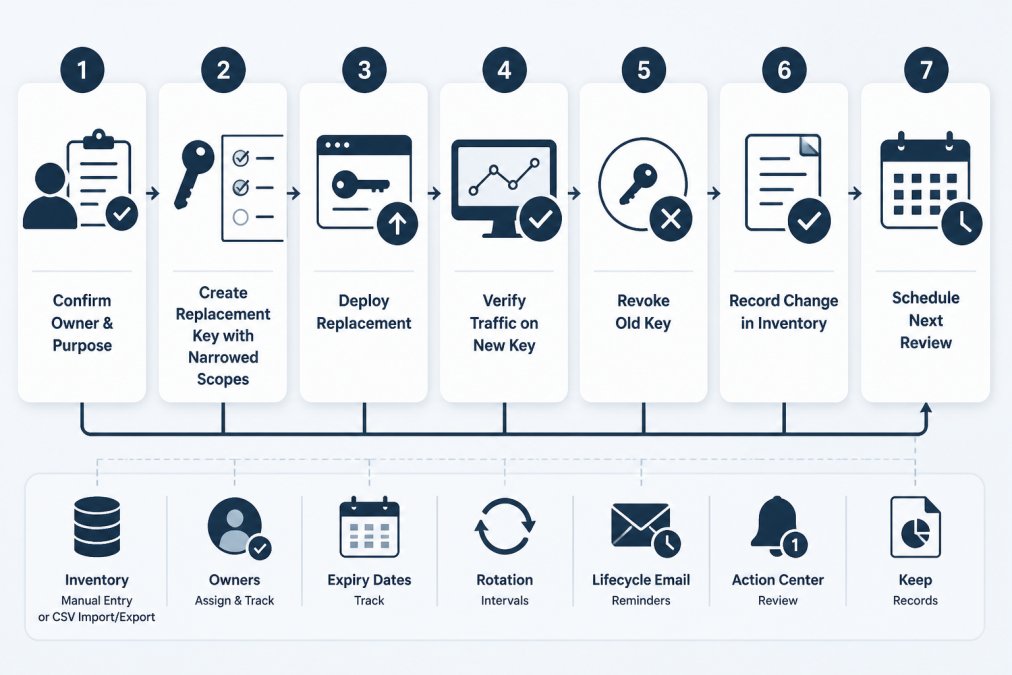
- Confirm the owner and purpose of the key being changed.
- Create a replacement key with the narrowed scope set.
- Deploy the replacement to the consuming service.
- Verify requests succeed on the new key using logs or a health check.
- Revoke the old key in the provider console.
- Record the change, date, and reviewer in the inventory.
Watch out: revoking before verification is the most common cause of self-inflicted incidents in permission reviews.
More lifecycle detail sits in 7 API key lifecycle management tips, which covers generation, storage, rotation, and revocation together.
API Key Rotation Best Practices After a Permission Change
A permission change resets the clock on a credential.
Set a rotation interval that matches the key's blast radius. Broad-scope keys warrant shorter intervals than read-only keys with narrow reach.
Expiry tracking is the weak point in most programs. Keys without expiry dates drift for years. A step-by-step guide on how to track API key expiry covers reminders and rotation planning across providers.
Keeping Permission Reviews From Drifting Back
Permission drift is the quiet failure mode: scopes get widened for a debugging session, a temporary key becomes permanent, and the review's findings erode within months.
Assign a review owner for the inventory itself, separate from the owners of individual keys.
Lifecycle reminders help here. KeyGuardRail tracks expiry dates, rotation intervals, and owners as metadata, sends email reminders when deadlines approach, and keeps an audit history of recorded changes.
Build Your First Credential Inventory This Week
A first inventory does not need to be complete to be useful. Start with production credentials, the keys with the widest scopes, and anything without a named owner.
Set a review date for every entry, even a provisional one. A date that exists can be moved; a blank field never gets revisited.
The getting-started walkthrough covers setting up a workspace, verifying your email, enabling MFA, and importing a first inventory without sharing secret values.
Frequently Asked Questions
How do I check what permissions an API key has?
Open the key in the provider console that issued it. Most providers show scopes or roles on the key detail page, and cloud platforms show them in the IAM or service account view attached to the key. Record the scopes, the resource it can reach and the last-used date in your inventory. If the console only shows a key prefix and creation date, trace the key to its service account or role first, because the permissions live there rather than on the key itself.
How often should API key permissions be reviewed?
Review permissions on a fixed schedule and after any triggering event. A quarterly review fits most small teams, with an immediate review when someone leaves, a service is retired or an integration changes. Set the interval per key based on how much it can reach and how often it changes. Keys with broad write access and no recent use deserve the shortest interval. The point is a predictable date on the calendar, not an annual scramble.
What is the difference between an API key and an access token?
An API key is usually a long-lived string tied to a project or service account, used to identify the calling application. An access token is typically short-lived, issued after an authentication step, and often carries scoped permissions and an expiry. Both are credentials and both belong in your inventory. The practical difference for an audit is lifetime: tokens expire on their own, while API keys often stay valid until someone revokes them, so unused keys are the ones that quietly accumulate.
How do I safely rotate an API key after changing its permissions?
Create the replacement key with the narrowed scopes first, deploy it to the calling service, and confirm requests succeed on the new key before you revoke the old one. Keep both valid during the overlap so a failed deploy does not take the integration down. Once traffic is confirmed on the new key, revoke the old one in the provider and record the rotation date, the new scope set and who did the work in your inventory. Never paste key values into tickets, logs or chat.
