
Last Updated: November 4, 2026
Quick Summary
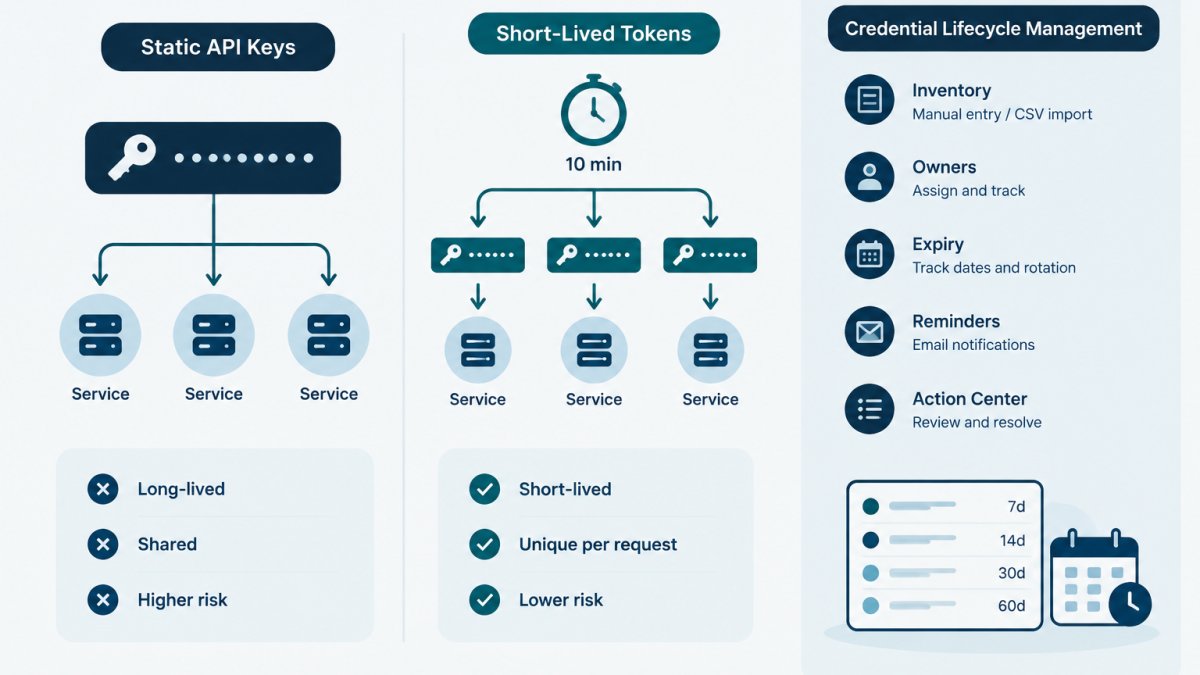
Migrating from static API keys to short-lived tokens means replacing long-lived, manually distributed credentials with credentials that expire quickly and are issued on demand. Short-lived tokens typically stay valid for minutes to hours and lapse automatically, shrinking the exposure window without manual revocation. The trade-off is operational effort: you must keep the token issuance and refresh path healthy.
- Static keys carry no expiry by default, so nothing forces a review and risk grows in silence.
- A token valid for 15 minutes is commonly refreshed at 11 minutes, leaving a 4-minute buffer.
- Refresh-ahead with jitter stops a fleet of services from stampeding the issuer at once.
- Run old and new credentials in parallel, then revoke the old one outright once overlap closes.
- Rotate an exposed credential first and clean Git history second, since history rewriting is optional.
Table of Contents
- Why Static API Keys Become a Liability
- Short-Lived vs Long-Lived Access Tokens
- How Short-Lived Tokens Change Your Authentication Flow
- API Credential Rotation Best Practices During a Migration
- Managing Service Account Token Expiration
- Credential Inventory Management for the Transition
- Common Migration Mistakes and How to Recover
- Start Your Migration with a Credential Inventory
- Frequently Asked Questions
Why Static API Keys Become a Liability
Migrating from static API keys to short-lived tokens means replacing long-lived, manually distributed credentials with credentials that expire quickly and are issued on demand. Static keys carry no expiry by default, so nothing forces a review, the risk grows in silence.
How Static Keys Leak: Source Code, Logs and URLs
Static keys leak through ordinary engineering work, not exotic attacks. A developer hard-codes a key to get a prototype running and commits it.
The OWASP guidance on secrets management is blunt about this: secrets in source code are effectively public the moment they reach a shared repository.
- Source code: hard-coded values in config files, test fixtures and notebooks
- Logs: request dumps, error traces and third-party logging services
- URLs: query parameters captured by browsers, proxies and referrer headers
For a deeper treatment of these vectors, see how to prevent API key leakage in source code.
What a Leaked Key Actually Costs You
A leaked key costs engineering time first: revoking, rotating, auditing usage, checking downstream systems and documenting the incident, all landing on whoever owns the integration. The cost scales with how many systems depended on the credential and how long it sat unnoticed.
Watch out: the most common mistake is disabling a key and assuming the job is done. A disabled key can often be re-enabled, and any copy of the value still exists.
Short-Lived vs Long-Lived Access Tokens
Short-lived tokens are credentials with a deliberately brief validity window, typically minutes to hours, issued by an identity provider or token service after authentication. Long-lived tokens stay valid until someone revokes them.
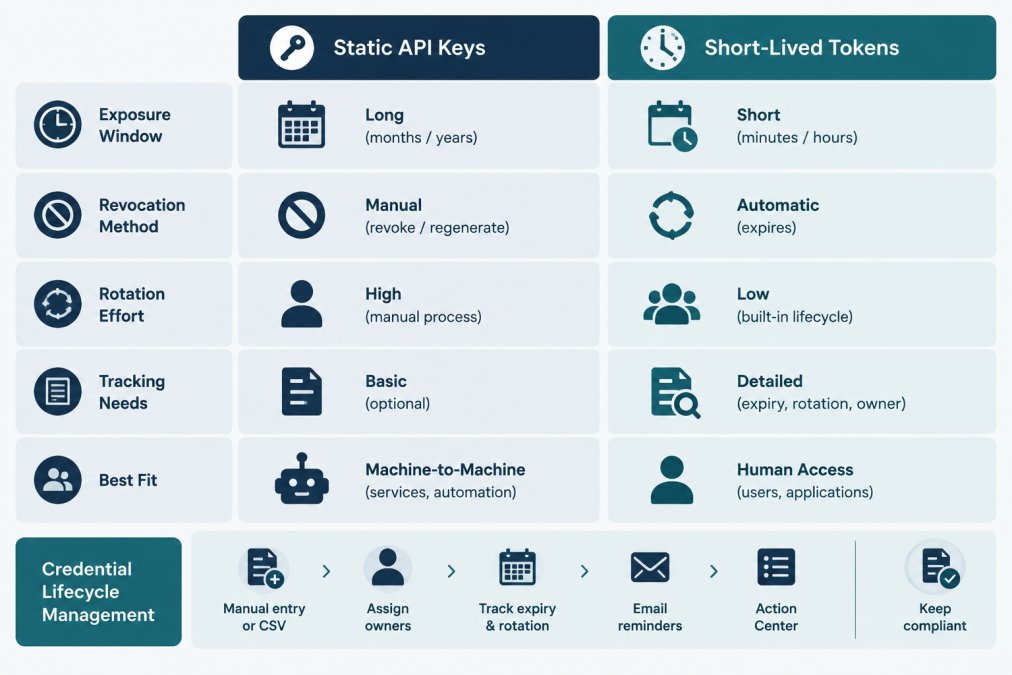
| Dimension | Static API Key | Short-Lived Token |
|---|---|---|
| Exposure window | Until manually revoked | Minutes to hours |
| Revocation | Manual, per key | Automatic at expiry |
| Rotation effort | Scheduled human work | Handled by token issuance |
| Tracking needs | Expiry dates, owners, rotation intervals | Issuance config plus service account ownership |
| Best fit | Low-risk internal scripts | Machine-to-machine and human access |
The matrix hides a real cost. Short-lived tokens move work from "remember to rotate" to "keep the issuance path healthy." That is usually a better trade, but it is not free.
How Short-Lived Tokens Change Your Authentication Flow
Short-lived tokens change the authentication flow from a stored secret to a request-time exchange. A client authenticates with a longer-lived identity (a workload identity, a service account, or a scoped bootstrap credential), receives a token with a short expiry, uses it, and lets it lapse.
Practically, that means:
- A service authenticates to a token issuer using its platform identity
- The issuer returns a token with a defined lifetime and scope
- The service caches the token in memory, never on disk
- The service refreshes before expiry, not after a failure
- The token expires on its own if the service dies
The hard part is step four. Refresh logic needs to handle clock skew, issuer outages and retry storms. A token that expires mid-request produces a failure that looks like a permissions bug, not an expiry bug.
Choosing a Token Lifetime
There is no universal correct lifetime, but there are workable defaults. A common pattern is to set the token lifetime to roughly a single request plus a safety margin, then refresh at a fixed fraction of that lifetime.
Two constraints shape the choice. First, the issuer's minimum and maximum lifetimes, many identity providers enforce a floor (often 5 or 10 minutes) and a ceiling (often 1 hour for interactive flows, longer for workload identity). Second, issuance cost: if every refresh is a round trip to a remote issuer, very short lifetimes multiply that traffic.
Refresh Patterns That Survive Failure
The refresh path is where migrations break. Three patterns are worth knowing:
- Refresh-ahead with jitter. Refresh at a fixed fraction of lifetime, but add random jitter (a few seconds) so a fleet of services does not all refresh at the same instant and stampede the issuer.
- Single-flight refresh. When many concurrent requests need a new token, only one should call the issuer; the rest wait on the result. Without this, a busy service can issue dozens of parallel refresh calls and hit rate limits.
- Fail-open with a short grace window. If the issuer is briefly unavailable, a token that expired seconds ago may still be accepted by the resource server if it allows a small clock-skew tolerance. Do not rely on this as a design; treat it as a safety net.
Watch out: a refresh loop that retries immediately on failure will amplify an issuer outage into a self-inflicted denial of service. Use exponential backoff with a cap, and surface refresh failures as a distinct metric so they are not buried inside generic 401 counts.
What Changes for Human vs Machine Access
For human access, short-lived tokens usually mean an interactive login that yields a session token, refreshed by a refresh token or a re-authentication prompt.
For machine access, the long-lived secret is often eliminated entirely. This is the pattern the Google Cloud documentation on service account keys recommends when workload identity is available, and it is the direction most cloud providers have moved toward.
The migration is not just a credential swap. It is a change in where the trust anchor lives: from a value copied into a config file to an identity the platform attests.
API Credential Rotation Best Practices During a Migration
API credential rotation best practices during a migration come down to one rule: never let the old and new credential paths fail at the same moment. Migrations break because teams cut over in a single step and discover the gap in production.
Overlap Old and New Credentials
Run both credentials in parallel. Issue the new credential, confirm it works in staging, then shift a small percentage of traffic. Keep the old credential valid until the new path has handled real load for a full cycle. The NIST SP 800-57 guidance on cryptographic key management frames this as a cryptoperiod: a defined window during which a key is authorized for use, with overlap built into the transition.
For a NIST-aligned rotation policy with dual-key overlap steps, see the API key rotation guide.
Revoke, Don't Just Disable
Revoke the old credential outright once the overlap window closes. Disabling leaves a re-enable path and a lingering value. Record the revocation date, the owner and the reason, because the next person to touch that integration will ask.
Managing Service Account Token Expiration
Managing service account token expiration is the discipline of knowing, in advance, which machine identities will lapse and who is responsible when they do. Service accounts are the hardest part of any migration because nobody watches them the way they watch a human login.
A workable approach:
- List every service account and its issuing platform
- Record the token lifetime and refresh mechanism for each
- Assign a named owner, not a team alias
The Google Cloud documentation on service account keys recommends avoiding long-lived service account keys where workload identity is available, which is the same argument this article makes in general terms. Tracking expiry dates, owners and reminders is exactly the gap a lifecycle tool covers; this step-by-step guide to tracking API key expiry walks through the setup.
Credential Inventory Management for the Transition
Credential inventory management is the practice of maintaining a record of every credential's metadata: what it is, where it is issued, who owns it, when it expires and how often it should rotate. During a migration, the inventory is the migration plan.
Many teams already use a vault, which stores secret values but does not by itself answer questions about ownership or upcoming expiry. If you want to see that tracking in practice, credential lifecycle monitoring covers assigning owners, setting rotation intervals and reviewing upcoming deadlines.
Common Migration Mistakes and How to Recover
The migration mistakes that hurt most are predictable. Here is what goes wrong and how to recover.
| Mistake | Symptom | Recovery |
|---|---|---|
| Single-step cutover | Auth failures across services | Re-enable old path, stage the rollout |
| No token refresh buffer | Intermittent 401s under load | Refresh at 75% of lifetime, add retry |
| Orphaned service accounts | Expiry with no owner | Assign owners before migration starts |
| Secrets left in Git history | Scanner flags old commits | Rotate the value, then clean history |
| Disabling instead of revoking | Old credential still usable | Revoke and record the action |
| Refresh stampede | Issuer rate limits during deploy | Add jitter and single-flight refresh |
The Git History Mistake, in Detail
Removing a secret from the current commit does not remove it from earlier ones.
The correct order is rotate first, clean second. Rotating (or revoking) the credential makes the exposed value useless; cleaning history is housekeeping that reduces the chance of a future reader copying the dead value.
A workable sequence:
- Revoke or rotate the exposed credential in the issuing provider. Record the action, the date and the owner.
- Confirm the old value no longer works by attempting an authenticated call with it and observing a rejection. Do not skip this; a rotated key that still works means the rotation did not take effect everywhere.
- Identify the scope of exposure. Which commits, branches, tags and forks contain the value? The hosting platform's documentation covers how to search history. GitHub's documentation on removing sensitive data from a repository describes the history-rewrite steps and the caveats around forks and cached views.
- Rewrite history only if the value's presence is still a problem after rotation. Rewriting is disruptive: it changes commit hashes, breaks open pull requests, and requires every collaborator to re-clone. For many teams, rotation alone is sufficient and history rewriting is optional.
- Notify collaborators before and after a rewrite so they do not push stale branches that reintroduce the value.
Watch out: a history rewrite does not reach forks you do not control, and it does not invalidate cached views on the hosting platform immediately.
A Leak-Response Sequence for a Suspected Exposure
When a key is suspected or confirmed exposed, the order of operations matters more than the speed of any single step. A common sequence:
- Contain. Revoke the credential at the issuer. If the issuer supports it, disable the associated service account or integration as well. Revocation is preferred over disabling because disabling leaves a re-enable path.
- Assess. Pull the issuer's usage logs for the credential's lifetime. Look for calls from unexpected source addresses, unexpected endpoints, or volumes that do not match normal traffic. Record findings with timestamps.
- Rotate. Issue a replacement through the new short-lived path if ready, or the old path if not. Update every consumer, then verify each one.
- Notify. Tell the integration owner, the security contact, and any downstream team whose service depended on the credential. If the credential granted access to third-party data, follow the provider's incident-reporting requirements.
- Record. Write down what happened, what was revoked, what was rotated, and what was learned.
- Prevent recurrence. Add the credential to the inventory with an owner and expiry, add a pre-commit check if the leak was via source code, and review whether the integration can move to short-lived tokens sooner than planned.
The sequence is not a guarantee that nothing went wrong, it is a way to make the response auditable and repeatable. The assessment step is the one teams skip under pressure, and it is the one that tells you whether the incident is over.
Start Your Migration with a Credential Inventory
A clear inventory makes the migration easier to plan and audit. Before touching a single authentication flow, build a list of every credential in scope, its owner, its expiry and its rotation interval.
A free credential inventory template gives you the fields to start with, including fictional examples and import guidance. From there, KeyGuardRail's getting-started path covers assigning owners, setting rotation intervals and reviewing the Action Center as deadlines approach.
Short-lived tokens reduce the exposure window, but they do not remove the need to know what exists, who owns it and when it changes.
Frequently Asked Questions
What happens if a short-lived token is leaked?
The exposure window is bounded by the token's lifetime. Once it expires, the leaked value stops working, so the attacker's access ends without you having to hunt down every copy. That is the main reason short-lived tokens reduce risk compared with static API keys, which stay valid until someone revokes them. Expiry is not instant protection, though: a token stolen mid-lifetime still works until it lapses, so keep scopes tight and monitor for suspicious use.
How do you handle authentication when migrating to short-lived tokens?
Most teams move to a token-exchange step: a long-lived bootstrap credential, stored in your existing vault, is exchanged for a short-lived access token that the workload uses for a set period. The application requests a fresh token when the old one nears expiry, often through a sidecar or SDK. Document each bootstrap credential's owner and expiry in your inventory so the exchange itself does not become an untracked long-lived secret.
What is a sensible rotation interval for short-lived API tokens?
There is no universal number. Match the lifetime to the sensitivity of what the token can reach and how often the workload runs. High-privilege tokens should be shorter than low-risk read-only ones. The practical rule: set a lifetime you can actually support with automated refresh, then record the interval and expiry date so nothing lapses silently. Review intervals whenever a token's scope changes.
How can teams track credential lifecycles during a migration?
Keep an inventory that records, for every credential, its owner, expiry date, rotation interval and where it is used. During a migration that inventory also tracks which keys are still static, which are converted, and which are pending revocation. KeyGuardRail supports this with manual entry or CSV import, lifecycle email reminders and an audit history, while the actual rotate and revoke steps happen in your provider.
