
Quick Summary
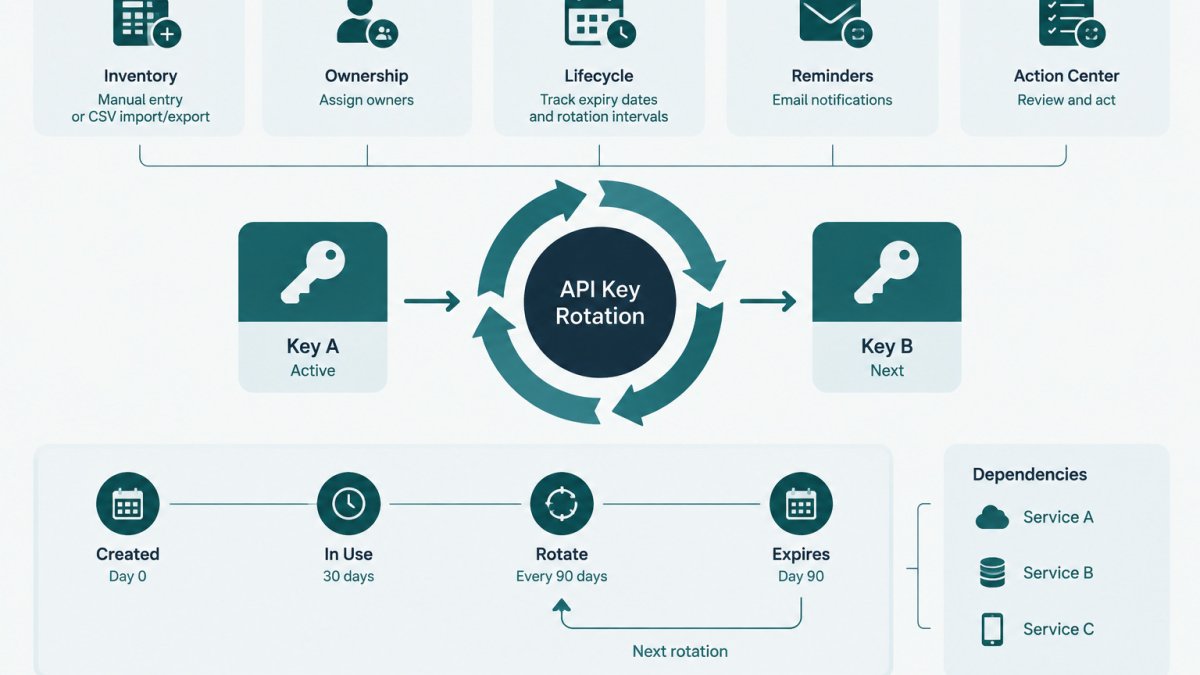
API key rotation without a secrets vault works by keeping an accurate inventory with a named owner and dated rotation record for every credential. Overlapping rotation, where old and new keys are briefly both valid, lets teams deploy the new key and verify traffic before revoking the old one. Secret values stay in the systems where they already live.
- Record each credential's owner, systems, issue date, expiry date and rotation interval in one inventory.
- Set rotation intervals by key privilege, distribution breadth and any provider-enforced expiry.
- Use overlapping rotation where the provider allows two active keys at once.
- Verify each deployment location, including scheduled jobs, before revoking the old key.
- Keep the old key valid until verification completes, since rollback is only possible while it remains active.
Table of Contents
- Why API Key Rotation Matters When You Have No Vault
- Building an API Key Inventory Template Before You Rotate Anything
- How Often to Rotate API Keys and What Sets the Interval
- Zero-Downtime API Key Rotation with Overlapping Keys
- Distributing Replacement Keys Safely Without a Central Vault
- API Key Rotation Checklist for Verification, Rollback and Handoff
- Scheduling Your Next Rotation and Recording It
- Frequently Asked Questions
How Can You Rotate API Keys Without a Secrets Vault?
Last Updated: November 11, 2026
Rotating API keys without a secrets vault is possible, but it demands more discipline from the team. Without a central store that issues and retrieves secret values, the work depends on three things: an accurate inventory, a named owner for every credential, and a dated record of each rotation. KeyGuardRail is built around that metadata layer. It tracks owners, expiry dates and rotation intervals while the secret values themselves stay in the systems where they already live.
Why API Key Rotation Matters When You Have No Vault
An API key is a static credential. Once it is issued, it remains valid until someone revokes it or its provider expires it. That makes exposure costly: a key copied into a configuration file, a CI variable or a shared document stays usable by anyone who holds it until it is replaced.
Rotation limits that window. Replacing a key on a schedule, or immediately after a suspected exposure, shortens how long a leaked value stays useful. Without a vault, however, nothing automatically tells the team which keys exist, where they are deployed or when they expire. Rotation therefore becomes a coordination problem before it is a technical one.
Building an API Key Inventory Template Before You Rotate Anything
Before rotating anything, record every credential in a single list. The minimum useful fields are:
- Credential name and provider
- Owning team or individual
- Systems and environments where the key is deployed
- Issue date and expiry date (if the provider sets one)
- Rotation interval set by policy
- Last rotated date and the person who performed the rotation
A spreadsheet works at small scale. KeyGuardRail's free credential inventory template provides these fields in CSV form, and KeyGuardRail can import the same metadata through CSV once the team is ready to track lifecycle reminders centrally. Use fictional placeholder names such as billing-api-prod-key when drafting the first version, and never paste live values into the inventory.
How Often to Rotate API Keys and What Sets the Interval
No universal interval applies to every key. Teams typically set intervals based on the key's privilege, how widely it is distributed and whether the provider enforces expiry. Keys with broad write access or wide distribution across services justify shorter intervals. Read-only keys confined to one service may tolerate longer ones.
Some providers issue keys that expire automatically, which sets a hard ceiling regardless of internal policy. For Kubernetes and other service tokens, see service account token expiration management. Where no provider limit exists, the interval is an internal decision. Record the chosen interval in the inventory so that the expiry reminder reflects policy, not guesswork. Review intervals after any incident or when a key's scope changes.
Zero-Downtime API Key Rotation with Overlapping Keys
The safest pattern without a vault is overlapping rotation, in which the old and new keys are both valid for a short period. For a worked AWS example, see AWS access key rotation policy with zero-downtime steps. The sequence follows five steps:
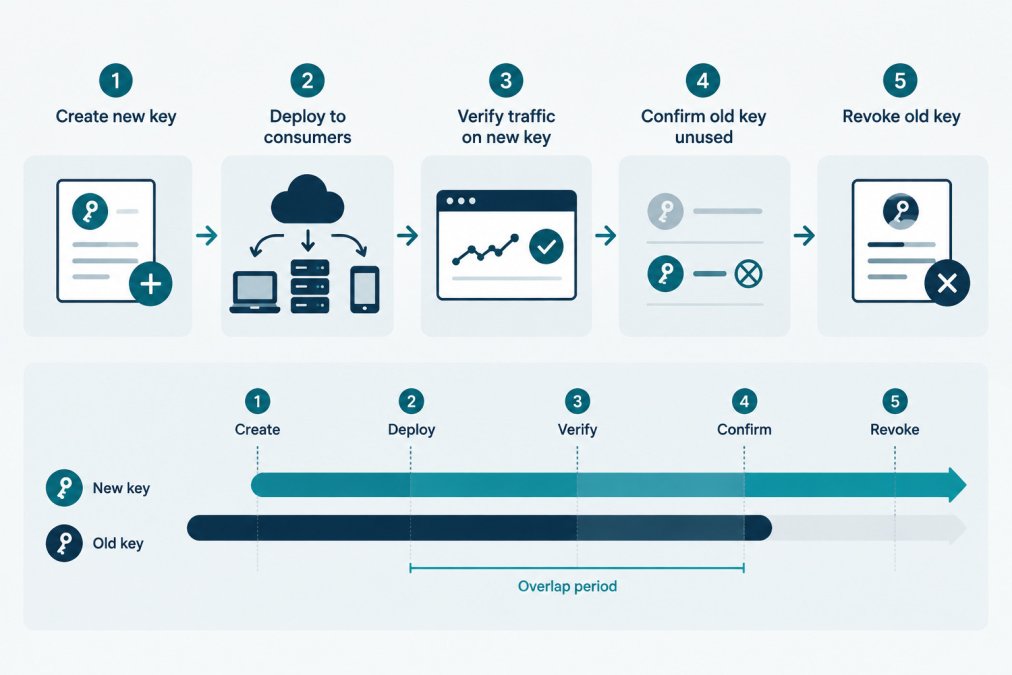
- Create the new key in the provider's console, leaving the old key active.
- Deploy the new key to consumers in one environment at a time, starting with staging.
- Verify traffic on the new key by checking provider logs or application authentication success rates.
- Confirm the old key is unused for an agreed observation period.
- Revoke the old key and record the completion in the inventory.
Not every provider supports two active keys at once. Where only one key is permitted, rotation requires a short, planned cutover window, and the team should schedule it accordingly. Confirm the provider's behavior in its current documentation before designing the process.
The overlapping rotation sequence breaks down into five steps, each with a clear purpose:
| Step | What to do | Purpose |
|---|---|---|
| 1. Create the new key | Create it in the provider's console, leaving the old key active | Old key keeps serving traffic |
| 2. Deploy the new key | Roll it out to consumers, staging first | Limits blast radius |
| 3. Verify traffic | Check provider logs or authentication success rates | Confirms adoption |
| 4. Confirm old key unused | Observe for an agreed period | Makes revocation safe |
| 5. Revoke old key | Revoke and record completion in the inventory | Closes the exposure window |
Distributing Replacement Keys Safely Without a Central Vault
Without a vault, distribution is where most vault-free rotations go wrong. A vault gives every consumer one place to fetch the current value. Without one, the team has to know, for each key, every location that holds a copy and how that copy will be updated.
The distribution channels teams commonly use are these:
- CI/CD protected variables, which store a value in the pipeline platform and inject it into jobs. The value is masked in logs where the platform supports masking, but a script that echoes it can still expose it, so masking is a backstop and not a control.
- Environment-specific configuration on the host, such as a file readable only by the service account, written during deployment and never committed to source control.
- Container orchestrator secret objects where the platform provides them, mounted into the workload at start time.
- Operating-system credential stores on developer workstations or single-host services, where the platform's own access controls apply.
Each channel has a different propagation behavior. A pipeline variable changes for the next job run only. A value mounted into a running container usually does not change until the container restarts. A host file changes as soon as the deployment writes it, but a running process may have read the old value into memory and keep using it.
A Propagation Checklist for Each Key
Before switching any consumer to the new key, walk the inventory entry and confirm the following:
- Every deployment location listed for the key is known, including scheduled jobs, workers, and one-off scripts that may not appear in the main service list.
- Each location is assigned to an environment, and the new key is scoped to that environment where the provider allows it.
- The restart or reload step needed to pick up the new value is written down and owned by someone.
- No copy exists in source control, build logs, chat history or a shared document. Search the repository and pipeline history for the key's name pattern before declaring the old key unused.
Configuration Drift Across Services
Drift is the most common cause of a rotation that appears complete but leaves a stale consumer running. A service deployed from an older image, a worker started before the rotation and never restarted, or a staging copy that someone edited by hand can all keep the old key alive. The practical defense is to treat the inventory's deployment-location list as the source of truth and to check each listed location after the cutover, rather than trusting that the deployment pipeline reached everything.
Verifying Each Consumer After Cutover
After the new key is deployed, confirm adoption location by location:
- Check the provider's logs, if it exposes per-key usage, for requests using the new key from each expected source.
- Check the old key's usage for requests from any source that should already have switched.
- Compare authentication failure counts in each consuming service against the pre-rotation baseline.
- Mark the location as verified in the inventory only after steps 1 to 3 agree.
If the provider does not expose per-key usage, the verification falls back to application logs and the restart record. Note this limitation in the inventory, because it means revocation carries more risk and a longer observation period is warranted.
Watch out: a worker or cron job that runs weekly can look healthy for days after cutover and still hold the old key, so verify scheduled jobs by their next run rather than by the deployment date.
The sequence matters. Deploy to staging, verify there, then move production one location at a time, verifying each before the next. Batching production changes makes it harder to tell which consumer caused a failure when one occurs.
API Key Rotation Checklist for Verification, Rollback and Handoff
Use this checklist for each rotation:
- Inventory entry confirmed, including owner and deployment locations
- New key created and stored only in approved deployment mechanisms
- Deployment verified in staging before production
- Authentication success confirmed in provider or application logs
- Rollback criteria defined: if authentication failures exceed the agreed threshold, restore the old key while it is still valid
- Old key revoked only after the observation period ends
- Inventory updated with rotation date, performer and next due date
- Handoff notes passed to the new owner if responsibility changes
Rollback is only possible while the old key remains valid. For guidance on when to roll back versus retry a failed rotation, see rollback vs retry decision guide. This is the main reason to prefer overlapping rotation where the provider allows it. Once the old key is revoked, recovery means issuing a new key, which takes the full process again.
Scheduling Your Next Rotation and Recording It
Schedule the next rotation as soon as the current one closes. Set the due date in the inventory, assign the owner and add the rotation to the team calendar. KeyGuardRail can track expiry dates and rotation intervals and send lifecycle email reminders, so the due date is visible without relying on memory.
Record each completed rotation with the date, the person who performed it and any issues encountered. A checklist for tracking integration credentials across team handoffs can help keep these records consistent when ownership changes. Over time, this history shows which credentials are overdue, which owners need support and which providers require longer lead times.
Frequently Asked Questions
Do API keys need to be rotated?
Rotation is a recommended control rather than a universal legal requirement, but it limits how long a leaked or copied key stays useful. Keys that are shared widely, stored in several places, or tied to former staff are the strongest candidates. Teams without a vault can still rotate on a schedule by recording each key's owner, expiry date and rotation interval in a simple inventory, then working through the list at each due date. Provider documentation should be checked for any mandatory expiry or rotation behavior the platform enforces.
How can a team rotate API keys without a secrets vault?
Start with an inventory that lists every key, its owner, the services that use it and the provider where it is issued. Then create a replacement key in the provider, deploy it to each consumer through your existing configuration process, verify traffic, and revoke the old key. A vault is not required for this sequence, but each key still needs a controlled place to live, limited access, and a record of who performed each step. Document the work after each rotation so the next owner knows the current state.
How do you avoid downtime when replacing an API key?
Use overlapping keys where the provider supports two active keys at once. Create the new key, update consumers in stages, confirm that requests are authenticating with the new key, and only then revoke the old one. Where the provider allows just one active key, plan a short maintenance window and deploy the change to all dependent services in a tightly controlled sequence with a rollback value ready. Check the provider's documentation for exact behavior before you begin.
How should teams track API key owners and expiry dates?
Keep one record per credential with fields for owner, consuming services, environment, issue date, expiry date, rotation interval and last rotation date. KeyGuardRail can hold this metadata through manual entry or CSV import and export, send lifecycle reminders and keep an audit history of recorded rotations. The secret value itself stays in your existing provider or vault. Review the inventory at least when a team member changes role so ownership does not lapse.
