
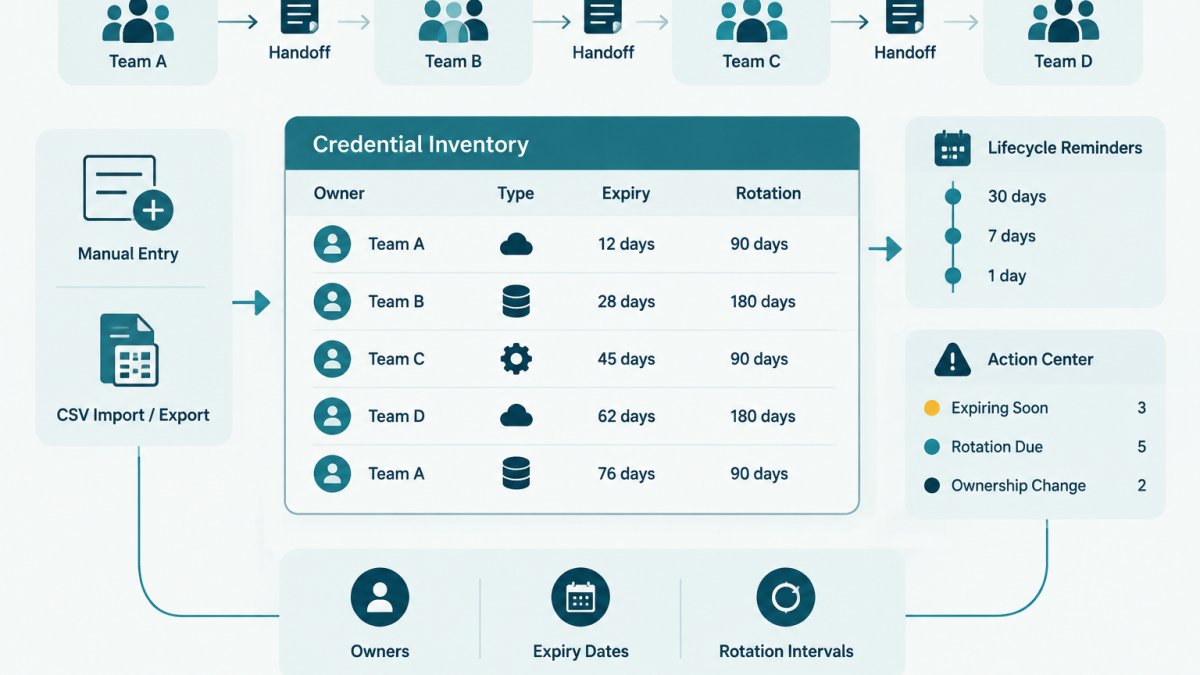
Last Updated: November 4, 2026
Quick Summary
Tracking integration credentials across team handoffs works when every credential has an inventory record with a named owner, expiry date, rotation interval, and revocation path, and the secret value stays in the vault. Each handoff follows a checklist: confirm the record, name both owners, verify access, rotate if needed, update metadata, revoke old access, and log evidence.
- Build the API key inventory before the handoff, not during it.
- Record one accountable owner and one backup owner per credential, never a team alias.
- Verify the receiving team can authenticate before revoking the outgoing owner's access.
- Reassign a departing owner's rotation entries during offboarding, not after a missed deadline.
- Keep handoff evidence with date, actors, verification step, and any rotation performed.
Table of Contents
- Why Integration Credentials Get Lost in Handoffs
- Build an API Key Inventory Template Before the Handoff
- The Credential Handoff Checklist, Step by Step
- How to Track API Key Expiration Dates Without Guesswork
- Building a Credential Rotation Schedule That Survives Staff Changes
- Who Owns a Credential After the Handoff
- Keeping Handoff Evidence You Can Actually Show
- Start Your First Credential Handoff Record
- Frequently Asked Questions
Why Integration Credentials Get Lost in Handoffs
Tracking integration credentials across team handoffs fails most often because the credential itself was never treated as an asset with a record.
The pattern repeats in small technical teams.
A service account is a non-human identity used by an application, pipeline, or integration to authenticate to another system (Service accounts overview | Identity and Access Management (IAM)).
Handoffs make the gap visible. Onboarding, offboarding, team reorganizations, and vendor migrations all move credentials between people. Without a written record, each handoff erodes accountability.
Build an API Key Inventory Template Before the Handoff
An API key inventory template is a structured record of every credential your team holds, including its provider, purpose, owner, and lifecycle dates. Build it before the handoff, not during it.
Start with a spreadsheet or CSV with one row per credential. The credential inventory template provides a ready-made structure with fictional examples and import guidance you can adapt.
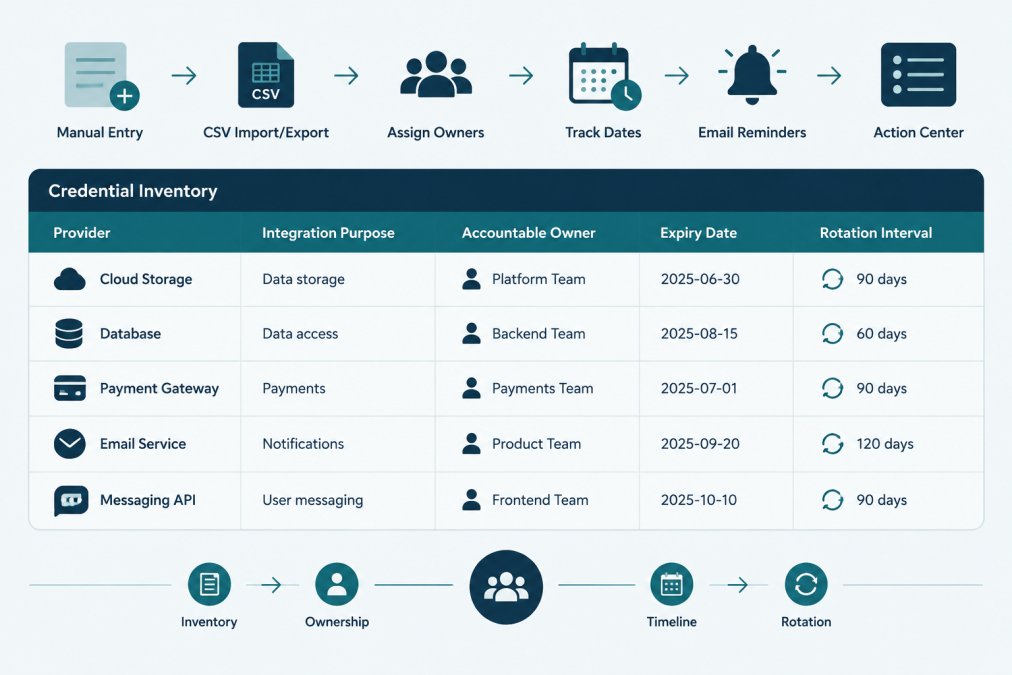
What to Record for Each Integration Credential
Record enough to act on the credential without ever storing the secret value itself. A practical minimum:
- Provider and integration name, which system, and what it connects to
- Credential type, API key, OAuth client, service account, access token, or certificate
- Accountable owner, one named person, not a team alias
- Backup owner, a second named person who can act if the primary is unavailable
- Environment, production, staging, or development
- Expiry date, if the provider enforces one
- Rotation interval, how often it should be replaced
- Last rotated, the date the value was last changed
- Revocation path, where an admin revokes it in the provider console
- Dependent services, what breaks if the credential stops working
Never put the credential value in the inventory. The record describes the credential; the vault or provider stores it.
An Integration-Specific Inventory Row, Worked Example
Generic password inventories treat every secret as interchangeable. Integration credentials are not: the same provider can have separate keys for production, staging, and a sandbox, each with a different owner and blast radius. Track them as separate rows so a handoff moves one integration without silently moving another.
A fictional row for a payments integration might look like this:
| Field | Example value (fictional) |
|---|---|
| Provider | ExamplePay |
| Integration | Checkout webhook receiver |
| Credential type | API key |
| Environment | Production |
| Accountable owner | A. Rivera (placeholder) |
| Backup owner | J. Okafor (placeholder) |
| Expiry date | 2027-03-01 |
| Rotation interval | 90 days |
| Last rotated | 2026-12-01 |
| Revocation path | ExamplePay dashboard > Developers > API keys |
| Dependent services | checkout-api, order-worker |
That row answers the four questions a handoff actually raises: what is it, who owns it, when does it expire, and where do you revoke it. A spreadsheet can hold this. So can a dedicated tracker. KeyGuardRail supports manual metadata entry and CSV import/export for this kind of record, with ownership and expiry metadata kept separate from the secret value.
Watch out: if you copy a production row to create a staging row, change the environment, owner, and revocation path too, a duplicated row with stale ownership is worse than no row, because it looks maintained.
The Credential Handoff Checklist, Step by Step
A credential handoff checklist is the ordered sequence that moves a credential from one accountable owner to another with verification at each step. Work through it in order, and record the date and actor at every stage.
- Confirm the inventory entry exists. If the credential is missing from the inventory, add it before proceeding.
- Name the outgoing and incoming owners. Both parties must be identifiable individuals.
- Confirm the receiving team accepts ownership. Acceptance is explicit, not assumed.
- Verify the receiving team can access the credential through the approved path (vault or provider console), not through a chat message.
- Rotate the credential in the provider if the handoff crosses a trust boundary, such as a contractor leaving.
- Update the owner, last-rotated date, and rotation interval in the inventory.
- Revoke the outgoing owner's access in the provider.
- Record the handoff as evidence with date, actors, and what changed.
For the offboarding side of a handoff, including revocation and verification steps, see the guide on building a secure credential offboarding process.
Verification and Rollback if the Handoff Fails
Verification means confirming the receiving team can authenticate successfully before the outgoing owner's access is removed. Test the integration in a non-production path first where possible. If authentication fails, roll back: restore the previous owner's access, confirm the credential still works, and correct the inventory entry before retrying. Watch out: revoking the outgoing owner's access before the receiving team has verified authentication can take a working integration offline with no quick recovery path.
How to Track API Key Expiration Dates Without Guesswork
Tracking API key expiration dates means recording each credential's expiry in one place and setting reminders ahead of the deadline. Guesswork enters when expiry dates live only in provider dashboards that nobody checks.
The workflow has four parts. First, record the expiry date from the provider console at creation time. Second, assign an owner who is accountable for the renewal. Third, set a reminder ahead of the date. Fourth, plan the rotation so it happens before expiry, not after.
A step-by-step guide to tracking API key expiry covers the full workflow. The key discipline is consistency: every credential gets an expiry date recorded, even when the provider does not enforce one, using your internal rotation interval as the effective deadline.
Building a Credential Rotation Schedule That Survives Staff Changes
A credential rotation schedule is the plan that defines when each credential is replaced and who performs the work. It survives staff changes only when it lives in a shared system rather than one person's calendar.
Two failure modes dominate. The first is a schedule held by a single engineer; when they leave, the schedule leaves with them. The second is a schedule that exists but has no owner per entry, so nobody acts when a deadline passes.
Rotation happens in the provider. For alternatives to spreadsheets when the person who built the schedule moves on, see alternatives to manual credential rotation tracking.
A Rotation Checklist With Verification and Rollback
Most rotation guidance stops at "rotate the key." The operational risk is in what depends on it. Use this sequence for any credential that other services consume:
- Identify dependents. List every service, pipeline, or integration that authenticates with this credential. The inventory's dependent-services field is the starting point.
- Confirm a rollback path. Before changing anything, know how to restore the previous credential or reissue a working one. For providers that support overlapping keys, create the new key before revoking the old one.
- Rotate in the provider. Generate the new value in the provider console. Do not paste it into chat, tickets, or source control.
- Update consumers through the approved path. Push the new value through your vault or secret-injection mechanism, not by editing files by hand.
- Verify authentication. Trigger a real request from each dependent service in a non-production path first where possible, then production. Confirm success before removing the old credential.
- Revoke the old value. Only after verification, disable or delete the previous credential in the provider.
- Record the rotation. Update last-rotated, the new expiry or interval, and the actor in the inventory.
Watch out: revoking the old credential before dependents are verified is the most common way a routine rotation takes an integration offline. If verification fails, roll back to the previous credential, confirm service is restored, fix the consumer configuration, and retry, do not leave the integration in a half-rotated state overnight.
Making the Schedule Survive a Handoff
A schedule survives staff changes when three things are true: every entry has a named owner and backup owner, reminders go to the owner rather than a shared inbox, and the rotation record is visible to anyone who inherits the credential. When an owner leaves, reassign their rotation entries during offboarding, not after the next missed deadline. KeyGuardRail's lifecycle email reminders and Action Center help surface upcoming rotations and expiries, and the audit history keeps a dated record of the work performed, while the actual rotation still happens in the provider.
Who Owns a Credential After the Handoff
Ownership transfers at the moment the receiving team accepts it, and that transfer must be recorded. A credential with no named owner is a credential nobody will rotate.
Accountable ownership means one person, not a distribution list. A team alias feels safe but diffuses responsibility until nobody answers. The guide on assigning owners to API keys covers the method for tracking accountability across infrastructure.
KeyGuardRail keeps ownership metadata separate from secret values, so the accountable owner for each credential is visible without exposing the credential itself.
Keeping Handoff Evidence You Can Actually Show
Handoff evidence is the dated record of who transferred what, when, and with what verification. It answers the question an auditor or incident responder will ask: who had access, and when did it change?
Keep evidence that records the date, the outgoing and incoming owners, the verification step, and any rotation performed.
KeyGuardRail keeps an auditable lifecycle history and an Action Center for upcoming deadlines, giving teams a record of the work performed. It does not store secret values, so the evidence describes the credential's lifecycle without holding the credential.
Start Your First Credential Handoff Record
The first handoff record is the hardest and the most valuable. You can create a free workspace to hold that first record, or start from the free credential inventory template if you prefer to begin in a spreadsheet.
Tracking integration credentials across team handoffs is a documentation discipline before it is a tooling problem. The teams that handle it well treat every credential as an asset with a named owner and a lifecycle record, and they keep the secret value in the vault while the metadata lives where the whole team can see it.
Frequently Asked Questions
What information should a team track for each integration credential?
Record the integration name, the provider, the credential type (API key, service account, OAuth token), the environment it serves, the accountable owner, the receiving team, the issue and expiry dates, the rotation interval, and where the secret value itself lives. Never store the secret value in the inventory. A spreadsheet works to start; a CSV import into a tracking tool scales better once you pass a few dozen entries.
Should integration credentials live in an inventory or a vault?
Both, and they do different jobs. The vault holds the secret value and controls access to it. The inventory holds lifecycle metadata: who owns it, when it expires, when it was last rotated, and who received it in a handoff. Keeping the two separate means the people who plan rotations do not need permission to read the secret itself.
How do you hand off API keys safely when a team member leaves?
Work from the inventory, not from memory. List every credential the departing person owned, assign a new accountable owner, rotate each credential in its provider rather than passing the old value along, verify the receiving service still authenticates, then revoke the old credential and record the date. A credential handoff checklist keeps the order consistent so nothing is rotated before the replacement is verified.
How can a team verify that a credential handoff is complete?
Three checks: the receiving team confirms the integration works with the new credential, the old credential is revoked or disabled at the provider, and the inventory shows the new owner, rotation date and expiry. If any of those three is missing, the handoff is still open. Recording the verification step in your audit history is what turns a verbal handoff into evidence.
