
Last Updated: October 28, 2026
Quick Summary
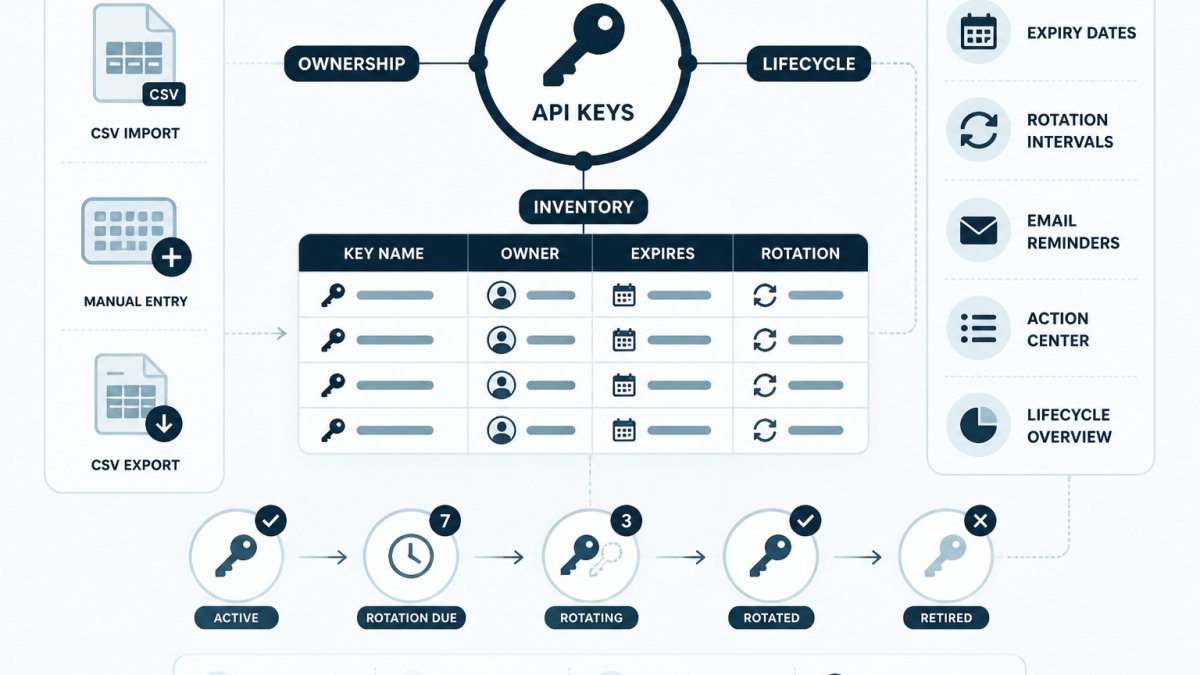
Credential lifecycle management tools track API key ownership, expiry dates and rotation history, and they fall into three categories: vaults that store secret values, metadata inventories that record accountability, and discovery services that find sprawled credentials. KeyGuardRail is a metadata inventory that tracks named owners, expiry dates and rotation intervals without holding secret values, so teams rotate keys in their provider and record the work.
- Vaults store and inject secret values; metadata inventories answer who owns a key and when it expires.
- KeyGuardRail records ownership, expiry and rotation intervals but does not store secrets or rotate keys.
- Score each candidate 0 to 2 on ownership accuracy, orphan detection, expiry tracking, audit evidence and recovery.
- Run five fictional test scenarios, including the departed owner and the overdue rotation, before you buy.
- Record the last-rotated date, the performer and the date after every rotation in your inventory.
Table of Contents
- What Credential Lifecycle Management Tools Actually Do
- How We Evaluated Tools for API Key Ownership and Rotation
- Comparison: Credential Lifecycle Tools for API Key Ownership
- A Scorecard for Ownership and Rotation Buyers
- Test Scenarios to Run Before You Buy
- KeyGuardRail: Metadata Inventory Without Secret Custody
- TokenTimer: Credential Visibility and Expiry Alerts
- AWS Secrets Manager and Google Cloud Secret Manager: Vault-First Rotation
- Doppler: Secrets Platform for API Keys
- What the Comparison Does Not Settle
- Secrets Management vs Credential Inventory: Which Do You Need?
- Building an API Key Inventory Template That Scales
- API Key Rotation Best Practices for Small Teams
- Your API Key Rotation Checklist
- Start Your Credential Inventory in KeyGuardRail
- Frequently Asked Questions
What Credential Lifecycle Management Tools Actually Do
Credential lifecycle management tools track who owns each API key, when it expires, and when it was last rotated. KeyGuardRail approaches this from the metadata side: it records ownership, expiry dates and rotation intervals without holding the secret value itself.
The core job has four parts: knowing a credential exists, who is accountable for it, when it must be replaced, and being able to prove the replacement happened. Vaults handle storage and injection; inventories handle accountability. Teams that conflate the two often end up with neither done well.
This guide separates the tool categories and gives a rotation checklist a small team can use.
Tool Categories: Vaults, Metadata Inventories, and Discovery Services
Three distinct categories of credential management tools solve different problems.
Vaults store secret values and inject them at runtime. AWS Secrets Manager, Google Cloud Secret Manager and HashiCorp Vault fit here.
Discovery services attempt to find credentials already sprawled across providers. TokenTimer describes discovery of machine credentials on its product page.
A team can reasonably run a vault plus an inventory. Neither replaces the other.
How We Evaluated Tools for API Key Ownership and Rotation
Evaluation can rest on documented capabilities rather than vendor claims about security outcomes. Useful criteria include named-person ownership, expiry and rotation-interval tracking, whether the tool executes rotation or the team does, whether secret values are held, and whether a history of completed work exists.
The fifth criterion is where most comparisons fall short. A rotation that nobody recorded is indistinguishable from a rotation that never happened, which is exactly the gap an audit trail closes.
Check each vendor's current pricing page before committing.
Verify capabilities against each vendor's own documentation before purchase.
Comparison: Credential Lifecycle Tools for API Key Ownership
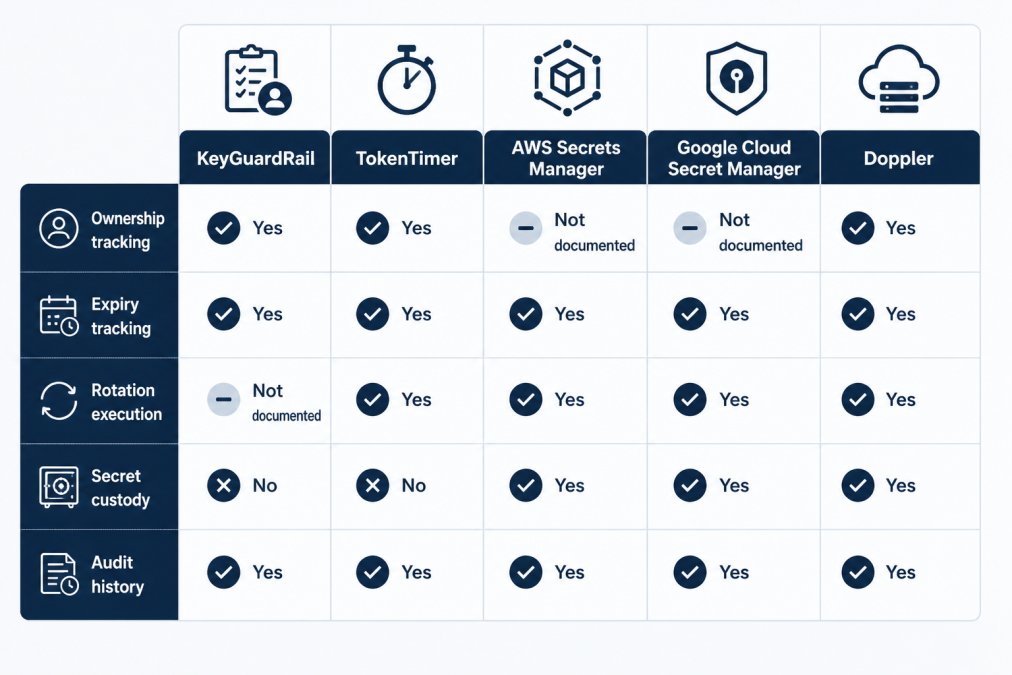
The table below compares documented capabilities across the five tools reviewed. "Not documented" means the vendor's public materials do not establish the capability, not that it is absent.
| Tool | Ownership tracking | Expiry tracking | Rotation execution | Holds secret values | Audit history |
|---|---|---|---|---|---|
| KeyGuardRail | Yes, named owners | Yes, with reminders | No, team rotates in provider | No | Yes |
| TokenTimer | Owner alerts | Yes | Not documented | No | Not documented |
| AWS Secrets Manager | Not documented | Rotation schedules | Yes, within AWS | Yes | Via AWS logging |
| Google Cloud Secret Manager | Not documented | Not documented | Not documented | Yes | Via GCP logging |
| Doppler | Not documented | Not documented | Not documented | Yes | Not documented |
A Scorecard for Ownership and Rotation Buyers
Feature checkboxes hide the differences that matter. A scorecard can help you assess the workflows you will actually run.
- Ownership accuracy: Can you assign one named person, a team, a service, an environment and a business purpose to each credential? Can you reassign ownership on a handoff without losing history?
- Orphan detection: Does the tool surface credentials with no owner or an owner who has left?
- Expiry and rotation tracking: Are expiry dates and rotation intervals separate fields? Do reminders fire before the deadline, and can you see overdue items in one view?
- Rotation execution vs. recording: Does the tool rotate the key itself, or record a rotation the team performed in the provider? Be explicit about which you need.
- Audit evidence: Is there an immutable history of who changed what and when? Can you export it for a reviewer?
- Recovery: If a rotation breaks a consumer, can you see which services depend on the credential and roll back?
A tool that scores well on storage but poorly on ownership accuracy may fit the vault category better than the inventory category. A tool that scores well on ownership but cannot record rotation history may function like a spreadsheet with reminders.
Test Scenarios to Run Before You Buy
A short trial can help you assess a tool's behavior. Run these fictional scenarios with placeholder data, never real credentials.
- The departed owner: Create a credential owned by
alex@example.com, then mark that owner as inactive. Does the tool flag the credential as orphaned, and can you reassign it toplatform-team@example.comwhile keeping the original owner in the history? - The overdue rotation: Set a credential with a 90-day rotation interval and a last-rotated date 120 days ago. Does it appear in an overdue view or Action Center, and does a reminder fire?
- The dependent-service break: Record a credential consumed by three services. Rotate it in the provider, then record the rotation. Can you see which services were affected and when the old key was revoked?
- The audit question: Six months later, can you answer "who rotated this key, when, and what was the previous expiry date?" from the tool alone?
- The CSV round-trip: Export your inventory, edit it, and re-import. Do ownership and dates survive, or does the import overwrite history?
KeyGuardRail: Metadata Inventory Without Secret Custody
KeyGuardRail is a credential lifecycle monitoring platform that tracks metadata while secret values stay in the team's existing vault or provider.
KeyGuardRail does not discover credentials automatically, rotate or revoke keys in providers, or store secrets. A team performs rotation in its existing provider, then records the work in KeyGuardRail.
Best for: small technical teams with keys spread across providers who need accountability and expiry visibility without moving secrets. Skip if: the team expects the tool to rotate keys for them.
TokenTimer: Credential Visibility and Expiry Alerts
Best for: teams whose primary problem is not knowing which credentials exist. Skip if: recorded ownership and an auditable rotation history are the priority.
AWS Secrets Manager and Google Cloud Secret Manager: Vault-First Rotation
Best for: teams whose credentials live predominantly in one cloud and who want storage and rotation in one place. Skip if: the estate spans multiple providers and needs a cross-provider ownership view.
Doppler: Secrets Platform for API Keys
Use the scorecard and test scenarios above to establish what the platform actually does for ownership and rotation recording.
Best for: teams comparing secrets platforms for API key storage and injection. Skip if: the requirement is metadata-only tracking that leaves secrets where they are.
What the Comparison Does Not Settle
A vault and an inventory address different needs. Match the category to the gap before comparing brands.
Secrets Management vs Credential Inventory: Which Do You Need?
A vault stores secret values; an inventory tracks metadata such as ownership, expiry and rotation history.
Teams that already run a vault still lose track of ownership: the vault knows a secret exists, but not that the platform engineer who created it left eight months ago. That accountability problem lives outside the vault's scope. A fuller explanation appears in credential management versus secret storage.
Practical test: if the question starts with "where is the secret," reach for a vault. If it starts with "who owns this and when does it die," reach for an inventory.
Building an API Key Inventory Template That Scales
An API key inventory can start with a small set of fields. Keep the schema manageable so it is practical to maintain.
Start with these:
- Credential name: a human label, never the key itself
- Provider or system: AWS, Stripe, an internal service
- Environment: production, staging, development
- Owner: one named person, not a team alias
- Created date: when the credential was issued
- Expiry date: when it stops working, if the provider sets one
Two practices can help keep the inventory useful. First, never paste a secret value into any field; record a reference to where it lives instead. Second, assign an accountable owner to each credential.
A credential inventory template is available. KeyGuardRail supports CSV import and export.
Assign an owner to the inventory itself.
API Key Rotation Best Practices for Small Teams
Plan when rotation happens, how dependent services get updated, and how to recover when a consumer breaks.
Scheduled vs. Event-Driven Rotation
Scheduled and event-driven rotation address different situations.
Scheduled rotation runs on a fixed interval set by provider guidance or your policy. It is predictable, but may not address every change that calls for rotation.
Event-driven rotation is prompted by a change, such as an owner leaving, a credential being suspected exposed, a service being decommissioned, or a provider deprecating an authentication method.
One approach is to set a scheduled interval for each credential and treat event-driven rotation as an override. Record the interval and the reason for any off-cycle rotation.
Updating Dependent Services Safely
Where the provider permits an overlap window, it can help with a staged rotation. Identify which services consume the key before planning the sequence:
- Identify every consumer of the credential, including batch jobs, CI/CD pipelines, and third-party integrations that may not appear in application code.
- Issue the new key alongside the old one in the provider, so both are valid during the transition.
- Deploy the new value to each consumer, one at a time where possible.
- Verify each consumer works with the new credential before moving to the next.
- Revoke the old key only after every consumer is confirmed.
- Record the rotation in the inventory with the date, the performer, and any notes.
Avoid rotating unrelated credentials at once when you need to isolate a failure. Where the provider permits it, keep the overlap window until consumers are verified before revoking the old key.
Rollback and Recovery When a Consumer Breaks
Even with sequencing, a consumer can break. Write the recovery plan before the rotation, not during it.
- Keep the old key valid until verification passes. If a consumer fails, you can revert that consumer to the old value without reissuing anything.
- Know which services depend on the credential. Keep this dependency information available so you can investigate a failure.
- Record the failure and the fix. If a rotation caused an outage, document it for future reference.
- Set a rollback deadline. If verification does not pass within a defined window, revert and investigate rather than extending the overlap indefinitely.
Rotation Intervals: How to Choose
There is no universal interval. Consider provider documentation and your own policy when setting intervals. Record the interval per credential so it can be reviewed against the relevant requirements and context.
For teams tracking expiry across multiple providers, a step-by-step method for tracking API key expiry covers reminder setup and rotation planning in more detail. The credential inventory template includes fields for rotation interval and last-rotated date, which are the two values the rotation process depends on.
Your API Key Rotation Checklist
Run this checklist per credential.
- Confirm the owner is current and still employed
- List every consumer of the credential
- Issue the replacement credential in the provider
- Deploy the new value to each consumer
- Verify each consumer works with the new credential
- Revoke the old credential in the provider
Recording who performed the rotation and when can help answer later questions about the work.
Assigning and tracking owners across a larger estate gets its own treatment in the guide to assigning owners to API keys.
Start Your Credential Inventory in KeyGuardRail
A KeyGuardRail inventory can be started with manual metadata entry or CSV import. No secret values are required.
KeyGuardRail complements existing vaults by tracking owners, expiry dates, rotation intervals and lifecycle history. The getting-started page provides more information.
Vaults store secrets; inventories track accountability. Choose the category that matches your needs, then use the checklist as part of your rotation process.
Frequently Asked Questions
What is credential lifecycle management?
Credential lifecycle management is the practice of tracking each credential from creation to revocation: who owns it, when it expires, how often it should rotate, and when it was last changed. It covers API keys, service accounts, integration tokens and certificates. Tools range from vaults that store and rotate secrets to metadata inventories that record ownership and deadlines while secret values stay in your existing provider. An inventory can help teams track ownership and expiry alongside their existing secret storage.
How do teams track who owns each API key?
Assign an accountable owner to each credential in an inventory. Record the owner's name, the system the key belongs to, its environment, expiry date and rotation interval. Review the list during offboarding. KeyGuardRail supports manual entry or CSV import, owner assignment, expiry tracking, lifecycle email reminders and audit history.
What is the difference between a secrets vault and a credential inventory?
A vault stores secret values and controls access to them; examples include AWS Secrets Manager and Google Cloud Secret Manager. A credential inventory records metadata about credentials, such as owner, expiry, rotation interval and change history, without holding the secret itself. The two complement each other: the vault protects the value, the inventory answers who is accountable and when rotation is due. KeyGuardRail is the inventory layer and does not replace a vault.
How often should API keys be rotated?
There is no single correct interval. Set rotation periods based on the key's blast radius, provider guidance and your own policy, then record the interval and deadline in your inventory. Consider provider guidance and your own policy when setting intervals. Rotate when an owner leaves or a key is exposed, following your team's process. Track completion in an audit history so the schedule is provable.
