
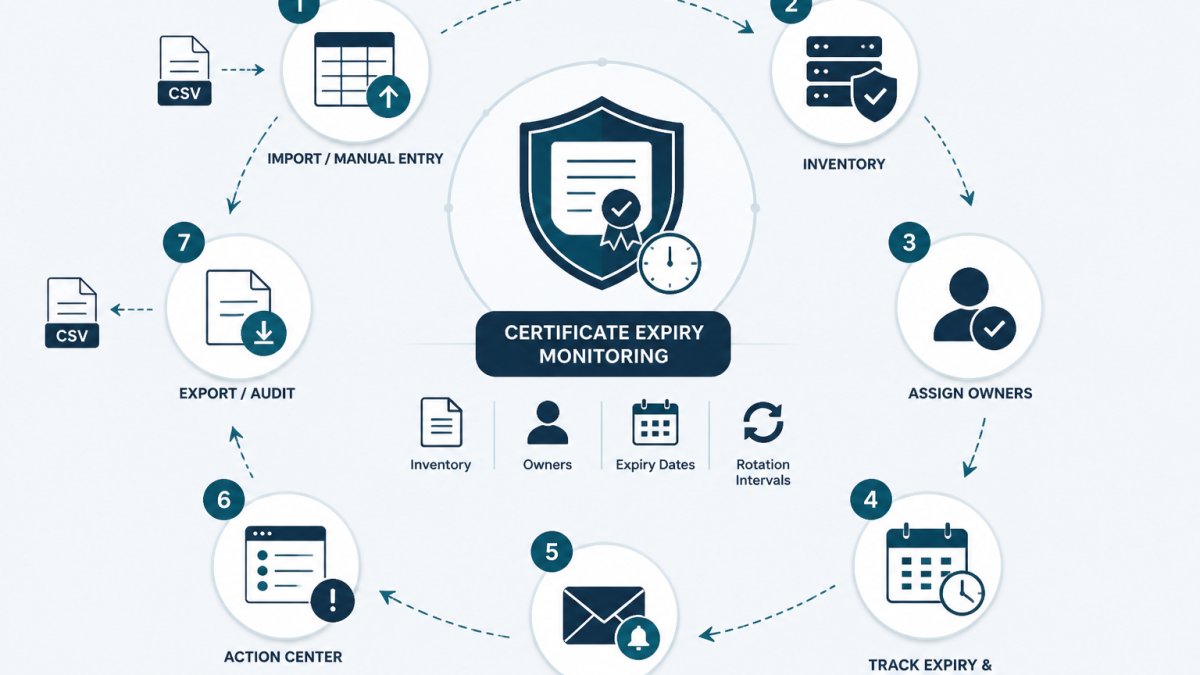
Last Updated: October 29, 2026
Quick Summary
Certificate expiry monitoring is the practice of tracking when TLS and X.509 certificates will lapse, then alerting the right person before they do. For internal services, it works when three things exist: a complete inventory, a named owner per certificate, and thresholds that prompt action without creating noise.
- Public monitoring tools cannot reach certificates on private networks, internal load balancers, or VPN-only services.
- Record seven fields per certificate, including common name, endpoint, issuing CA, owner, expiry date, rotation interval, and last verified date.
- Set the planning alert at the start of the rotation interval, not at a fixed day count like 30 days.
- Mark a renewal complete only when the live endpoint serves the new certificate and the inventory record is updated.
- Track renewal job health and CA availability, because automated renewal can fail silently while expiry counts down.
Table of Contents
- Why Internal Certificates Expire Without Warning
- Internal Certificate Management Best Practices
- Building a Certificate Inventory Before You Monitor Anything
- How to Track Certificate Renewal Intervals
- Managing Internal Service Account Credentials Alongside Certificates
- Certificate Expiry Tracking Spreadsheet: A Workable Starting Point
- Assigning Renewal Ownership and Verifying Deployment
- Setting Alert Thresholds Without Alert Fatigue
- What to Do Next
- Frequently Asked Questions
Why Internal Certificates Expire Without Warning
Certificate expiry monitoring is the practice of tracking when TLS and X.509 certificates will lapse, then alerting the right person before they do.
A public-facing certificate is easy to check. Anyone can open a browser, click the padlock, and read the expiry date. Internal certificates do not offer that convenience.
The pressure is increasing. The practical consequence for internal teams is simple: renewal ownership has to be explicit, because expiry surprises are becoming more frequent, not less. CA/Browser Forum baseline requirements for TLS certificates
What Public Monitoring Tools Cannot See
Most uptime and SSL monitoring services connect to an endpoint from outside.
So an internal certificate can sit at 30 days to expiration while every external dashboard shows green.
There is a second gap: external checks report what a certificate looks like from one vantage point, not who owns it, what it is used for, or whether renewal is in progress.
Internal Certificate Management Best Practices
Good internal certificate management rests on four habits, and none of them require a new platform:
- Record every certificate, including the boring ones. Internal CA-issued certificates for service meshes, databases, and queue brokers count.
- Name an owner for each one. "The platform team" is not an owner. A person is.
- Set a rotation interval, not just an expiry date. The interval tells you when work should start.
The common mistake is treating certificate management as a monitoring problem. Monitoring tells you something is wrong. An inventory tells you what exists, who is responsible, and when action is due. Teams that skip the inventory end up with alerts they cannot route to anyone.
Building a Certificate Inventory Before You Monitor Anything
Start with a spreadsheet and a short list of fields. A certificate inventory is a record of certificate metadata: what each certificate is, where it lives, who owns it, and when it expires.
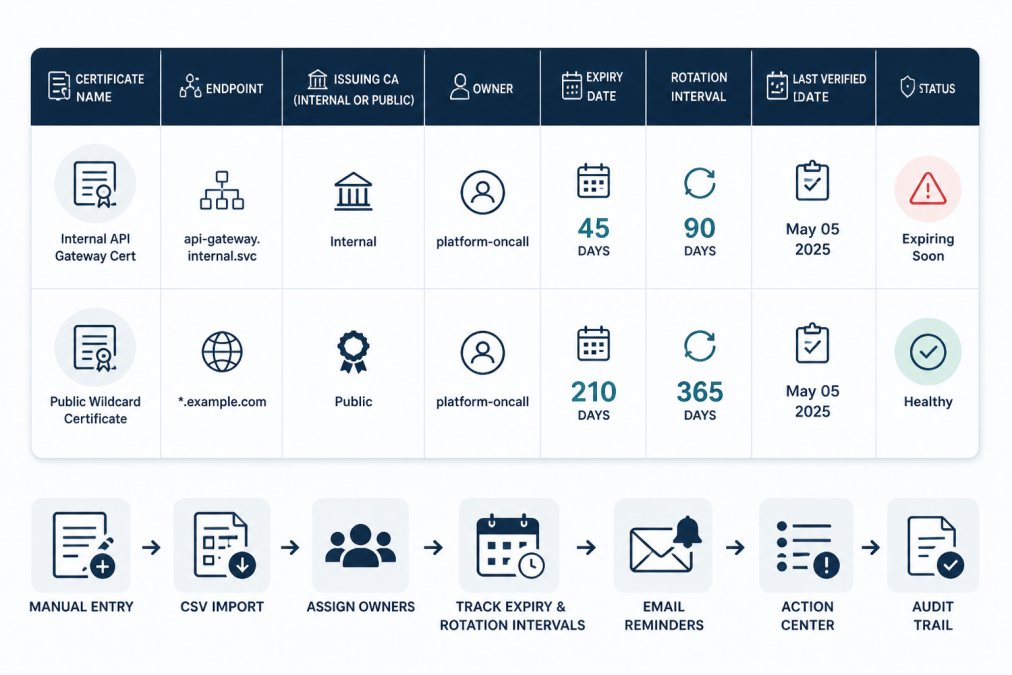
You can build this in a spreadsheet, or start from our free credential inventory template, which has fields for owners, expiry dates, and rotation policies that you can adapt for certificates.
What Metadata to Record per Certificate
Keep the field list short enough that people actually fill it in:
- Common name and SANs. What hostnames the certificate covers.
- Endpoint or location. Where it is deployed, and in which environment.
- Issuing CA. Internal CA or public CA, and which one.
How to Track Certificate Renewal Intervals
A renewal interval is the lead time before expiry when renewal work should begin. For a practical walkthrough of tracking certificate expiration dates so you can set renewal intervals for your own certificates, see our guide.
A practical method:
- List each certificate and its issuing CA.
- Estimate the real renewal path: request, approval, issuance, deployment, verification.
- Add buffer for the slowest step, usually approval or deployment.
- Record the interval as a date, not a vague note.
- Review intervals after the first renewal cycle and adjust.
For internal CA certificates, the path is often longer than expected because it depends on a person with CA access. For public CA certificates, automation may handle issuance, but deployment to every endpoint still needs checking.
The verification step is the one teams skip. After renewal, confirm the endpoint is actually serving the new certificate, not the old one.
Managing Internal Service Account Credentials Alongside Certificates
Certificates are credentials. So are the API keys and service account tokens that often sit on the same endpoints.
A shared approach helps:
- Record certificates and service account credentials in one inventory.
- Assign one owner per credential, not per system.
- Track expiry and rotation interval for both.
That last point matters. The inventory should never hold the private key or the token value.
KeyGuardRail tracks credential lifecycle metadata without storing secret values, so teams can see expiry dates and rotation deadlines in one place while secrets remain in their vault or provider.
Certificate Expiry Tracking Spreadsheet: A Workable Starting Point
A spreadsheet works well for a first pass: free, familiar, easy to share.
A simple starting structure:
| Column | Example value | Why it matters |
|---|---|---|
| Certificate name | api-gateway-internal |
Human-readable identifier |
| Endpoint | gateway.internal.example |
Where it is deployed |
| Issuing CA | Internal CA | Determines renewal path |
| Owner | platform-oncall |
Who acts on expiry |
| Expiry date | 2027-03-14 | Drives alerting |
| Rotation interval | 60 days before expiry | When work starts |
| Last verified | 2026-10-01 | Confirms record is current |
Two habits keep a spreadsheet honest: review it on a schedule, not only when something breaks, and require a last-verified date so stale rows are visible.
Watch out: a spreadsheet with no owner column becomes a list nobody acts on. The owner field is the difference between a record and a plan.
Assigning Renewal Ownership and Verifying Deployment
Ownership is the part most guides skip. A certificate with no named owner has no renewal plan, no matter how good the monitoring is. This section gives a concrete procedure: assign ownership, run the renewal, verify deployment, and recover when verification fails.
Prerequisites
- A certificate inventory with at least: certificate name, endpoint, issuing CA, expiry date, and rotation interval.
- Access to the issuing CA or the team that operates it.
- Access to the endpoint (or a teammate who has it) to confirm which certificate is being served.
Step 1: Assign a primary owner and a backup
Ownership should map to a role that survives staff changes, with a named backup. "The platform team" is not an owner; a person or a rotation role is.
- Assign one primary owner and one backup per certificate.
- Record both in the inventory next to the expiry date.
- Confirm the owner knows the renewal path for that issuing CA, who approves, who has CA access, and where the certificate is deployed.
The same discipline used for other credentials applies directly to certificates. Our guide on how to assign owners to API keys walks through the same step-by-step process for assigning accountable owners.
Step 2: Define the escalation path
An alert is only useful if it reaches someone who can act. Write the path down before you need it:
- Planning alert goes to the primary owner.
- No action within the planning window escalates to the backup.
- Urgent alert goes to the on-call rotation and the service owner.
- Renewal blocked (CA unavailable, approval stuck) escalates to whoever owns the CA or the approval process.
Record the escalation path in the inventory or the runbook so it is not reconstructed during an incident.
Step 3: Run the renewal and record it
Follow the renewal path for that issuing CA. Record the work as you go: who requested, who approved, when the certificate was issued, and when it was deployed. If a vault or provider holds the private key, keep the secret there and record only metadata in the inventory.
Step 4: Verify deployment
Verification closes the loop. After renewal and deployment, check three things:
- The endpoint serves the new certificate. Compare the serial number or not-after date on the live endpoint against the newly issued certificate. Do not rely on the file on disk being the one in use.
- The inventory shows the new expiry date. Update the row, not just the certificate.
- The last-verified date is current. This is what makes stale records visible.
If any of those is missing, the renewal is not finished.
Step 5: Recover when verification fails
The most common failure is a renewed certificate that never reached the endpoint, the "we renewed it and it still broke" incident. When verification fails:
- Confirm which certificate the endpoint is actually serving. A load balancer, sidecar, or cached connection may still hold the old certificate.
- Check every deployment target. The inventory should list all endpoints for that certificate; a renewal deployed to one but not another is a partial renewal.
- Restart or reload the service if required. Some services only pick up a new certificate on reload.
- Re-verify and update the record. Only mark the renewal complete once the endpoint serves the new certificate and the inventory reflects it.
An audit history of who did what and when turns this from memory into a record, and makes the next renewal faster.
Setting Alert Thresholds Without Alert Fatigue
Alert thresholds decide how much warning you get. Set them too late and there is no time to act; set them too early and the alert becomes background noise. A threshold only helps if the alert reaches someone who can act, and if the renewal it warns about is actually progressing.
Derive the warning window from the renewal path
Do not pick a round number like 30 days. Work backward from how long renewal actually takes for that certificate:
- Measure the renewal path. Request, approval, issuance, deployment, verification. For an internal CA, approval and deployment are usually the slow steps.
- Add buffer for the slowest step. If approval routinely takes a week and deployment to every endpoint takes another, a 14-day warning leaves no margin.
- Set the planning alert at the start of the rotation interval, not at a fixed day count. A certificate with a 60-day rotation interval and a 10-day renewal path gets its planning alert at day 60, not day 30.
- Set the urgent alert at roughly half the renewal path before expiry. That is the point where a stalled renewal becomes a real risk.
A common pattern is two thresholds per certificate: a planning alert routed to the owner, and an urgent alert routed to the on-call rotation. If you are choosing tooling, this comparison of credential expiration reminder tools covers workflows that help avoid alert fatigue. Keep the count low, one planning and one urgent alert per certificate is usually enough.
Severity by criticality, not by certificate count
Not every certificate deserves the same escalation. Classify by blast radius:
| Criticality | Example | Planning alert | Urgent alert |
|---|---|---|---|
| Critical | Internal API gateway, VPN concentrator | Owner + backup, 60 days | On-call page, 14 days |
| Standard | Service mesh, queue broker | Owner, 30 days | Owner + backup, 7 days |
| Low | Dev/test endpoints | Owner, 14 days | Owner, 3 days |
The exact day counts are illustrative, calibrate them to your measured renewal path. The point is that a dev certificate should never page on-call, and a VPN certificate should never wait for a weekly digest.
Deduplicate and suppress
Alert fatigue comes from volume, not from thresholds. Three habits keep volume down:
- Group by owner. One digest per owner per day beats twenty separate emails.
- Suppress once renewal is recorded. If the inventory shows a renewal in progress or completed, stop the planning alert. A reminder for work already done trains people to ignore reminders.
- Deduplicate across environments. The same certificate name in staging and production should not generate two independent alert streams to the same person.
Detect failed automated renewal, not just approaching expiry
This is the gap most guides miss. If a certificate is renewed automatically, by an internal CA agent, an ACME client, or a platform controller, the expiry date is not the only thing to watch.
Track three signals alongside expiry:
- Renewal job health. Did the last scheduled renewal run succeed? Record the last successful renewal date in the inventory, not just the expiry date.
- CA availability. If the issuing internal CA is down or its own signing certificate is near expiry, renewals will fail. The CA's certificate is itself an internal certificate that belongs in the inventory.
- Post-renewal deployment check. A renewed certificate that never reached the endpoint is still expired in practice. Verify the endpoint serves the new certificate after every renewal, and update the last-verified date.
A useful rule: an automated renewal that has not produced a new certificate within its expected window should raise the same urgent alert as a late manual renewal.
Certificates you cannot reach
Some internal certificates will never be visible to a network probe: offline appliances, certificates on air-gapped segments, VPN client certificates, and services behind restrictive firewalls. For these, monitoring has to be inventory-based rather than probe-based. Record the expiry date from the certificate itself, assign an owner, and rely on lifecycle reminders plus a periodic manual verification step.
What to Do Next
Certificate expiry monitoring for internal services works when three things exist: a complete inventory, a named owner per certificate, and thresholds that prompt action without creating noise. Public monitoring tools cannot see private endpoints, so the record has to come from the team that owns the infrastructure.
Start with a spreadsheet and the seven fields above. Add owners before you add tooling. Verify deployment after every renewal, and keep the last-verified date current so stale records stand out.
KeyGuardRail supports this workflow for teams that want reminders and an audit trail without storing secret values. Teams can create a free workspace to try the workflow, or review how to get started to see whether it fits how they already operate.
Frequently Asked Questions
Why is monitoring internal certificate expiry different from public SSL?
Public SSL certificates sit on internet-facing endpoints, so external monitoring services can reach them and check the chain and expiry date over the network. Internal certificates often live behind a VPN, on private subnets, or on services that never expose a port to the internet. A public poller cannot reach them, so you need either an internal monitoring agent or a metadata inventory that records expiry dates manually. The inventory approach also covers certificates on appliances and offline systems that no poller can touch.
What metadata should be tracked for internal service certificates?
At minimum record the certificate's common name, the endpoint or service it protects, the issuing certificate authority (internal CA or public CA), the expiry date, the renewal interval, the accountable owner, and the last verified date. Add the deployment location and the renewal procedure link if renewal is not automated. Keeping these fields in a shared inventory, such as the free credential inventory template, means anyone on the team can answer 'when does this expire and who renews it' without hunting through a ticket queue.
How do you assign ownership for internal service credentials?
Assign one named person, not a team alias, to each certificate or service account. That person confirms the expiry date is accurate, owns the renewal task, and records when the work is done. Pair the owner with a backup for holidays and offboarding. When someone leaves, review every credential they owned and reassign it before their last day. A lifecycle tool with ownership fields and audit history, like KeyGuardRail, keeps this record visible so handoffs do not depend on memory.
How can small teams manage certificate lifecycles without automated discovery?
Start with a manual inventory built from your configuration management database, load balancer configs, and a quick scan of internal DNS names. Record each certificate's expiry date and owner, then set calendar or email reminders at sensible intervals, for example 60 and 14 days before expiry. Review the inventory quarterly to catch new services. Manual tracking works for teams with tens of certificates; the key is that the inventory is shared, owned, and reviewed rather than living in one engineer's head.
