
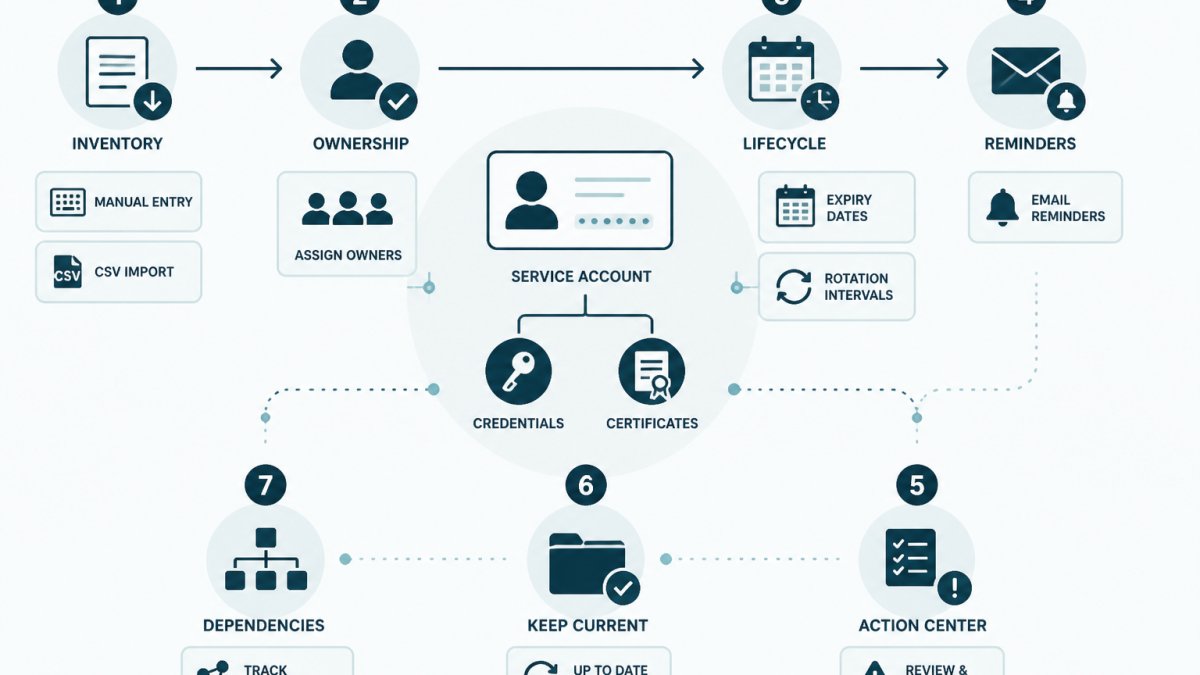
Last Updated: November 2, 2026
Quick Summary
Manage service account credentials and certificates together by keeping one inventory that records each item's type, system, named owner, expiry date, rotation interval and storage location, then reviewing it monthly. Record only metadata in the inventory, never secret values, and rotate or revoke in your existing provider.
- Fill the owner column before anything else, and name one accountable person per entry.
- Record certificate expiry timestamps with time zone alongside any paired credential's rotation deadline.
- Deploy the new secret before revoking the old one to avoid downtime during rotation.
- Treat any credential known only to a departing person as compromised and rotate it.
- Review monthly for past-due rotations, certificates expiring within 60 days, and ownerless entries.
Table of Contents
- Why Service Account Credentials and Certificates Drift Apart
- Step 1: Build One Inventory for Credentials and Certificates
- Step 2: Assign an Accountable Owner to Every Entry
- Step 3: Track Certificate Expiration Dates Next to Rotation Deadlines
- Step 4: Work Through a Secrets Rotation Checklist
- Step 5: Apply Service Account Management Best Practices Across Platforms
- Step 6: Handle Handoffs, Offboarding and Failed Rotations
- Step 7: Record the Work and Review the Lifecycle Monthly
- Frequently Asked Questions
Why Service Account Credentials and Certificates Drift Apart
Most teams do not set out to lose track of a service account. It happens one integration at a time: a developer creates an API key for a nightly job, a platform engineer requests a TLS certificate for an internal endpoint, and both live in different tools with different owners.
That split is the root problem. Service account credentials are the passwords, API keys, tokens and key pairs that let software authenticate to other software. Certificates prove identity for services and endpoints.
This guide walks through seven steps to manage both together: what to capture, who owns it, and how to keep the record current without storing secret values anywhere new. The cost of drift is quiet, a certificate expires on a Sunday, a contractor leaves and their API key stays active, a rotation gets done but never written down.
Step 1: Build One Inventory for Credentials and Certificates
The first step is a single inventory that lists every credential and certificate in one place: one table, one owner column, one expiry column.
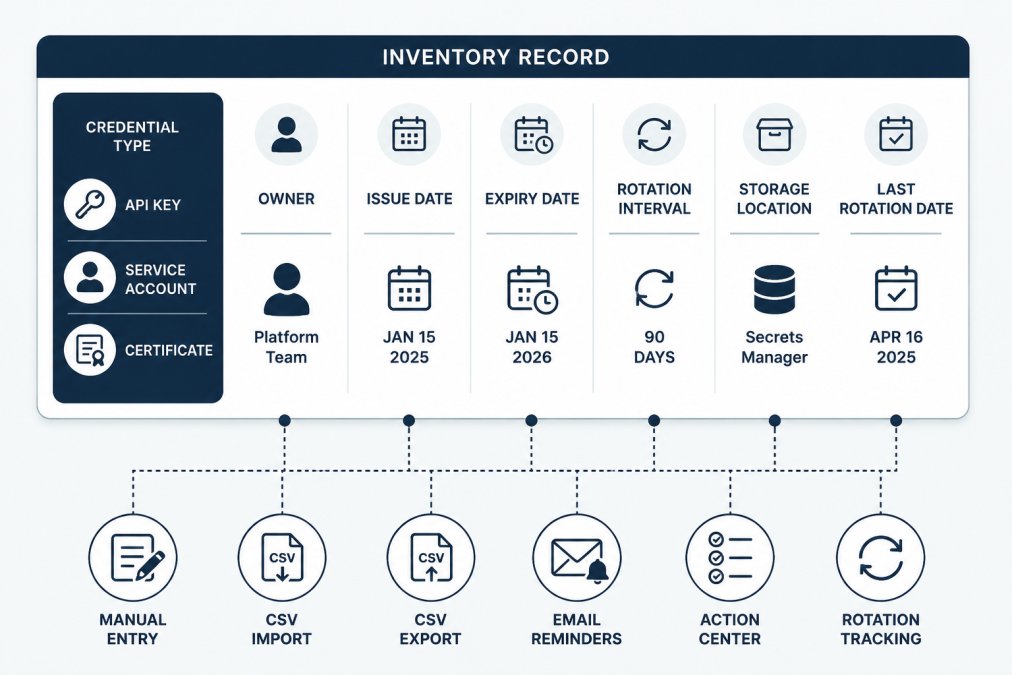
A credential inventory template should capture these fields for each entry:
- Type: API key, service account, OAuth client, key pair, or certificate
- System: the provider or platform it authenticates to
- Owner: one named person, not a team
A free credential inventory template gives you these fields as a starting CSV, with fictional examples and import guidance.
Watch out: do not put secret values in the inventory. Record only metadata. The value stays in your vault or provider.
Step 2: Assign an Accountable Owner to Every Entry
An inventory without owners is a list of future problems. Every row needs one person who answers for it.
"Owner" means accountable, not necessarily the person who performs every rotation. The owner confirms the credential still exists, the expiry date is right, and the rotation actually happened.
A practical ownership model looks like this:
| Role | Responsibility |
|---|---|
| Credential owner | Confirms lifecycle status and approves rotation |
| Platform engineer | Performs rotation in the provider |
| Team lead | Reviews ownership during handoffs |
For a deeper walkthrough on assigning and tracking accountability, see how to assign owners to API keys. Fill the owner column before you fill anything else.
Step 3: Track Certificate Expiration Dates Next to Rotation Deadlines
Certificates and credentials fail differently, which is why teams track them separately. Certificates expire on a fixed date. Passwords and keys expire on a schedule you choose. Put both dates in the same row: a certificate expiring March 14 and a service account with a 90-day rotation interval belong side by side, because both create work on a calendar.
To track certificate expiration dates well, record three things:
- The exact expiry timestamp, including time zone
- The renewal owner and the renewal window
- The rotation deadline for any credential the certificate pairs with
For a detailed method, read how to track certificate expiration dates. The goal is one view where nothing expires without someone knowing.
Step 4: Work Through a Secrets Rotation Checklist
A secrets rotation checklist turns an ad hoc task into a repeatable process. Use the same list every time, and record the result.
- Confirm the credential is still in use and note its owner.
- Create the new secret in the provider.
- Deploy the new value to every dependent system.
- Verify authentication works in each environment.
- Revoke the old secret in the provider.
- Record the rotation date, who did it, and any issues.
Steps 3 and 5 are where most incidents start. Deploying the new value before revoking the old one avoids downtime. Revoking too early breaks running jobs.
Watch out: if a rotation fails partway through, stop and record where it stopped.
Step 5: Apply Service Account Management Best Practices Across Platforms
Service account management best practices differ by platform, but the principles are the same: least privilege, a named owner, and a documented lifecycle.
The table below maps the common platforms to the identity mechanism, the rotation lever, and the certificate pairing you need to record. Treat it as a starting point, not a complete reference, each vendor's documentation is the source of truth for current behavior.
| Platform | Identity mechanism | Rotation lever | Certificate pairing to record |
|---|---|---|---|
| AWS | IAM role (preferred) or IAM user with access keys | Rotate access keys; prefer roles and short-lived credentials over long-lived keys | TLS certificates for internal endpoints, ACM-issued or imported |
| Google Cloud | Service account with JSON key or Workload Identity Federation | Disable and delete old keys; prefer federation over downloaded keys | Certificates for load balancers and internal services |
| Microsoft Entra ID | App registration with client secret or certificate credential | Rotate client secrets on a schedule; prefer certificate credentials where supported | The app's own certificate credential, plus any TLS cert the app serves |
| GitHub | Deploy key, GitHub App installation token, or personal access token | Rotate tokens; scope deploy keys to a single repository | TLS certificates for any endpoint the workflow calls |
| Kubernetes | ServiceAccount with bound token, or external secret via a CSI driver | Rotate the token; rotate the underlying secret in the external store | Ingress TLS certificates and any mTLS certificates between services |
| On-premises | Local service account or directory account | Rotate the password on a schedule; prefer gMSA or managed service accounts where the directory supports them | Internal CA-issued certificates for the service |
Why the pairing matters
On AWS, an IAM role attached to an EC2 instance or Lambda function has no long-lived secret to rotate, which is why roles are preferred over access keys (Security best practices in IAM).
On Kubernetes, a ServiceAccount token is bound to a pod and rotates automatically in recent versions, but the secret it authenticates to (for example, a database password pulled through an external secrets operator) still follows your rotation schedule.
On GitHub, a deploy key is scoped to a single repository and suits a CI job that only needs to read one repo.
Least privilege in practice
Grant the minimum access the service needs, then review it when the workload changes. A common pattern is to start from a deny-by-default policy and add only the specific actions the job calls.
Watch out: a service account created for a one-off migration often keeps its original broad permissions long after the migration ends.
For platform-specific guidance on onboarding accounts, assigning owners and enforcing rotation, see CyberArk service account management. The principles transfer even with different tooling.
Step 6: Handle Handoffs, Offboarding and Failed Rotations
Handoffs, departures and failures are where credentials quietly go stale. A person leaves, their keys stay active, and nobody notices until an access review. A rotation errors out halfway, and the inventory says the work is done. This section is the runbook for those moments.
Offboarding a person who owns credentials
When someone leaves or changes role, the risk is not just their personal login. It is every service account, API key and certificate they created or owned. Work through this list before their last day:
- List every entry where they are the owner. Filter the inventory by owner name, not by team.
- Reassign ownership to a named successor and record the handoff date.
- Rotate any credential only they held. If the secret value was known only to them, treat it as compromised on departure.
- Check for credentials they created but never recorded. Ask their manager and teammates for systems they touched; add anything missing to the inventory.
- Record the handoff with a date, the old owner, the new owner, and any rotations performed.
Run this list as a ticket template so the steps are not skipped under time pressure. No credential should outlive its owner's access.
When a rotation fails partway through
A half-rotated credential is worse than an unrotated one, because the inventory now lies. The failure modes are predictable:
- The new secret was created in the provider but not deployed to every dependent system.
- The new value was deployed but authentication failed in one environment.
- The old secret was revoked before all consumers switched over.
Recovery steps:
- Stop and record where it stopped. Note the step number from the rotation checklist and the error.
- Do not revoke the old secret until every consumer is confirmed on the new one.
- Roll back if needed. If the new value is broken, restore the old value in the provider and redeploy it, then investigate before retrying.
- Create a follow-up item with a next-attempt date so the gap is visible in the next review.
- Update the inventory only after verification passes in every environment.
Watch out: a rotation marked done in the inventory but not verified in production is the most common source of a false sense of safety. Verification is required, not optional.
When a certificate expires unexpectedly
Certificates fail on a fixed date, often outside business hours. The runbook:
- Confirm the expiry against the certificate itself, not just the inventory.
- Identify every consumer of that certificate, load balancers, internal services, clients that pin it.
- Issue a replacement through your certificate authority or provider.
- Deploy the replacement and verify the handshake from each consumer.
- Record the new expiry and renewal owner in the inventory.
- Investigate why the renewal window was missed and adjust the reminder lead time.
When a key is suspected compromised
Emergency revocation is different from routine rotation because speed matters more than avoiding downtime. The sequence:
- Revoke the credential in the provider first, then investigate. A brief outage is preferable to continued exposure.
- Record the revocation time and reason in the audit history.
- Issue a replacement and deploy it to consumers.
- Review access logs for the period the credential was active to understand what was accessed.
- Update the inventory with the new credential and a note linking to the incident record.
For the people side, read how to build a secure credential offboarding process. For the certificate side, the renewal-window method in how to track certificate expiration dates sets the lead time that prevents the unexpected-expiry scenario above.
Step 7: Record the Work and Review the Lifecycle Monthly
The final step keeps everything else honest: record what actually happened, then review it on a schedule. A monthly review is enough for most small teams. Check four things:
- Credentials past their rotation deadline
- Certificates expiring in the next 60 days
- Entries with no owner or a departed owner
This is where a tool like KeyGuardRail fits. It tracks credential lifecycle metadata without storing secret values. The team rotates or revokes credentials in the existing provider, then records the work.
The value shows up in the review. For teams starting out, the getting-started guide covers the first inventory and the first review cycle, and you can create a free workspace to put the inventory and its reminders in place before the next review.
Managing service account credentials and certificates together comes down to one habit: keep the metadata, the owner and the dates in one place, and review them on a schedule.
Frequently Asked Questions
How do you manage service account credentials and certificates together?
Keep one inventory record per credential or certificate that holds metadata only: type, provider, owner, issue date, expiry date, rotation interval and where the secret value lives. Track both in the same list so expiry and rotation deadlines appear side by side. Rotate or renew in the provider, then record the date and who did it. KeyGuardRail supports this metadata workflow without storing secret values, so your vault stays the system of record for the secrets themselves.
What should a service account credential inventory include?
At minimum: a unique ID, credential type (API key, service account key, client secret, certificate), the system or provider it authenticates to, the environment, the accountable owner, issue and expiry dates, rotation interval, storage location (vault path or provider reference, never the value), last rotation date and status. Add a notes field for dependencies. Our free credential inventory template at keyguardrail.com/resources/credential-inventory-template gives you a starting column set you can import via CSV.
How often should service account credentials be rotated?
There is no single interval that fits every credential. Set the interval from the provider's documented limits, the credential's blast radius and how easily it can be replaced without downtime. A short-lived token issued per job may need no manual rotation, while a long-lived integration key with broad access usually needs a shorter cycle. Record the chosen interval per entry and review it when access scope changes. The rotation itself happens in the provider; the inventory tracks when it is due and when it was done.
How can teams verify that a credential or certificate rotation is complete?
Treat completion as three checks: the new credential works in the consuming service, the old one is revoked or expired at the provider, and the inventory record shows the new issue and expiry dates with the operator and date. Without the third check, the next rotation reminder will be wrong. Keep an audit history of who changed what so a later review can confirm the sequence. If any check fails, reopen the entry and note the recovery step taken.
