
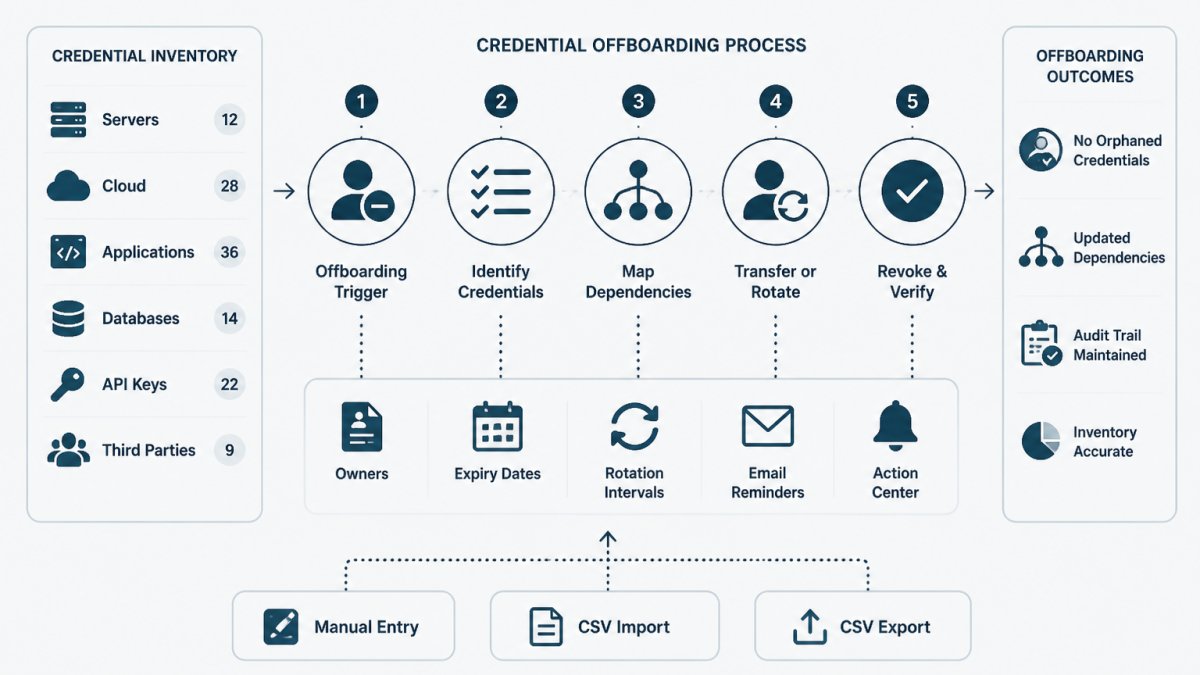
Last Updated: October 31, 2026
Quick Summary
Build a secure credential offboarding process by starting with a credential inventory that names every credential and its accountable owner, then revoke access in phases with a verification step for each credential type. Rotate anything the departing person could have read, and record the action, owner, and verification result in an audit trail.
- Define separate revocation and rotation targets for planned resignations, contractor endings, and immediate terminations.
- Disabling an account and ending active sessions are separate steps, so verify both.
- Every service account needs one named person responsible, not a team alias.
- Rotate any key the person could have read, then confirm the new credential works before revoking the old one.
- Monitor authentication attempts from the departed account for a defined window, commonly 30 days.
Table of Contents
- Why Credential Offboarding Fails Without an Inventory
- The Credential Offboarding Checklist, Phase by Phase
- Service Account Ownership: Handing Over Without Handing Out
- API key rotation best practices for departures
- Using a Credential Inventory Template to Close Access Gaps
- Verifying Revocation and Keeping an Audit Trail
- Start Your Credential Offboarding Runbook This Week
- Frequently Asked Questions
Why Credential Offboarding Fails Without an Inventory
Most credential offboarding processes fail for a boring reason: nobody knows what to revoke.
Credential offboarding is the process of removing, rotating, and documenting every credential a departing person could access.
Teams often treat offboarding as an HR task with an IT tail.
You cannot revoke what you cannot name. A credential inventory template gives you the fields to start with.
The Credential Offboarding Checklist, Phase by Phase
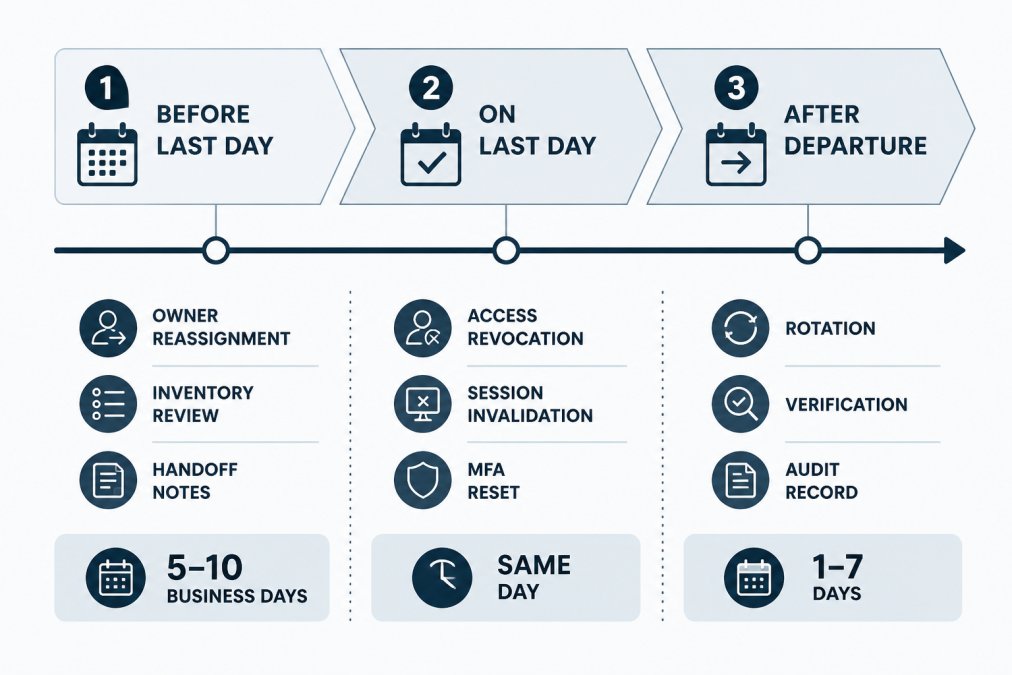
The checklist below splits into three phases, each with a goal, actions, and a verification step. Timings are targets your team sets, not fixed rules, but writing them down turns "act quickly" into something measurable.
Set Timing Targets by Departure Type
A single timeline does not fit every departure. A planned resignation, a contractor whose engagement ends, and an immediate termination for cause carry different risk. Define a target window per scenario so the team knows which checklist to run.
| Departure type | Access revocation target | Rotation target | Notes |
|---|---|---|---|
| Planned resignation | End of last working day | Within 1-7 days | Use the notice period for handoff |
| Contractor end of engagement | End of contract date | Same day for shared secrets | Confirm scope of access first |
| Immediate termination (cause or risk) | Within the hour, before notification | Same day for privileged and shared | Coordinate with HR and manager |
| Long-term leave or transfer | At role change date | Per rotation policy | Treat as a partial offboarding |
These are starting points, not mandates. The point is that "same day" and "within the hour" are different commitments, and the team should agree on which applies before the next departure, not during it.
Before the Last Day
Use the notice period to plan, not to panic. Prerequisites: a current credential inventory and a named owner for each credential the person touches.
- Pull the departing person's credential list from your inventory
- Confirm each credential has a named owner who stays
- Reassign service account ownership in writing
Handoff notes matter more than teams expect. A common mistake is reassigning an owner without recording what the credential does or where it is used. Another is forgetting personal MFA factors, an authenticator app, a hardware key, or printed backup codes, which can leave a shared account unreachable after the person leaves.
On the Last Day
Revoke access first. Ask questions later. For an immediate termination, compress this phase to the first hour and notify the person only after revocation is confirmed.
- Disable the identity provider account and end active sessions
- Revoke application access tied to SSO
- Remove VPN and remote access profiles
Session invalidation is the step people skip. Disabling an account does not always kill a live session. Check your provider's documentation for how sessions end, and treat disabling the account and ending active sessions as separate steps.
After Departure
- Rotate any credential the person could have copied
- Verify each revocation actually took effect (see the verification section below)
- Record what changed, who did it, and when
When a Revocation Breaks Something
Recovery matters as much as revocation. If disabling an account or rotating a key takes down a service, you need a documented path back that does not involve re-enabling the departed person's access.
- Identify which credential the failing system depends on, using the inventory's "what depends on it" field.
- If the credential was rotated, roll back to the previous value only if it was not exposed; otherwise fix the consumer to use the new value.
- If the account was disabled, create a service account or shared owner account with a named human owner rather than re-enabling the person's identity.
- Record the incident and update the handoff notes so the next departure does not repeat it.
A common pattern is a scheduled job or integration that authenticates as the departing person. Those failures surface days later. Flagging them during the "Before the Last Day" phase is cheaper than discovering them after.
Service Account Ownership: Handing Over Without Handing Out
Service accounts and API keys are the hardest part of offboarding. They have no human login to disable, so they survive departures quietly.
The fix is accountable ownership: every service account needs one named person responsible for it, plus a documented purpose and a rotation interval.
Handing over ownership is not the same as handing out access. The new owner should know:
- What the credential does and which system calls it
- Where the secret value lives (a vault, a CI variable, a config store)
- When it expires or is due for rotation
A common mistake is transferring ownership to a team alias with no named person behind it. This guide on assigning owners to API keys walks through the handoff step by step.
API key rotation best practices for departures
API key rotation best practices for departures come down to one rule: rotate anything the person could have read, and document the rotation. A key visible in a shared dashboard, a CI log, or a config file counts as exposed.
A practical rotation sequence:
- Create the replacement credential in the provider
- Deploy it to the systems that use it
- Confirm the new credential works
- Revoke the old credential
- Record the rotation in your inventory with a date and owner
Rotation decisions depend on exposure. Use this as a starting point:
| Exposure | Action | Target window |
|---|---|---|
| Key stored only in a vault | Rotate on normal schedule | Next interval |
| Key visible in a shared dashboard | Rotate at departure | Same day |
| Key pasted into a ticket or chat | Rotate and check logs | Same day |
| Key in a public repo | Rotate immediately | Now |
Never paste real key values into tickets, logs, or inventory notes. Record the credential's name, owner, and location, not the secret itself.
Using a Credential Inventory Template to Close Access Gaps
A credential inventory template is a structured list of every credential your team holds, with fields for owner, provider, expiry date, and rotation policy.
A workable inventory includes these fields:
- Credential name and type (API key, service account, certificate, shared login)
- Provider or system
- Accountable owner
Start small. A spreadsheet with fifty rows beats a perfect system that never gets built. Import it into a tracking tool later if you need reminders and audit history.
A credential inventory template can give you these fields as a starting point.
Verifying Revocation and Keeping an Audit Trail
Verification separates a real offboarding process from a hopeful one. A revocation you have not checked is a guess. This section covers how to verify each credential type, what to record, and how to monitor after departure.
Verify by Credential Type
Different credentials fail in different ways. A disabled account can still have a live session; a revoked API key can still work if a cached copy is in use.
| Credential type | How to verify | What "still working" looks like |
|---|---|---|
| Identity provider account | Sign-in attempt returns disabled or denied | Sign-in succeeds or session persists |
| Active SSO session | Provider session list shows no active session for the user | Session still listed after disable |
| API key or token | Test call returns authentication error | Test call succeeds |
| Service account | Owner field shows the new named owner; old key rejected | Old key still authenticates |
| VPN profile | Connection attempt fails | Tunnel establishes |
| Shared account password | Old password rejected; new password works for remaining users | Old password still works |
| MFA factor | Factor removed from account; recovery codes invalidated | Factor still prompts or codes still work |
Use a test call or sign-in attempt, not a dashboard status alone. Dashboards can lag, and some providers show a key as "revoked" while a cached token remains valid until expiry.
Keep an Audit Trail That Survives an Audit
An audit trail is only useful if it answers who, what, when, and how verified. For each credential touched during offboarding, record:
- Credential name and type (never the secret value)
- Owner before and after
- Action taken (disabled, rotated, revoked, transferred)
Compliance teams and auditors ask for this, and so will your own team when something breaks. The trail should live somewhere durable, not in a chat thread that gets archived.
Monitor After Departure
Revocation is not the end of the story. Attempted access from a departed account, dormant credentials never rotated, and delayed handoffs all show up after the last day. Define a monitoring window, commonly 30 days for planned departures and longer for privileged roles, and check for:
- Sign-in attempts or authentication failures from the departed account
- API calls using credentials that should have been rotated
- Dormant credentials still listed under the old owner
A common pattern is an alert on the identity provider for any authentication attempt tied to a disabled account. That single alert catches both stale sessions and credentials the team missed.
Handle Exceptions Explicitly
Not every credential can be revoked on schedule. Legal holds, shared accounts still in use by a team, and integrations that cannot be migrated immediately are real.
Access reviews are how many teams confirm revocation and keep evidence on an ongoing basis. This guide to running API key access reviews covers the process for compliance.
KeyGuardRail keeps lifecycle history without storing secret values. Users rotate or revoke credentials in their existing providers, then record the work.
Start Your Credential Offboarding Runbook This Week
A runbook turns offboarding from a scramble into a checklist. Write it once, test it once, and refine it after each departure.
Start with three steps:
- Build your inventory from the template
- Assign an owner to every credential
- Set target windows for each phase
If you want reminders and audit history without sharing secret values, you can create a free workspace and import your first inventory.
One clarification that helps teams decide: tracking credential lifecycle is not the same as storing secrets. This article on credential management vs secret storage explains the custody boundary.
Offboarding fails when nobody knows what exists. An inventory, a named owner per credential, and a verified revocation step close the gap.
Frequently Asked Questions
What is the difference between offboarding a user and offboarding a credential?
Offboarding a user means disabling a person's identity: their SSO account, email, VPN access and device. Offboarding a credential means dealing with the keys, tokens and service accounts that person could reach or owned. The two overlap but are not the same task. A user account can be disabled while an API key they created keeps working for years. A complete credential offboarding process therefore tracks each credential separately, with its own owner, expiry date and rotation record, and confirms what happened to it after the person leaves.
When should credentials be rotated during an employee offboarding?
Rotate any credential the departing person could read, copy or use, and do it as close to their last working day as your change process allows. Prioritise shared accounts, long-lived API keys and tokens with broad scope. Credentials the person never had access to do not need rotation just because they left. Record each rotation in your inventory with the date and who performed it. If a credential cannot be rotated immediately, note the reason, set a deadline and track it until it is closed.
How can a small team track credential expiry and rotation dates?
Start with a single inventory that lists each credential, its owner, where it is used, its expiry date and its rotation interval. A spreadsheet works at small scale, and our free credential inventory template gives you the columns to begin with. The part that breaks down is remembering to check it. Add a recurring monthly review, or use a tool that sends lifecycle email reminders before dates fall due. KeyGuardRail tracks this metadata without storing secret values, so the inventory stays separate from your vault.
How do you verify that a credential has actually been revoked?
Do not rely on the ticket being closed. Test the credential from outside the person's account: attempt the call, login or connection it was used for and confirm it now fails. Check the provider's own audit log or activity history for the last time it was used. Then record the verification in your inventory, including who checked and when. For service accounts, also confirm that any replacement credential is working before you retire the old one, so verification does not turn into an outage.
