
Last Updated: October 25, 2026
Quick Summary
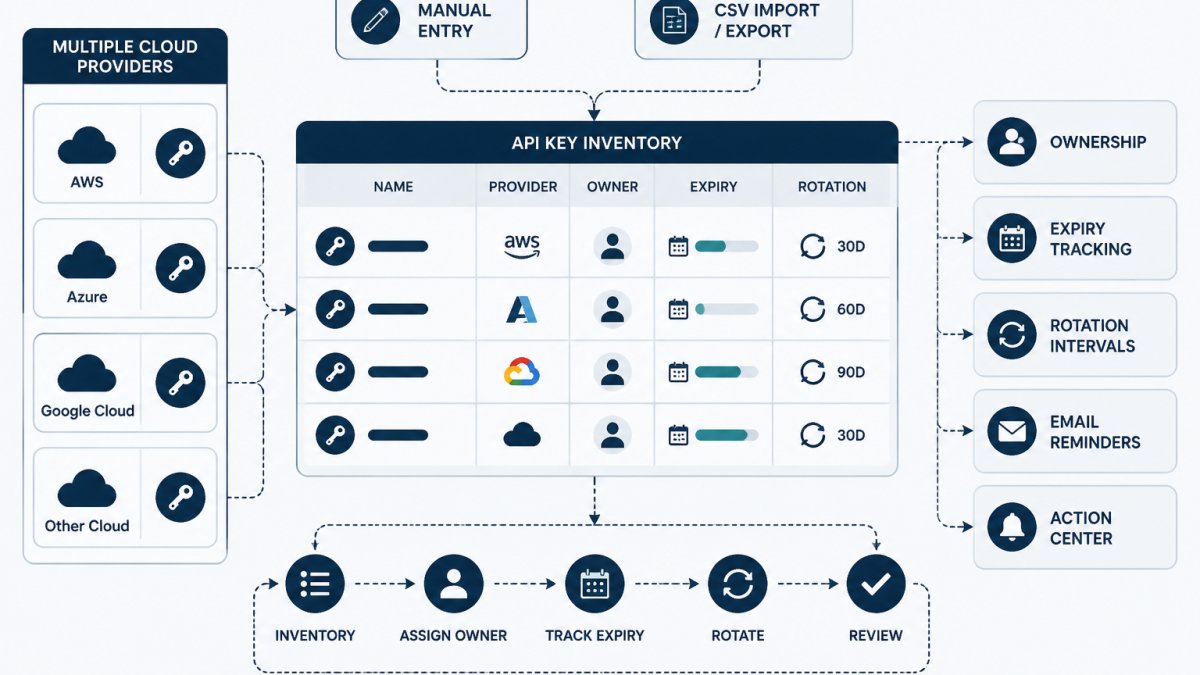
To manage API keys across multiple cloud providers, build one metadata inventory that records each credential's owner, expiry date, rotation interval and storage location pointer, while the secret values stay in your vault or provider console. Track service accounts in the same inventory, rotate with an overlap window, and reassign ownership before anyone leaves.
- Record nine fields per credential, including a named owner and a storage location pointer, never the value.
- No credential enters the inventory without an expiry date or an annual review note.
- Rotate by creating the new credential, deploying it everywhere, verifying, then revoking the old one.
- Offboarding is a rotation event: reassign every credential the departing person owned.
- Choose centralized, provider-native or federated storage separately from how you track metadata.
Table of Contents
- Why Managing API Keys Across Multiple Cloud Providers Breaks Down
- Build a Multi-Cloud API Key Inventory
- API Key Inventory Template: The Fields That Actually Matter
- Managing Service Account Credentials Across Cloud Providers
- Cloud API Key Expiration Tracking Without Guesswork
- API Key Rotation Best Practices for Multi-Cloud Teams
- Handling Handoffs and Offboarding in a Multi-Cloud Setup
- Choosing the Right Storage Model for Your API Keys
- Frequently Asked Questions
Why Managing API Keys Across Multiple Cloud Providers Breaks Down
Teams that manage API keys across multiple cloud providers fail because each provider gives you a different console, a different naming convention, and a different idea of what an owner is.
The failure is organizational before it is technical. Nobody owns the key, nobody knows when it rotates, and the engineer who created it left eight months ago. Below, this guide breaks down how to build an inventory, track expiration, plan rotation, and handle handoffs without storing secret values in the tracking system.
Build a Multi-Cloud API Key Inventory
An API key inventory is a record of every credential your team holds, who owns it, when it expires, and where it lives. It contains metadata, not secret values. That distinction matters: the inventory tells you a key exists and who is accountable for it, while the actual credential stays in your vault or provider console.
Start with a spreadsheet or a dedicated tracker and capture one row per credential. A free credential inventory template gives you the field structure and fictional example rows to work from, so you are not designing columns from scratch. A free credential inventory template gives you the field structure and fictional example rows to work from, so you are not designing columns from scratch.
The common mistake is building the inventory from memory. Pull from provider consoles, CI/CD variables, and integration docs instead, then reconcile.
What an API Key Inventory Template Should Capture
A usable template captures nine fields per credential:
- Credential name and the API service it authenticates to
- Cloud provider and environment (production, staging, development)
- Accountable owner, a named person, not a team alias
Keep the storage location as a pointer, never the value itself.
API Key Inventory Template: The Fields That Actually Matter
The fields that matter are the ones that answer three questions: who owns this, when does it expire, and where does the real secret live. Everything else is optional context.
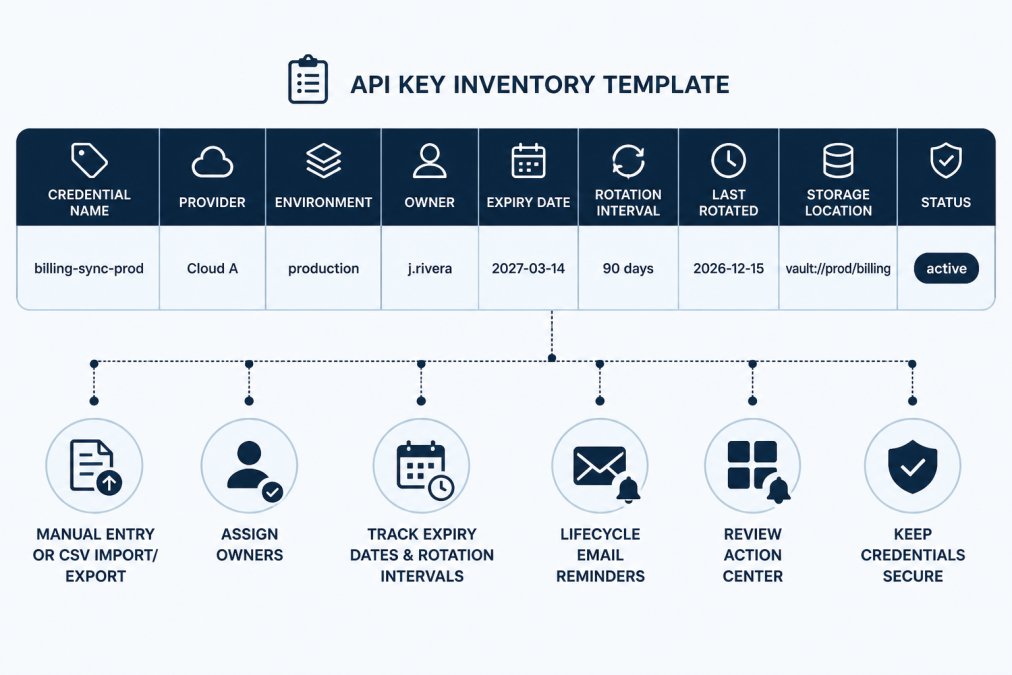
A fictional row makes the structure concrete.
Watch out: teams that put the secret value in the inventory spreadsheet have created a second copy of every credential outside the vault. Store the pointer only.
Managing Service Account Credentials Across Cloud Providers
Service account credentials need the same treatment as user-facing API keys, with one addition: they usually outlive the project that created them.
Track service accounts in the same inventory you use to manage API keys, tagged by type. Record the workload they serve and the person accountable for that workload.
Provider consoles differ in how they present service accounts, so normalize the naming in your tracker.
Cloud API Key Expiration Tracking Without Guesswork
Expiration tracking works when every credential has a date and a reminder that fires before the date, not after. The step-by-step method for building that tracking is covered in a dedicated guide on how to track API key expiry, which walks through setting dates, intervals, and reminder cadence. The step-by-step method for building that tracking is covered in a dedicated guide on how to track API key expiry, which walks through setting dates, intervals, and reminder cadence.
The core discipline is simple: no credential enters the inventory without an expiry date or an explicit "no expiry, review annually" note. Keys with no expiry are the ones that surprise teams, because nothing prompts anyone to look at them.
A tracker that sends lifecycle reminders before a deadline turns expiration from a fire drill into routine maintenance. If you want to see how that works against your own inventory, you can create a free workspace and start with manual entry or a CSV import.
API Key Rotation Best Practices for Multi-Cloud Teams
Rotation best practices come down to planning the swap before you touch the key. For teams that want a deeper set of lifecycle habits, the API key lifecycle management tips article goes further than this section can.
For teams that want a deeper set of lifecycle habits, the API key lifecycle management tips article goes further than this section can.
Prerequisites Before You Rotate
- A complete inventory row for the credential, including every storage location and consumer (CI/CD variables, container env vars, serverless function config, partner integrations).
- A named owner who can approve the cutover and a second person who can verify.
- A rollback plan: the old credential stays valid until verification passes.
The Overlap Rotation Procedure
- Create the new credential in the provider console with the same scopes and restrictions as the old one. Do not broaden permissions during a rotation, that turns a maintenance task into a security change.
- Stage the new value in your vault or provider secret store under a new version or path. Keep the old version readable.
- Deploy the new value to every consumer, one at a time. For each consumer, confirm the deployment picked up the new value (for example, check the running config hash or the secret version ID, never the secret itself).
- Verify with a read-only call or health check that exercises the credential. A 200 response from a lightweight endpoint is enough; do not run a full production workload as the test.
- Watch for errors for one full traffic cycle, at least one scheduled job interval, not just a few minutes. Batch jobs and cron-driven integrations are the usual late failures.
- Revoke the old credential in the provider console only after step 5 passes.
- Record the rotation in the tracker: date, person, new expiry, and the new storage location pointer.
Likely Mistakes and Recovery
| Mistake | Symptom | Recovery |
|---|---|---|
| Revoked old key before all consumers migrated | 401/403 errors from one integration | Recreate a credential with the same scopes, redeploy, then re-run verification |
| Missed a consumer (e.g., a scheduled job) | Failures appear hours later | Keep the old key valid longer; add the missed consumer to the inventory row |
| New key created in wrong environment | Auth works in staging, fails in prod | Delete the mis-scoped key, recreate in the correct project/account |
| Rotation done but not recorded | Next owner cannot tell when it happened | Backfill the tracker from provider audit logs |
Rotation Triggers
| Rotation trigger | Action | Record in tracker |
|---|---|---|
| Scheduled interval reached | Create new, deploy, verify, revoke old | Date, owner, new expiry |
| Suspected exposure | Revoke first, then replace | Incident reference |
| Owner leaves the team | Reassign owner, rotate | New owner, date |
| Integration retired | Revoke, mark retired | Status change |
KeyGuardRail does not rotate or revoke credentials in your providers, you perform those steps in the console, then record the work so the next rotation starts from an accurate inventory. Its rotation intervals and lifecycle email reminders surface the scheduled trigger; the overlap procedure above is what you run when the reminder fires.
Handling Handoffs and Offboarding in a Multi-Cloud Setup
Handoffs fail when ownership lives in someone's head. A practical guide on assigning owners to API keys covers the mechanics of making ownership stick. A practical guide on assigning owners to API keys covers the mechanics of making ownership stick.
Offboarding is a rotation event. When an engineer departs, every credential they owned gets a new owner and, where they had access to the value, a rotation. The inventory makes this a checklist rather than an archaeology project.
- List every credential where the departing person is the owner
- Reassign each to a named successor
- Rotate any credential the person could read
Choosing the Right Storage Model for Your API Keys
Storage and tracking are two separate decisions, and conflating them causes most of the confusion. A vault stores secret values with encryption and access control. A tracker records metadata: owner, expiry, rotation history. You need both, and they serve different purposes. This section gives you a decision framework for the storage half; the tracking half stays the same regardless of which model you pick.
The Three Storage Models
Centralized vault. Every secret value lives in one secrets manager (for example, a dedicated secrets service or a cloud provider's secret store used as the single home for all clouds).
Provider-native. Each key stays in the secret service of the cloud that owns the workload, Cloud A keys in Cloud A's secret manager, Cloud B keys in Cloud B's.
Federated. Per-team or per-business-unit vaults, often one per cloud or per environment, with a thin governance layer on top. Boundaries match org structure.
Decision Table
| Criterion | Centralized vault | Provider-native | Federated |
|---|---|---|---|
| Access-control complexity | One policy layer to reason about | One per cloud; must be kept consistent | One per boundary; governance layer needed |
| Cross-cloud latency | Higher; every fetch crosses a network boundary | Lowest; fetch stays in-cloud | Varies by boundary |
| Audit trail | Single log, easy to review | Fragmented across clouds | Fragmented but scoped to teams |
| Failure mode | Vault outage blocks every cloud at once | One cloud's outage is contained | Contained per boundary |
| Operational overhead | Low day-to-day, high initial migration | Low per cloud, high consistency work | Highest; most moving parts |
| Vendor lock-in | Low if the vault is multi-cloud | High per cloud | Medium |
Selection Criteria
- If your team is small and runs two clouds, provider-native storage plus a single metadata tracker is usually the least operational overhead. You avoid building a cross-cloud vault before you need one.
- If you have a strict single access-control requirement, a centralized vault gives you one place to review who can read what. Accept the cross-cloud latency and the single-dependency failure mode, and plan for vault availability.
- If you have per-team security boundaries, federated matches the org chart, but budget for the governance layer that keeps naming and rotation intervals consistent across boundaries.
Failure Modes to Plan For
- Vault unavailability. A centralized vault is a dependency for every workload in every cloud. Know how consumers behave when the vault is unreachable, cached values, retry, or hard failure, before you consolidate.
- Consistency drift. Provider-native and federated models drift: one cloud rotates on 90 days, another on 365. The tracker is what catches the drift, because it holds the intended interval independent of where the value lives.
- Audit gaps. In provider-native and federated models, no single log shows every access. Decide which log is authoritative for each credential and record that in the inventory row.
For teams weighing their options beyond spreadsheets, alternatives to manual credential rotation tracking lays out the trade-offs. KeyGuardRail sits alongside whichever storage model you pick: it tracks lifecycle metadata and audit history while the values stay in your existing vault or provider.
Whichever model you choose, keep the inventory separate from the secrets. That boundary is what lets you track lifecycle metadata across clouds without creating a new attack surface.
Frequently Asked Questions
How often should cloud API keys be rotated?
There is no single interval that fits every credential. Rotation frequency should follow the credential's blast radius, how it is stored, and what the provider or your own security policy requires. A common approach is to set shorter intervals for keys with broad permissions or long-lived access, and longer intervals for tightly scoped keys behind a vault. The practical rule is to record a rotation interval for every key in your inventory and treat it as a deadline, not a suggestion. Review intervals annually and after any ownership change.
Where should API keys be stored in a multi-cloud environment?
Secret values belong in a dedicated secrets store, such as a cloud provider's native secret manager or a vault your team already operates. What many teams miss is the second layer: the metadata about each key, including its owner, expiry date, rotation interval and where the secret lives. Keeping that metadata separate from the secret values means you can track lifecycle and accountability without widening access to the secrets themselves. KeyGuardRail is built for that metadata layer and does not store secret values.
How do you rotate an API key without disrupting an application?
The safe pattern is to create the new key first, deploy it to every consumer, verify traffic succeeds on the new credential, and only then revoke the old one. That requires knowing every place the old key is used, which is why an inventory with owners and consumers listed matters more than the rotation step itself. Record the rotation date and the person who performed it. If verification fails, keep the old key active until you have found the missed consumer, then retry.
How should teams handle API keys when an employee leaves?
Offboarding should start from the credential inventory, not from memory. List every credential where the departing person is the recorded owner, reassign ownership before their last day, and rotate any key they could read or retrieve. For keys stored in a vault, confirm their access is removed and check the audit log. Record the reassignment and rotations in your lifecycle history so the next audit can show who owned what and when the change happened.
